
In today’s digital-first world, your website is more than an online presence — it is your brand’s growth engine. A slow-loading, poorly structured, or outdated website can silently damage your visibility on search engines and reduce customer trust. On the other hand, a fast, SEO-focused, and user-friendly website can significantly improve traffic, leads, and conversions.
Whether you run a startup, local business, or eCommerce brand, mastering website optimization is essential for long-term online success.
This complete guide explores practical and modern strategies for website performance optimization and building an SEO-friendly website that ranks higher on search engines like Google.
What Is Website Optimization?
Website optimization is the process of improving your website’s speed, usability, structure, content, and technical performance to deliver a better experience to both users and search engines.
The goal of website optimization is simple:
- Improve loading speed
- Increase organic traffic
- Reduce bounce rate
- Improve mobile experience
- Boost search rankings
- Increase conversions
A properly optimized website becomes easier for search engines to crawl and more enjoyable for users to navigate.
Why Website Optimization Matters for SEO
Search engines prioritize websites that provide fast, relevant, and user-friendly experiences.
If your website loads slowly or is difficult to use, users leave quickly. This sends negative engagement signals to search engines.
A strong SEO-friendly website improves:
- Search visibility
- User engagement
- Website authority
- Conversion rates
- Customer trust
- Organic rankings
Google’s ranking systems now heavily consider:
- Core Web Vitals
- Mobile responsiveness
- Page experience
- Secure browsing
- Content quality
- Website structure
That is why website performance optimization is no longer optional.
1. Improve Website Loading Speed
Studies show that users often leave websites that take more than 3 seconds to load.
Ways to Improve Speed
Website speed directly impacts SEO rankings and user experience.
Compress Images
Large images slow down websites dramatically.
Use modern formats such as:
- WebP
- AVIF
- Compressed JPEG

Enable Browser Caching
Caching stores files locally in users’ browsers so pages load faster on repeat visits.
Use a CDN
A Content Delivery Network distributes content globally for faster access.
Popular CDN providers include:
- Cloudflare
- BunnyCDN
- Amazon CloudFront
Minify CSS and JavaScript
Reduce unnecessary code spaces and scripts to improve loading performance.
2.Create an SEO-Friendly Website Structure
A clean website structure helps search engines understand your content hierarchy.
Best Structure Practices
Use Simple URLs
Good URL:yourdomain.com/website-optimization-tips
Bad URL:yourdomain.com/page?id=8493
Organize Content Properly
Use:
- Categories
- Subcategories
- Internal linking
- Clear navigation menus
Add Breadcrumb Navigation
Breadcrumbs improve navigation and help search engines understand website architecture.
Example:
Home → SEO Services → Website Optimization
3.Optimize for Mobile Users
Most searches now happen on mobile devices.
Google uses mobile-first indexing, meaning it primarily evaluates the mobile version of your website.
Mobile Optimization Tips
- Use responsive design
- Avoid intrusive popups
- Increase button size
- Improve font readability
- Optimize images for mobile
- Reduce unnecessary animations
A mobile-optimized and SEO-friendly website improves engagement and rankings simultaneously.

4.Optimize Core Web Vitals
Core Web Vitals are performance metrics Google uses to evaluate user experience.
The three main metrics are:
Largest Contentful Paint (LCP)
Measures loading speed.
Ideal:
Under 2.5 seconds
First Input Delay (FID)
Measures interactivity.
Ideal:
Under 100 milliseconds
Cumulative Layout Shift (CLS)
Measures visual stability.
Ideal:
Less than 0.1
Improving these metrics strengthens your website performance optimization strategy.
5. Use SEO-Optimized Content
Content remains one of the strongest ranking factors.
Your content should:
- Solve user problems
- Include keywords naturally
- Be easy to read
- Include headings and structure
- Match search intent
Keyword Placement Tips
Use your target keywords in:
- Title
- Meta description
- First 100 words
- H2 and H3 headings
- Image alt text
- URL
- Conclusion
Primary keywords:
- website optimization
- website performance optimization
- SEO-friendly website
Avoid keyword stuffing. Focus on readability and natural flow.
6. Improve Internal Linking
Internal links connect pages within your website.
Benefits include:
- Better crawlability
- Increased page authority
- Lower bounce rate
- Improved user navigation
Example internal links:
- SEO services
- Technical SEO
- Local SEO
- Website audit
- Page speed optimization
A strong internal linking structure helps create a more SEO-friendly website.
7.Optimize Meta Titles and Descriptions
Your title and description influence click-through rates.
Meta Title Example
Website Optimization Tips for Better Search Rankings in 2026
Meta Description Example
Learn powerful website optimization strategies to improve speed, SEO rankings, mobile performance, and user experience in 2026.
Best practices:
- Keep titles under 60 characters
- Keep descriptions under 160 characters
- Include primary keywords naturally
8.Secure Your Website with HTTPS
Google considers HTTPS a ranking factor.
A secure website:
- Builds trust
- Protects user data
- Improves SEO signals
If your website still uses HTTP, migrate to SSL immediately.
9. Optimize Images Properly
Images improve engagement but can also slow your website.
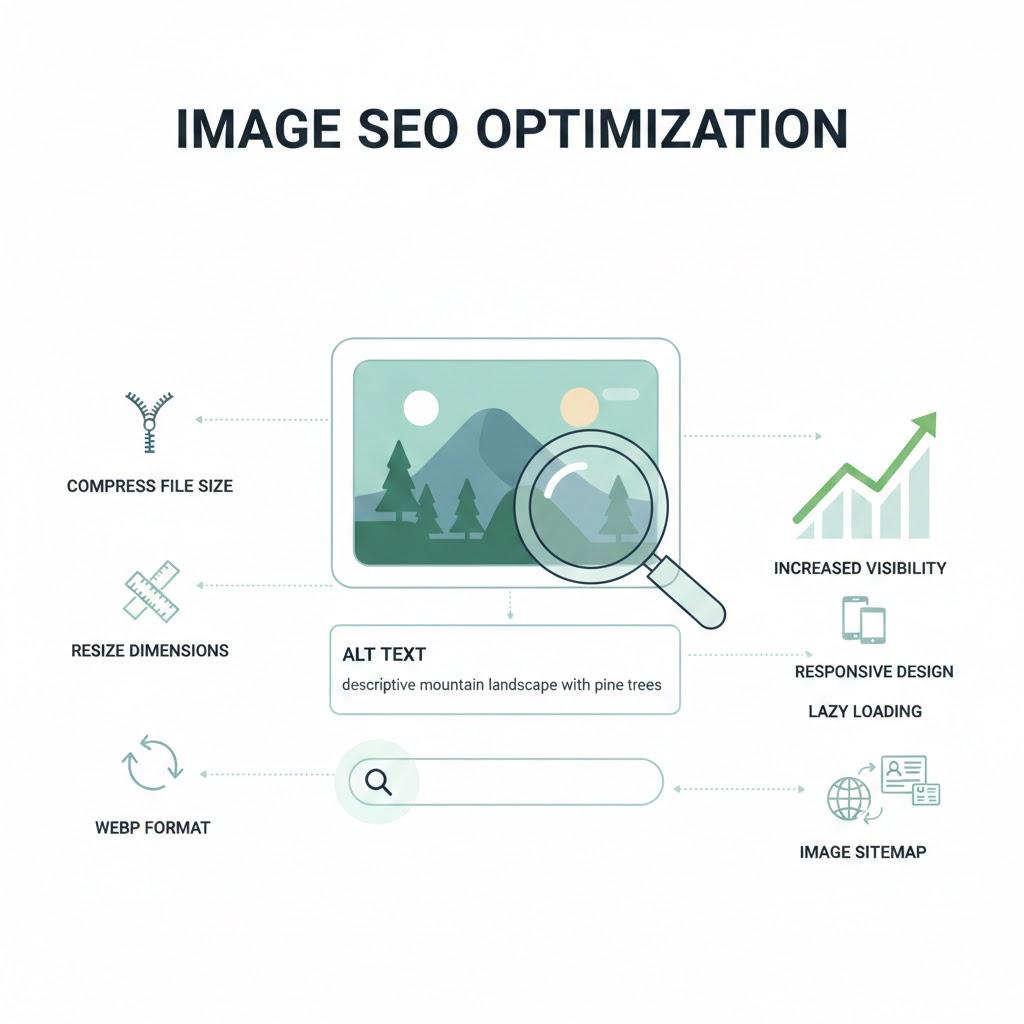
Image Optimization Checklist
- Compress images
- Use descriptive filenames
- Add keyword-rich alt text
- Use lazy loading
- Use responsive image sizing
“SEO-friendly website image optimization process for faster loading”

10. Improve Website Navigation
Visitors should easily find what they need.
Good navigation improves:
- User experience
- Session duration
- Conversion rate
- Search engine crawling
Navigation Best Practices
- Keep menus simple
- Use logical categories
- Add search functionality
- Avoid cluttered layouts
An organized website contributes heavily to effective website optimization.
11. Reduce Bounce Rate
Bounce rate measures how quickly users leave your website.
A high bounce rate can indicate:
- Slow speed
- Poor design
- Weak content
- Bad mobile experience
How to Reduce Bounce Rate
- Improve page speed
- Use engaging visuals
- Add clear CTAs
- Improve readability
- Use interactive content
12. Focus on Technical SEO
Technical SEO forms the foundation of a high-ranking website.
Technical SEO Checklist
Fix Broken Links
Broken links hurt both users and search engines.
Submit XML Sitemap
Helps search engines crawl pages efficiently.
Optimize Robots.txt
Control which pages search engines can access.
Use Structured Data
Schema markup improves search appearance.
Fix Duplicate Content
Duplicate pages confuse search engines and reduce ranking potential.
Strong technical foundations are essential for website performance optimization.
13.Optimize User Experience (UX)
Google increasingly values user behavior signals.
If users stay longer and interact more, rankings improve.
UX Optimization Tips
- Use clean layouts
- Improve readability
- Add whitespace
- Use engaging headlines
- Keep consistent branding

14. Use High-Quality Hosting
Cheap hosting often leads to:
- Slow speed
- Downtime
- Security risks
Choose hosting providers with:
- SSD storage
- CDN support
- Fast server response
- Strong uptime guarantees
Good hosting is a major part of website optimization.
Common Website Optimization Mistakes to Avoid
Many businesses unknowingly damage their SEO with avoidable mistakes.
Avoid These Errors
- Keyword stuffing
- Slow hosting
- Uncompressed images
- Poor mobile design
- Thin content
- Broken links
- Duplicate pages
- Missing meta tags
- Weak internal linking
Correcting these issues can dramatically improve rankings.
Advanced Website Optimization Strategies for 2026
SEO continues evolving rapidly.
Here are modern strategies businesses should adopt.
AI-Powered Content Optimization
Use AI tools carefully for:
- Topic research
- Keyword analysis
- Content planning
Always humanize content before publishing.
Voice Search Optimization
Optimize for conversational queries.
Example:
“What are the best SEO_ Friendly website tips for SEO?”
Featured Snippet Optimization
Use:
- Bullet points
- Numbered lists
- Short answers
- Structured headings
Visual Search Optimization
Optimize:
- Image metadata
- Alt text
- Image quality
Future-ready optimization strengthens your SEO-friendly website strategy.
How Website speed Optimization Helps Startups
For startups, strong optimization creates long-term visibility without relying completely on paid ads.
Benefits include:
- Higher organic traffic
- Better lead generation
- Improved credibility
- Lower customer acquisition cost
- Sustainable growth
A well-optimized website becomes a 24/7 sales asset.
Website performance Optimization Checklist
Technical Optimization
Content Optimization
- Improve speed
- Fix broken links
- Enable HTTPS
- Submit sitemap
- Optimize Core Web Vitals
UX Optimization
- Improve navigation thus improve website rankings.
- Optimize mobile experience
- Reduce clutter
- Add clear CTAs
Performance Optimization
- Compress images
- Use CDN
- Minify code
- Upgrade hosting
Final Thoughts
Website success today depends on far more than just attractive design. Search engines reward websites that are fast, secure, user-friendly, and content-rich.
By implementing these website performance optimization strategies, improving website Speed optimization, and building an SEO-friendly website, businesses can achieve stronger rankings, higher traffic, and better conversions in 2026 and beyond.
Consistent optimization creates a better experience for both users and search engines — and that combination drives sustainable digital growth.
If you want your business to compete effectively online, website speed optimization should become an ongoing priority rather than a one-time task.