
7 Powerful YouTube Title Formulas for Better Clicks in 2026!
Writing a good YouTube title is more than adding a keyword and hoping people click. YouTube title formulas give creators a repeatable way to turn a video topic into a clear, useful, and appealing title.
Your title is one of the first things viewers see with your thumbnail. YouTube recommends making titles accurate, concise, and putting the most important words near the beginning. It also distinguishes between searchable titles, which clearly communicate what viewers can expect, and intriguing titles, which create curiosity.
For beginners, the goal is simple: tell the right viewer what the video offers and give them a reason to watch.

What Are YouTube Title Formulas?
YouTube title formulas are reusable structures that help you create video titles quickly and consistently.
Instead of starting with a blank page every time, you can use a proven framework such as:
Keyword + Benefit + Number
For example: YouTube SEO: 7 Powerful Tips to Rank Your Videos
The formula does not guarantee views. The actual video still needs to deliver the promise made by the title. YouTube explains that changing a title can affect performance because viewers may interact differently with the new presentation.

Why YouTube Title Formulas Matter
A strong title connects several important parts of YouTube growth:
- Topic: What is the video about?
- Search intent: What does the viewer want?
- Keyword relevance: What phrase describes the topic?
- Value: What will the viewer gain?
- Curiosity: Why should they care?
- Accuracy: Does the video actually deliver?
- Thumbnail connection: Does the visual reinforce the title?
This makes the title a backbone of your video’s packaging and topical clarity. It helps communicate the central entity or subject of the video to both viewers and YouTube’s search system.
YouTube Search considers relevance, engagement, and quality, including how well the title, description, tags, and video content relate to a viewer’s query.
7 YouTube Title Formulas Beginners Can Use
1. Number + Power Word + Keyword
Formula:
[Number] + [Power Word] + [Keyword] + [Benefit]
Example:
7 Powerful YouTube Title Formulas for Better Clicks
This formula works well for educational content because the number makes the promise specific while the power word adds emotional interest.
Use it for:
- Tips
- Strategies
- Mistakes
- Tools
- Techniques
- Examples
2. How-to + Keyword + Result
Formula:
How to + [Keyword] + [Desired Result]
Example:
How to Write YouTube Titles That Get More Clicks
This is particularly useful for search-based content because the viewer immediately understands what they will learn.
Keep the result realistic. Avoid promising guaranteed rankings or viral results.
3. Keyword + Beginner’s Guide
Formula:
[Keyword]: The Complete Beginner’s Guide
Example:
YouTube Titles: The Complete Beginner’s Guide
This is useful for pillar content because it clearly signals comprehensive educational information.
You can also add the year when freshness matters:
YouTube Titles: Complete Beginner’s Guide for 2026
4. Mistake + Keyword + Solution
Formula:
[Number] + [Keyword] Mistakes + [Solution]
Example:
9 YouTube Title Mistakes That Hurt Your Clicks
This formula focuses on a problem. It can attract viewers who already suspect something is wrong with their current strategy.
5. Question + Keyword + Answer
Formula:
What Is [Keyword] and How Does It Work?
Example:
What Are YouTube Title Formulas and How Do They Work?
This is excellent for beginner-focused content because it matches informational search intent.
6. Keyword + Before-and-After Benefit
Formula:
[Keyword]: From [Problem] to [Desired Outcome]
Example:
YouTube Titles: From Low Clicks to Better Viewer Appeal
This structure creates a transformation without making an unrealistic guarantee.
7. Number + Keyword + Specific Promise
Formula:
[Number] [Keyword] Examples You Can Use Today
Example:
10 YouTube Title Formulas You Can Use Today
The phrase “you can use today” makes the title practical and action-oriented.
The Key Elements of a Strong YouTube Title
| Element | Purpose | Example |
|---|---|---|
| Primary keyword | Establishes topic | YouTube title formulas |
| Number | Makes promise specific | 7 |
| Power word | Adds emotional impact | Powerful |
| Benefit | Communicates value | Better clicks |
| Search intent | Matches viewer need | Beginner’s guide |
| Specificity | Reduces ambiguity | 2026 |
| Curiosity | Encourages interest | You can use today |
| Accuracy | Builds trust | Matches actual video |
Do not force every element into every title. YouTube recommends keeping titles succinct and accurate, with the most important words near the beginning.

How to Create YouTube Title Formulas Step by Step
Step 1: Identify the main topic
Start with one clear subject.
For example:
YouTube title formulas
Step 2: Identify the search intent
Ask:
- Is the viewer learning?
- Solving a problem?
- Comparing options?
- Looking for examples?
- Trying to achieve a specific result?
Step 3: Choose one formula
Select the structure that best matches the video’s purpose.
For an educational video:
Number + Power Word + Keyword + Benefit
Step 4: Add the primary keyword naturally
Do not repeat the keyword unnecessarily. One clear use near the beginning is often enough for the title.
Step 5: Add a genuine benefit
Instead of:
YouTube Title Formulas
Try:
7 Powerful YouTube Title Formulas for Better Clicks
The second title tells viewers what they will receive.
Step 6: Check the thumbnail-title relationship
The title and thumbnail should work together rather than repeat exactly the same message.
YouTube describes title and thumbnail as important parts of how viewers decide whether to watch.
Step 7: Test and improve
YouTube currently allows eligible creators to A/B test up to three title and thumbnail combinations, with the winning combination based on watch time.
How to Optimize a YouTube Title to 100%
There is no official YouTube setting that makes a title “100% optimized,” and no title formula guarantees ranking.
Instead, use this practical checklist:
- Put the main topic near the beginning.
- Match the title to the video’s actual content.
- Use one clear search intent.
- Add a specific benefit.
- Use numbers only when the video genuinely contains that number.
- Use power words naturally.
- Avoid excessive CAPITALIZATION.
- Avoid unnecessary emojis.
- Do not use misleading clickbait.
- Make the title and thumbnail complementary.
- Compare performance in YouTube Analytics.
- Test alternative titles when performance is weak.
YouTube specifically advises limiting excessive capitalization and emojis and warns that inaccurate titles can cause viewers to stop watching.
Four Related Focus Keywords
Use these naturally throughout the article:
- YouTube title formulas
- YouTube title ideas
- YouTube SEO titles
- how to write YouTube titles
- YouTube title optimization
A roughly 1.5% keyword-density target can be used as a writing guideline, but do not force exact percentages. Natural language and search intent are more important than repeatedly inserting a phrase.

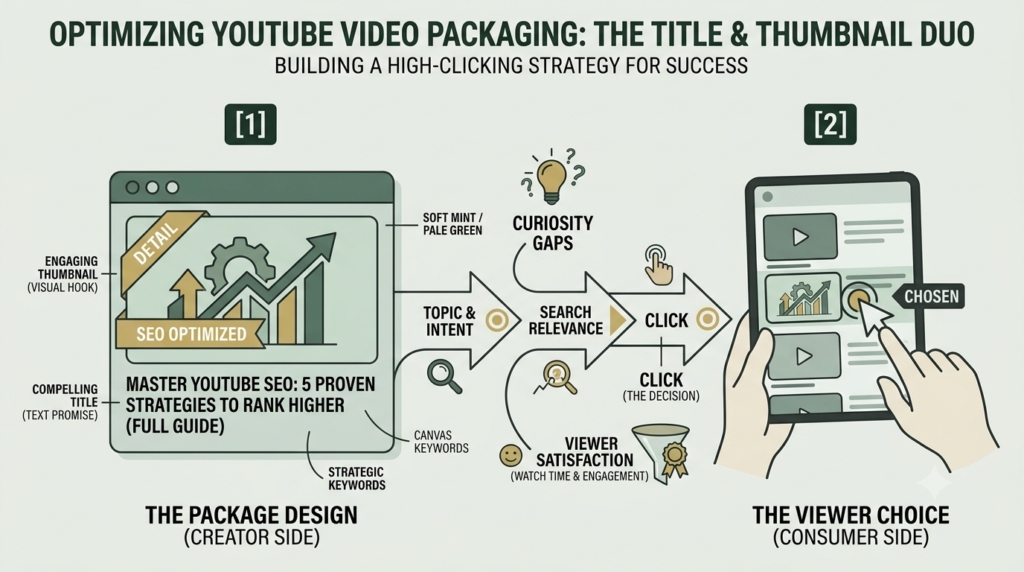
Why Titles Are the Backbone of YouTube Video Packaging
A title is not an isolated SEO field.
It connects your topic, keyword, search intent, thumbnail, audience promise, and video content.
For example:
Keyword: YouTube SEO
Viewer problem: Videos are not getting discovered
Promise: Improve discoverability
Title: 7 Powerful YouTube SEO Strategies for Better Visibility
The title establishes the subject and promise. The thumbnail creates visual context. The opening of the video should then deliver what the title promised.
YouTube’s recommendation system focuses on whether viewers choose to watch, continue watching, and are satisfied with the content.
That is why a clever title alone cannot rescue weak content.
Common YouTube Title Mistakes
Avoid these beginner mistakes:
- Keyword stuffing
- Making false promises
- Writing extremely vague titles
- Using clickbait unrelated to the video
- Hiding the main topic
- Repeating the thumbnail text word-for-word
- Adding unnecessary dates
- Using too many emojis
- Making every title identical
- Ignoring audience intent
Remember: clarity first, curiosity second.
Quick YouTube Title Formula Checklist
Before publishing, ask:
☐ Is the main topic immediately clear?
☐ Is the keyword naturally included?
☐ Does the title match search intent?
☐ Is there a clear viewer benefit?
☐ Is the title accurate?
☐ Does the thumbnail complement it?
☐ Is it easy to understand on mobile?
☐ Have unnecessary words been removed?
☐ Does the opening of the video deliver the promise?
☐ Can the result be measured in Analytics?
FAQ: YouTube Title Formulas
What is a YouTube title formula?
A YouTube title formula is a reusable structure for creating clear and compelling video titles. It can combine a keyword, benefit, number, question, problem, or curiosity element.
Are YouTube title formulas good for SEO?
Yes, they can help you create titles that clearly communicate the video’s topic and search intent. However, formulas do not guarantee rankings. YouTube evaluates relevance alongside viewer response and other signals.
How long should a YouTube title be?
YouTube recommends being succinct and placing important words near the beginning because viewers may see only part of the title in some contexts.
Should every YouTube title contain a keyword?
Not necessarily. The title should accurately communicate the video’s topic. When a keyword naturally describes the topic and matches viewer intent, including it can improve clarity.
Can I change a YouTube title after publishing?
Yes. Changing a title can change how viewers respond to the video, which can affect performance. YouTube recommends considering changes when a video has low CTR and fewer impressions than usual, rather than changing videos that are already performing well.
Final Takeaway
The best YouTube title formulas are not tricks. They are frameworks that help you communicate value clearly and consistently.
Start with the viewer’s problem, identify the search intent, choose an appropriate formula, add your keyword naturally, communicate a genuine benefit, and make sure the video delivers exactly what the title promises.
Your next step: choose one of the seven formulas and create three different titles for your next video. Then compare them using your audience data instead of guessing.