
What Are YouTube Featured Sections? 7 Powerful Ways to Optimize Your Channel
Your YouTube channel is more than a collection of videos. It is also a storefront where new visitors decide whether your content is worth watching. YouTube Featured sections help you organize that storefront by placing selected videos, playlists, Shorts, or other content into clearly defined areas on your channel homepage.
For beginners, this can seem like a small design option. In reality, properly arranged Featured sections can improve navigation, highlight your strongest content, and guide viewers toward the videos you most want them to watch.
In this guide, you will learn what YouTube Featured sections are, the main elements they contain, how to add and rearrange them, and how to optimize your channel homepage for a better viewer experience.
YouTube Featured sections give creators a practical way to present their most useful content in an organized channel layout. By arranging YouTube Featured sections around important topics, creators can help new visitors discover tutorials, explore playlists, and understand the purpose of the channel. Well-planned YouTube Featured sections also make it easier to guide viewers from introductory videos to more advanced content. The goal is to make every section useful, relevant, and easy to navigate.
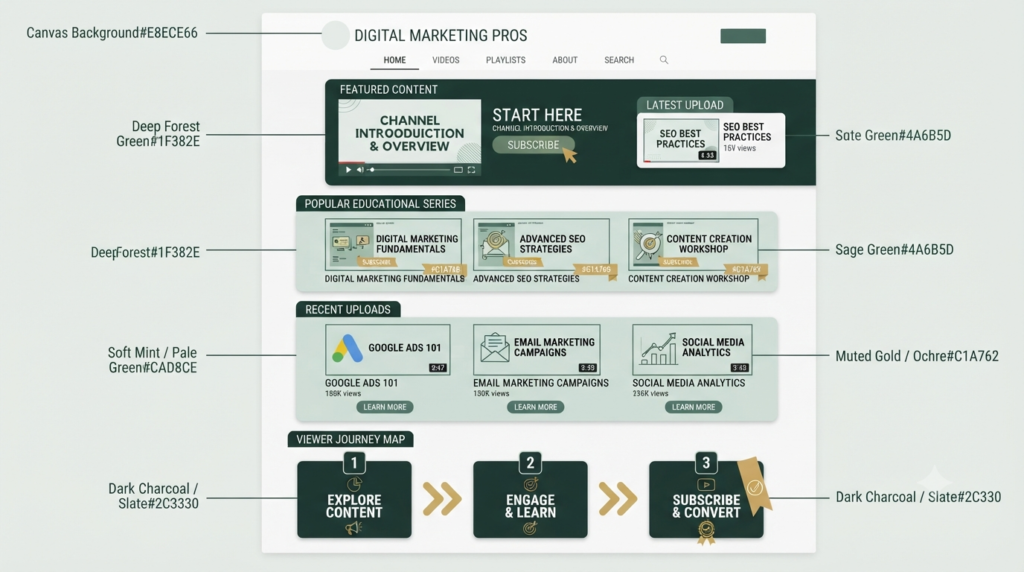
What Are YouTube Featured Sections?
YouTube Featured sections are customizable rows on your channel’s Home tab that allow you to showcase different types of content.
Instead of asking visitors to scroll through every upload, you can organize content into logical groups. For example, a creator teaching YouTube SEO could create sections for:
- YouTube SEO tutorials
- Beginner guides
- YouTube Shorts
- Popular videos
- SEO case studies
- Helpful playlists
This makes your channel easier to understand within seconds.
The exact section options available can vary depending on YouTube’s current channel features and the content available on your channel.
Why YouTube Featured Sections Matter
A well-organized channel homepage can work like a simple content navigation system.
Think of your channel as a library. Your videos are the books, playlists are the shelves, and Featured sections are the signs telling visitors where to go.
They can help you:
- Introduce your content to new visitors.
- Highlight important videos.
- Group related content.
- Promote playlists.
- Give returning viewers easier navigation.
- Create a clearer content journey.
- Showcase your strongest or newest content.
Featured sections do not automatically guarantee more views or subscribers. Their value comes from helping viewers find relevant content more easily.
How YouTube Channel Sections Improve Content Organization
YouTube channel sections help creators organize videos into meaningful categories so visitors can find relevant content quickly. Instead of displaying uploads without a clear structure, group related videos around specific viewer needs. For example, a beginner-focused channel can create separate sections for keyword research, video optimization, thumbnails, and channel analytics. This organization makes your content easier to explore and gives visitors a clearer reason to watch more videos.
How to Build a Better YouTube Channel Homepage
Your YouTube channel homepage should immediately communicate what your channel offers and whom it helps. Start with a suitable featured video, followed by your most important learning playlist and clearly organized topic sections. Keep section names simple, avoid unrelated content, and check how the layout appears on mobile devices. A clear homepage helps first-time visitors understand your channel without having to search through every upload.
Why YouTube Playlist Sections Matter
YouTube playlist sections are especially valuable for educational channels because they connect videos that solve related problems. For example, a YouTube SEO playlist can guide viewers from keyword research to video titles, descriptions, thumbnails, and performance analysis. Displaying relevant playlists on your channel homepage creates a logical learning path and helps viewers find the next video that matches their needs.
7 Important Elements of YouTube Featured Sections
| Element | Purpose | Example |
|---|---|---|
| Featured video | Introduces your channel or content | Channel introduction |
| Video section | Displays selected videos | Latest tutorials |
| Shorts section | Highlights short-form content | YouTube Shorts |
| Playlist section | Groups related videos | YouTube SEO playlist |
| Popular content | Highlights strong-performing videos | Most-watched tutorials |
| Multiple content rows | Organizes different topics | SEO, thumbnails, analytics |
| Section order | Controls viewing journey | Start → Learn → Advanced |
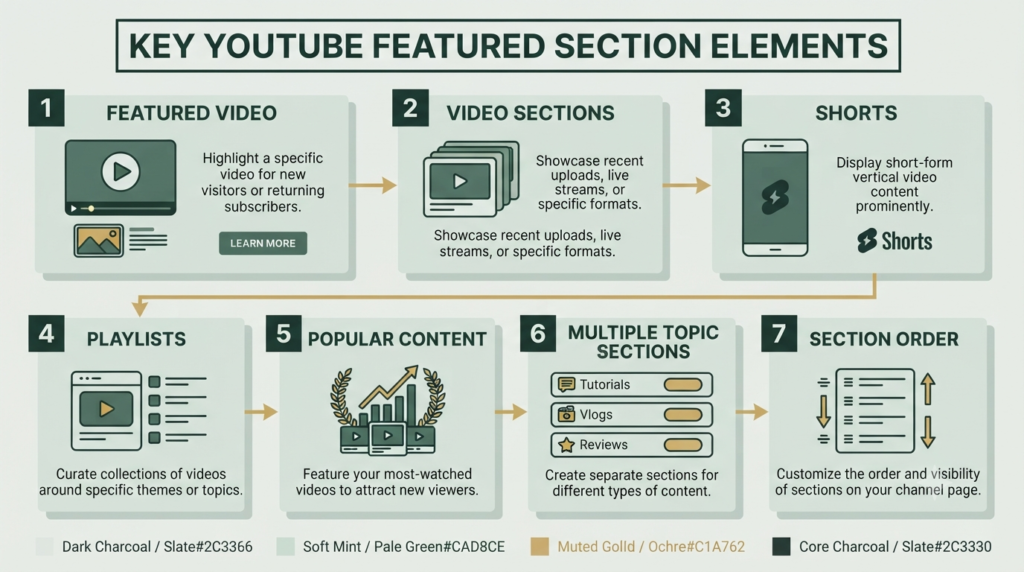
1. Featured Video
A featured video can act as an introduction for visitors.
Choose a video that quickly explains who you help, what your channel covers, and why someone should subscribe.
For a YouTube SEO channel, this could be a short introduction such as:
“Learn YouTube SEO from beginner basics to advanced channel growth.”
Keep the message clear rather than making the visitor search for your purpose.
2. Video Sections
Video sections allow you to showcase groups of videos.
Instead of presenting random uploads, arrange them according to a useful topic or viewer need.
For example:
YouTube SEO Basics → Keyword Research → Titles → Thumbnails → Analytics
This creates a natural learning journey.
3. Shorts Section
If you publish Shorts, a Shorts section can help visitors discover your short-form content without mixing it unnecessarily with long-form tutorials.
Use Shorts to introduce quick tips, definitions, mistakes, or actionable ideas.
4. Playlist Sections
Playlists are especially useful because they group related videos into a structured viewing experience.
For example:
YouTube SEO for Beginners
could contain videos about:
- Keyword research
- Video SEO
- YouTube titles
- Thumbnails
- Descriptions
- Tags
- Analytics
A visitor who watches one video has an obvious next step.
5. Popular Content
Your strongest content can be placed where new visitors can easily discover it.
However, do not select a video only because it has the highest number of views. Relevance matters too.
A popular video that no longer represents your channel may not be the best introduction.
6. Multiple Topic Sections
As your channel grows, separate major topics into different sections.
For example:
YouTube SEO
YouTube Channel Setup
YouTube Analytics
YouTube Shorts
YouTube Monetization
This is particularly useful for educational channels with several content clusters.
7. Section Order
The order of your sections matters because visitors normally encounter the upper part of the homepage first.
A simple structure could be:
- Channel introduction
- Best starting videos
- Beginner playlist
- Core topic videos
- Shorts
- Advanced tutorials
- Popular content
The goal is to create a logical viewer journey rather than simply filling the page.
How to Add YouTube Featured Sections
You can manage your channel homepage through YouTube Studio.
Step 1: Open YouTube Studio
Sign in to YouTube and open YouTube Studio.
Step 2: Open Channel Customization
From the left-hand navigation, select Customization.
Step 3: Select the Home Tab
Open the Home tab within Channel Customization.
Step 4: Find Featured Sections
Look for the area where you can organize or add sections to your channel homepage.
Step 5: Add a Section
Choose the type of content you want to showcase, such as videos, playlists, or Shorts, depending on the options currently available to your channel.
Step 6: Select Your Content
Choose the relevant playlist or content collection.
Step 7: Rearrange the Sections
Move sections into an order that makes sense for your target viewer.
Step 8: Publish
Preview the channel and save or publish your changes.
YouTube periodically changes Studio’s interface, so the wording or location of individual controls may differ slightly.
For the current official instructions, refer to YouTube Help – Customize your channel layout.
How to Improve YouTube Featured Sections Optimization
Effective YouTube Featured sections optimization starts with understanding your audience. Place your most useful introductory content near the top, use descriptive section names, and organize videos according to related topics. Review your layout regularly to ensure that featured content remains relevant. Although these improvements do not guarantee higher search rankings, they can make your channel easier to navigate and help visitors discover useful videos.
How to Optimize YouTube Featured Sections to 99/100 SEO Quality
Featured sections themselves are not a magic SEO ranking factor. Your optimization should focus on viewer experience, content relevance, discoverability, and internal navigation.
Use a Clear Content Structure
Organize sections around the problems your audience wants to solve.
Bad structure:
- Random Videos
- More Videos
- My Videos
- New Stuff
Better structure:
- Start Here: YouTube SEO Basics
- YouTube Keyword Research
- YouTube Video SEO
- YouTube Titles & Thumbnails
- YouTube Analytics
Build Topic Clusters
Your sections should connect related videos.
For example:
YouTube Keyword Research → YouTube Titles → Video SEO → CTR → Audience Retention
This creates a content ecosystem instead of isolated articles or videos.
Put Your Strongest Starting Point First
Ask: “If someone discovers my channel today, what should they watch first?”
Place that content near the beginning of the homepage.
Keep Section Names Understandable
Avoid clever names that do not communicate the topic.
Use:
YouTube SEO for Beginners
instead of:
Level Up Your Channel
The first tells both viewers and search systems what the content is about.
Avoid Overloading the Homepage
More sections do not automatically create a better channel.
Too many rows can make navigation confusing. Use enough sections to organize your major content categories without overwhelming visitors.
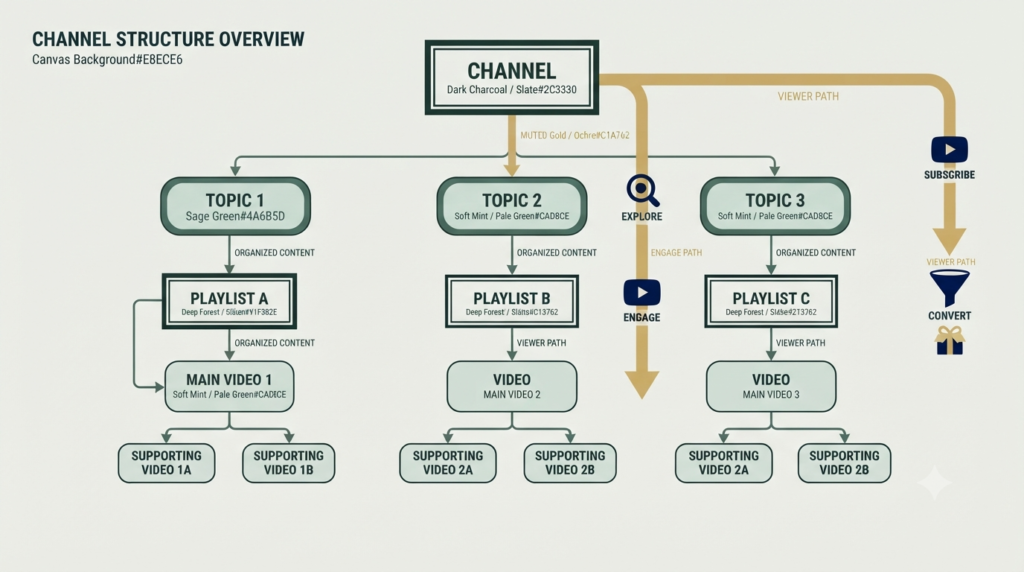
How Featured Sections Become the Backbone of Your Channel Entity
Your YouTube channel can be understood as an interconnected content entity.
Think of this structure:
Channel → Topic → Playlist → Video → Supporting Video → Viewer Journey
Featured sections visually connect these content groups.
For example:
Aahraa YouTube SEO Channel
→ YouTube SEO
→ YouTube Keyword Research Playlist
→ Keyword Research Video
→ YouTube Titles Video
→ YouTube Thumbnail Video
→ YouTube CTR Video
This structure helps communicate topical relationships to visitors.
However, Featured sections alone do not establish or strengthen a search entity. Your channel name, About information, video topics, playlists, titles, descriptions, links, consistency, and overall topical authority all contribute to the broader entity understanding.
Common Featured Section Mistakes
Avoid these mistakes:
- Adding unrelated videos.
- Creating too many sections.
- Putting old or irrelevant videos first.
- Using confusing section names.
- Ignoring playlists.
- Repeating the same content everywhere.
- Designing the homepage only for yourself.
- Forgetting mobile viewers.
- Expecting Featured sections alone to increase rankings.
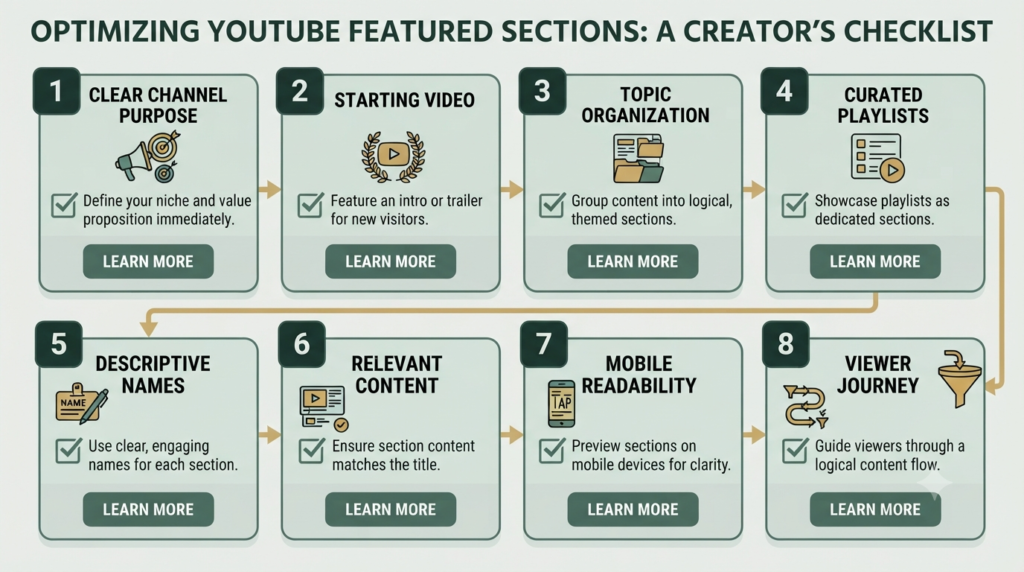
Quick Optimization Checklist
Before publishing your channel layout, check:
- Channel purpose is immediately clear.
- Best starting video is easy to find.
- Major topics have logical sections.
- Related videos are grouped together.
- Important playlists are visible.
- Section names are descriptive.
- Content is relevant to your target audience.
- The homepage is not overloaded.
- The layout works well on mobile.
- Sections guide viewers toward the next useful video.
Frequently Asked Questions
What are YouTube Featured sections?
YouTube Featured sections are customizable content rows on a channel’s Home tab. They allow creators to organize and showcase videos, playlists, Shorts, and other eligible content.
How many Featured sections should a YouTube channel have?
There is no universal ideal number. Start with the sections that represent your most important content categories and expand only when additional sections improve navigation.
Do Featured sections improve YouTube SEO?
They can support discoverability and viewer navigation, but they should not be treated as a direct ranking shortcut. Strong topics, useful videos, viewer satisfaction, and effective metadata remain important.
Can beginners use Featured sections?
Yes. Beginners should actually use them early because a clear channel homepage helps visitors understand the channel faster.
Should I put my most-viewed video first?
Not necessarily. Choose content based on relevance and usefulness for the visitor you want to attract.
Should playlists have their own Featured sections?
For educational or topic-based channels, playlists can be extremely useful because they organize related videos and provide viewers with a natural next step.
Final Takeaway
YouTube Featured sections are more than decorative rows on your channel homepage. Used strategically, they create a clear content structure that helps visitors understand your channel, discover related videos, and continue watching.
Start with your audience’s biggest questions. Group related videos into useful topics, place your strongest entry point near the top, and build a logical journey from beginner content to more advanced material.
A well-organized homepage will not replace good YouTube SEO, but it can make the SEO work you are already doing easier for viewers to navigate.
Your next step: Open YouTube Studio → Customization → Home tab and review your current channel sections. Remove anything unrelated and organize your most useful content into a simple viewer journey.