
7 Powerful Facebook Business Meta Suite Facebook Instagram Automation Strategies for Beginners in 2026
Facebook Business Meta Suite Facebook Instagram Automation becomes valuable, while managing Facebook and Instagram manually can become exhausting, especially when you are a startup owner, freelancer, creator or small-business marketer. You have to create content, write captions, publish posts, answer messages, monitor comments and check performance.
Meta Business Suite brings important Facebook and Instagram business-management functions into one environment. Meta’s own resources confirm that businesses can create and schedule content for Facebook and Instagram, while Planner provides a calendar-style view of content such as posts, Stories and Reels.
The important idea is simple: automation should remove repetitive work, not remove the human connection behind your brand.

What Is Facebook Business Meta Suite Facebook Instagram Automation?
Facebook Business Meta Suite Facebook Instagram Automation refers to using Meta Business Suite and related Meta business tools to streamline repetitive marketing activities across Facebook and Instagram.
Depending on the feature available to your account, this can include:
- Content creation
- Post scheduling
- Facebook and Instagram publishing
- Stories and Reels planning
- Inbox management
- Automated responses
- Comment and message management
- Content planning
- Performance analysis
- Advertising workflows
- Business asset management
Content creation
Post scheduling
Facebook and Instagram publishing
Stories and Reels planning
Inbox management
Automated responses
Comment and message management
Content planning
Performance analysis
Advertising workflows
Business asset management
Meta Business Suite is particularly useful because Facebook and Instagram can be managed together rather than treating them as completely separate marketing channels.
For beginners, this creates a central workflow:
Create → Plan → Schedule → Publish → Engage → Measure → Improve
That workflow is the foundation of effective social media automation
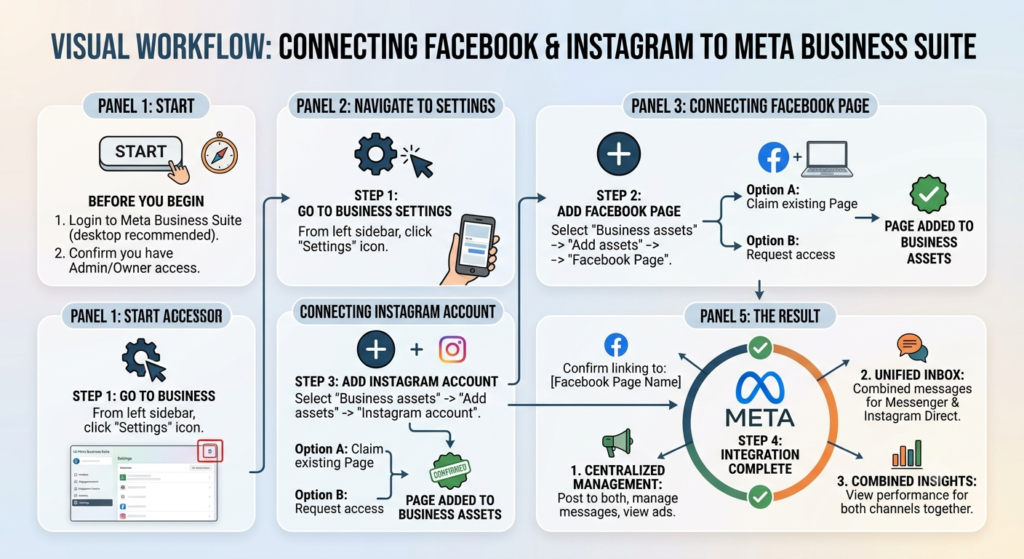
1. Set Up Meta Business Suite Correctly
Before beginning Facebook automation or Instagram automation, establish the correct business structure.
You generally need:
- A Facebook Page for your business.
- A professional Instagram account.
- Appropriate access permissions.
- The Facebook Page and Instagram account connected where supported.
- Meta Business Suite configured for your business assets.
Meta provides business resources for publishing, advertising, selling and managing business activities through its ecosystem.
Why this matters
Automation cannot work properly if your accounts, permissions or business assets are incorrectly connected.
Think of Meta Business Suite as your control centre.
Instead of jumping between multiple screens every day, you can organize much of your Facebook and Instagram activity from one place.
2. Use Content Scheduling Instead of Posting Manually
One of the most useful beginner features is scheduling.
Rather than remembering:
“I need to post at 10 AM tomorrow.”
you can prepare the content in advance and schedule it.
Meta’s official help documentation states that Meta Business Suite can be used to create and schedule posts for Facebook and Instagram.
The mobile experience also supports scheduling content such as posts, Stories and Reels.
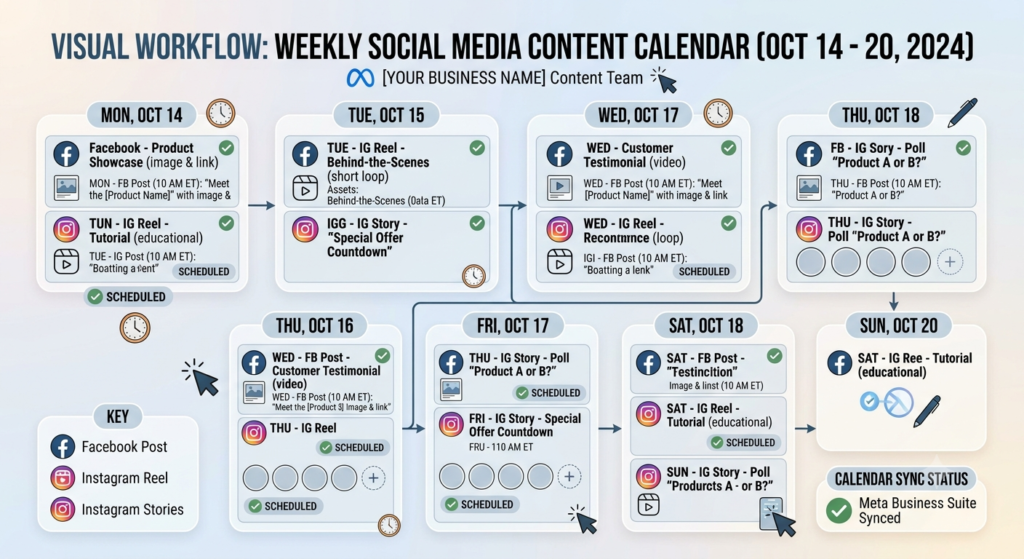
A simple weekly system
For example:
| Day | Content |
|---|---|
| Monday | Educational post |
| Tuesday | Short video/Reel |
| Wednesday | Tip or checklist |
| Thursday | Behind-the-scenes content |
| Friday | Promotional post |
| Saturday | Customer/value content |
| Sunday | Inspirational/community content |
Prepare several pieces of content together and schedule them.
This is one of the simplest forms of Meta Business Suite automation.
3. Build a Facebook + Instagram Content Calendar
A content calendar prevents random posting.
Meta’s Planner provides a calendar view for Facebook and Instagram content, including posts, Pins, Stories, Reels and ads.
Your calendar should answer four questions:
What are we publishing?
Where are we publishing it?
When are we publishing it?
Why are we publishing it?
For example:
Objective: Generate awareness
Platform: Facebook + Instagram
Content: Educational carousel
CTA: Visit website
Date: Tuesday
Topic: 5 SEO mistakes startups make
This turns social media automation from simple scheduling into an actual marketing system.
4. Automate Routine Messages and Customer Communication
Posting is only one part of social media marketing.
Customers may also ask:
- What do you sell?
- What are your prices?
- Where can I buy?
- How can I contact you?
- What are your working hours?
- Do you provide this service?
Automated messaging tools can help businesses handle repetitive questions and provide quicker initial responses.
However, automation should not make your brand sound robotic.
A good automated response should be:
Short + helpful + human + action-oriented
For example:
“Thank you for contacting us. We’ve received your message and will get back to you as soon as possible. In the meantime, you can explore our services here.”
The purpose of Facebook automation is not to replace conversation. It is to make sure routine communication does not consume your entire day.
5. Manage Facebook and Instagram Engagement From One Workflow
Another major advantage is centralized management.
Instead of checking Facebook comments, Instagram messages and other interactions separately throughout the day, use Meta’s business tools to organize your workflow where available.
This is especially helpful for small businesses.
Imagine receiving 20 routine questions.
Without a system, you repeatedly type the same answers.
With an organized Instagram automation and Facebook workflow, common questions can be handled more efficiently, while complicated questions can be passed to a human.
The rule to remember
Automate repetition. Humanize relationships.
That principle is essential for sustainable digital marketing.
6. Use Analytics to Improve Your Automation
Automation without measurement is simply scheduled activity.
You need to understand what happens after publication.
Monitor metrics such as:
- Reach
- Engagement
- Comments
- Shares
- Saves
- Video views
- Profile activity
- Link clicks
- Leads
- Conversions
Then ask:
Which content attracted attention?
Which content generated conversations?
Which posts produced website visits?
Which topics should we create again?
This creates a feedback loop:
Publish → Measure → Learn → Improve → Repeat
That is where Facebook Business Meta Suite Facebook Instagram Automation becomes more than a time-saving tool. It becomes part of your marketing decision-making process.
7. Connect Automation With Your Overall Digital Marketing Strategy
This is the most important point.
Meta Business Suite should not operate in isolation.
It should connect your:
Website + SEO + Social Media + Content + Email + Lead Generation + Sales
For example:
Blog article
↓
Facebook post
↓
Instagram Reel
↓
Instagram/Facebook engagement
↓
Website visit
↓
Lead magnet
↓
Email relationship
↓
Digital product or service
This is why social media automation can become the backbone of a broader digital marketing entity ecosystem.
The automation handles repetitive distribution and communication, while your website remains the deeper destination where customers learn about your brand, services and products.
For example, Aahraa’s services page covers SEO optimization, social media optimization, website development and startup branding, making social media activity one component of a broader startup marketing system.
Facebook vs Instagram Automation: What Should Beginners Automate?
| Activity | ||
|---|---|---|
| Post scheduling | ✅ | ✅ |
| Content planning | ✅ | ✅ |
| Stories | ✅ | ✅ |
| Reels | ✅ | ✅ |
| Engagement management | ✅ | ✅ |
| Messaging workflows | ✅ | ✅ |
| Analytics | ✅ | ✅ |
| Advertising | ✅ | ✅ |
Availability can vary by account, content type, region and Meta’s current product configuration, so always check the current Meta interface and help documentation before building a workflow around a particular feature. Meta continues to update its business tools and ecosystem.
What Should You NOT Automate?
Automation has limits.
Do not blindly automate:
- Sensitive customer complaints
- Personal conversations
- Complex sales questions
- Negative reviews
- Crisis communication
- Important customer decisions
- Every comment with the same generic response
People can recognize robotic communication very quickly.
A better strategy is:
Automate the predictable.
Personalize the important.
Why Meta Business Suite Is a Backbone for Modern Business Marketing
Think of your digital marketing system as a wheel.
At the centre is your brand and website.
Around it are:
- Content
- SEO
- Messaging
- Advertising
- Analytics
- Digital products
Meta Business Suite can help coordinate an important part of that wheel by bringing Facebook and Instagram content planning, publishing and business management into a unified workflow.
Meta itself describes its technologies as tools that help people connect, find communities and grow businesses.
But remember:
Meta Business Suite is the operational backbone for your Facebook and Instagram workflow—not the entire digital marketing strategy.
Your website, SEO, content and conversion system still matter.
A Simple Beginner Automation Workflow for 2026
If you are completely new, start small.
Step 1
Connect your Facebook Page and professional Instagram account.
Step 2
Create 7 pieces of useful content.
Step 3
Prepare captions and calls-to-action.
Step 4
Schedule your content using Meta Business Suite.
Step 5
Create simple responses for frequently asked questions.
Step 6
Check your inbox and comments regularly.
Step 7
Review your weekly analytics.
Step 8
Repeat what works.
Do not attempt to automate everything on your first day.
Build the system gradually.
Frequently Asked Questions
1. What is Facebook Business Meta Suite Facebook Instagram Automation?
It is the use of Meta Business Suite and related business tools to streamline Facebook and Instagram activities such as content planning, scheduling, publishing, messaging and performance monitoring.
2. Is Meta Business Suite free?
Meta provides Meta Business Suite as a business-management platform, although some activities, particularly advertising, involve paid media budgets. Features and availability can vary.
3. Can I schedule Facebook and Instagram posts together?
Yes. Meta’s official documentation confirms that Meta Business Suite supports creating and scheduling content for Facebook and Instagram.
4. What is Facebook automation?
Facebook automation means using available tools to reduce repetitive Facebook marketing tasks, such as scheduling content and handling routine communication.
5. What is Instagram automation?
Instagram automation involves using approved tools and workflows to streamline repetitive Instagram activities such as content planning, publishing and certain communication tasks.
6. Is automation better than manually posting?
Automation saves time and improves consistency, but human involvement is still important for strategy, creative decisions and meaningful customer conversations.
7. Can beginners use Meta Business Suite?
Yes. Beginners can start with simple scheduling and content planning before progressing to more advanced workflows.
8. Is social media automation enough to grow a business?
No. Automation supports marketing, but sustainable growth also requires strong content, positioning, SEO, a useful website, customer trust and an effective conversion process.
Conclusion
Facebook Business Meta Suite Facebook Instagram Automation can make social media marketing considerably more organized for beginners in 2026.
The goal is not to create a completely automated brand.
The goal is to create a smarter brand that spends less time repeating tasks and more time creating value.
Start with scheduling. Then organize your content calendar. Add appropriate messaging workflows. Monitor analytics. Finally, connect Facebook and Instagram with your website, SEO, content and sales strategy.
That is how simple Facebook automation, Instagram automation and social media automation can develop into a practical business system.