
7 Powerful Video Creation Tips to Increase Engagement & Conversion
Video Creation to increase engagement and conversion has become one of the most practical ways for a business to communicate online. A well-made video can explain a product, demonstrate a service, answer a question, build trust and encourage someone to take the next step—all within a few seconds.
For beginners, however, video creation can feel complicated. You may think you need expensive cameras, professional editing software, a studio or even a large team.
You don’t.
In 2026, effective video creation to increase engagement and conversion is less about producing a cinematic masterpiece and more about communicating one useful idea clearly to the right audience.
Whether you are promoting a startup, digital product, service, personal brand or online store, video can become an important part of your marketing system.
This complete beginner’s guide explains how to plan, create, optimize and measure videos that attract attention, increase engagement and support conversions.

What Is Video Creation to Increase Engagement and Conversion?
Video creation to increase engagement and conversion means creating videos with a specific business purpose rather than simply creating videos because video is popular.
The purpose could be to:
- attract new audiences
- educate potential customers
- demonstrate a product
- explain a complicated topic
- build credibility
- generate leads
- increase website visits
- encourage purchases
- nurture existing customers
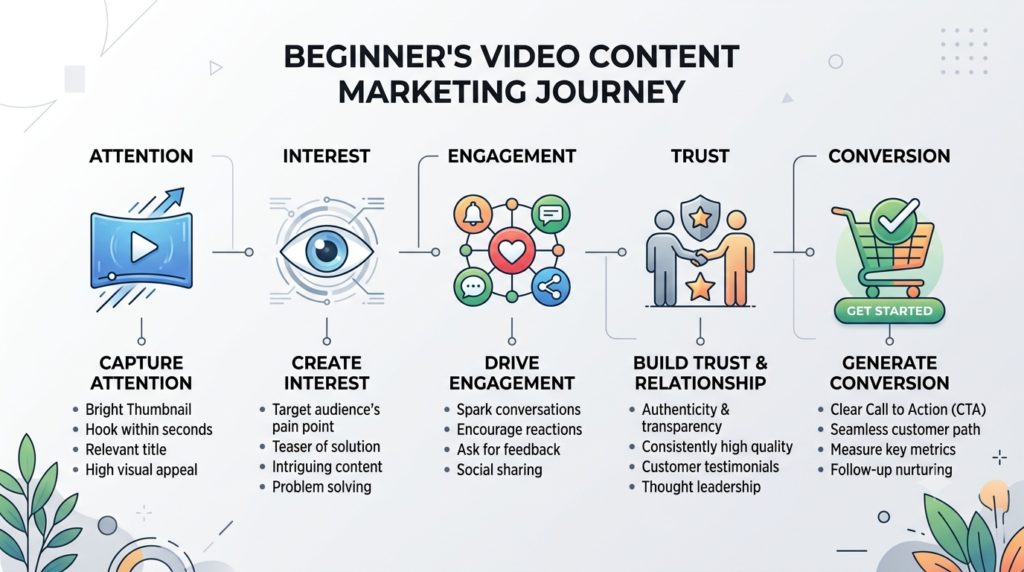
A useful video therefore follows a simple journey:
Attention → Interest → Value → Trust → Action → Conversion
For example, a digital-product business could create a short video showing a common problem faced by beginners, demonstrate a simple solution and then direct viewers to a relevant product page.
That is much more strategic than simply saying, “Buy my product.”
Why Video Marketing Matters in 2026
Video marketing works because it combines several communication elements at once.
A viewer can see your product, hear your explanation, read on-screen text and understand your personality within a short period.
YouTube itself explains that relevance, engagement and quality are important parts of its search system.
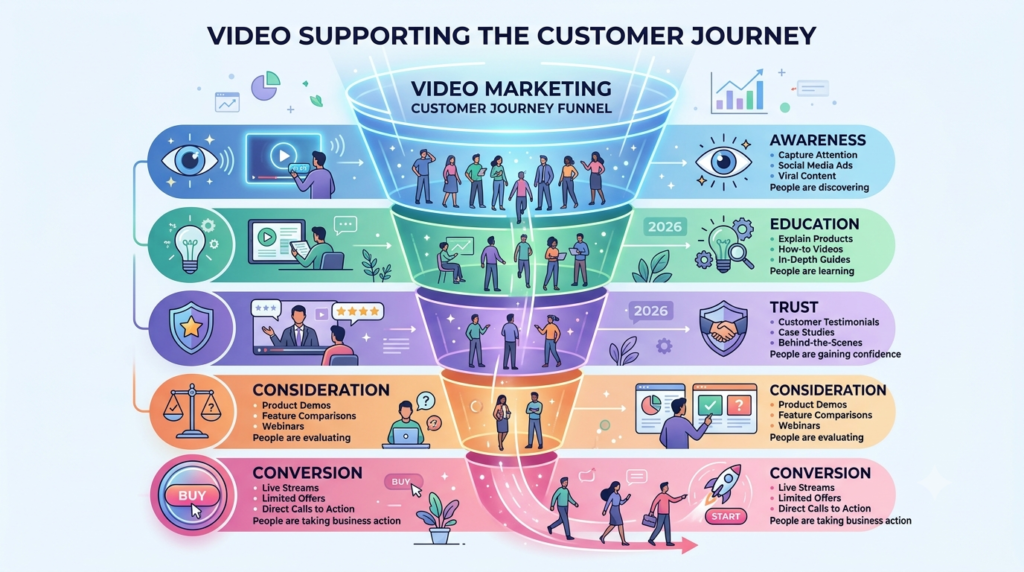
Video is particularly useful because it can support several stages of the customer journey.
1. Awareness
Short-form videos can introduce your brand to people who have never heard of you.
2. Education
Tutorials and demonstrations can explain what your product or service actually does.
3. Trust
Showing your process, expertise or customer problem in a human way can make a business feel more authentic.
4. Consideration
Comparison videos, demonstrations and FAQs can help potential customers make decisions.
5. Conversion
A strong call-to-action can move an interested viewer to a landing page, product page, signup form or purchase.
This makes video Creation to increase engagement and conversion more than a content format. It can become part of your complete marketing funnel.
7 Powerful Elements of Video Creation
1. Start With a Clear Audience and Goal
The first mistake beginners make is opening Canva or a video editor before deciding what the video needs to accomplish.
Start with two questions:
Who is this video for?
and
What should the viewer do after watching it?
For example:
Audience: Startup founders
Problem: They struggle to generate social-media engagement.
Video goal: Teach three practical techniques.
CTA: Visit the website for more information.
Your objective could be:
- awareness
- engagement
- traffic
- lead generation
- sales
- education
- retention
One video should generally have one primary objective.
2. Create a Strong Hook
The first few seconds are critical.
Your viewer is constantly deciding whether your content deserves attention. You therefore need a reason to continue watching.
You could begin with:
Problem hook:
“Posting every day but still getting almost no engagement?”
Result hook:
“Here are three simple video changes that can improve your content.”
Question hook:
“Why do some simple videos outperform expensive productions?”
Mistake hook:
“Stop making this common video marketing mistake.”
Curiosity hook:
“Most beginners optimize the wrong part of their videos.”
The important principle is simple:
Do not waste the opening on a long introduction.
YouTube’s current guidance similarly emphasizes getting quickly to the value promised by the title and thumbnail.
3. Deliver One Clear Message
Beginners often try to put everything into one video.
That creates information overload.
Instead, follow the one-video-one-message principle.
For example:
Bad approach:
“Today we will discuss Instagram, Facebook, SEO, email marketing, Google Ads, websites and branding.”
Better:
“Three Instagram video mistakes that reduce engagement.”
The second topic is easier to understand, easier to script and easier to promote.
A simple video structure is:
Hook → Problem → Solution → Example → CTA
This structure works particularly well for educational and promotional videos.
4. Make the Video Visually Easy to Follow
Good video creation to increase engagement and conversion doesn’t require expensive equipment.
A beginner can start with:
- smartphone
- natural light
- simple background
- Canva
- CapCut or another accessible editor
- screen recording
- stock footage where appropriate
- text animation
- screenshots
- product demonstrations
Your visual design should support your message rather than compete with it.
Use:
- large readable text
- short text sections
- clear contrast
- consistent branding
- simple transitions
- relevant images
- captions
Avoid:
- excessive animations
- tiny text
- too many fonts
- distracting backgrounds
- unnecessary transitions
- long static screens
YouTube recommends keeping thumbnails clear, representative and easy to understand, rather than making them unnecessarily complicated
5. Add a Strong Call-to-Action
A video can receive thousands of views and still generate no business if viewers don’t know what to do next.
This is where video conversion becomes important.
Your CTA should match your objective.
For engagement:
“Tell me your biggest video-marketing challenge in the comments.”
For traffic:
“Visit our website to read the complete guide.”
For lead generation:
“Download the free checklist.”
For sales:
“Explore the complete bundle through the link below.”
For subscribers:
“Follow for more beginner-friendly digital marketing strategies.”
Don’t give viewers five different actions.
Choose one primary action.

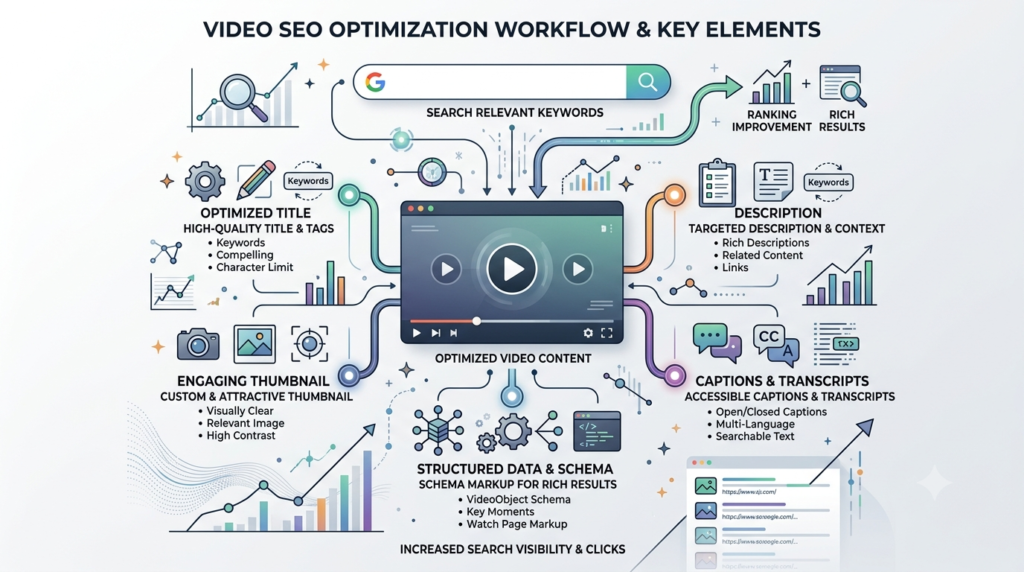
6. Optimize Your Video for Search
This is where video SEO becomes important.
Search optimization doesn’t mean stuffing keywords everywhere.
Instead, make the topic clear through:
- video title
- description
- spoken content
- captions
- thumbnail
- webpage copy
- relevant headings
- supporting text
- structured data where appropriate
For YouTube, titles, thumbnails and descriptions are more important discovery elements than tags; YouTube says tags play only a minimal role except in situations such as common misspellings.
Example title
7 Powerful Video Marketing Tips for Beginners in 2026
Example description opening
Learn how to use video marketing to increase engagement, build trust and generate conversions in 2026.
The primary topic should appear naturally near the beginning.
7. Measure Video Engagement and Conversion
Creating a video is only the beginning.
You need to understand what happens after publication.
Track metrics such as:
Views
How many people watched?
Watch time
How long did people continue watching?
Retention
At what point did viewers leave?
Engagement
Did viewers like, comment, save or share?
Click-through rate
Did viewers click your link?
Conversion rate
Did viewers complete the desired action?
For example:
10,000 views → 500 clicks → 50 purchases
That gives you a much more useful picture than views alone.
A video with 2,000 highly relevant views and 40 sales can be more valuable than a video with 100,000 views and zero sales.
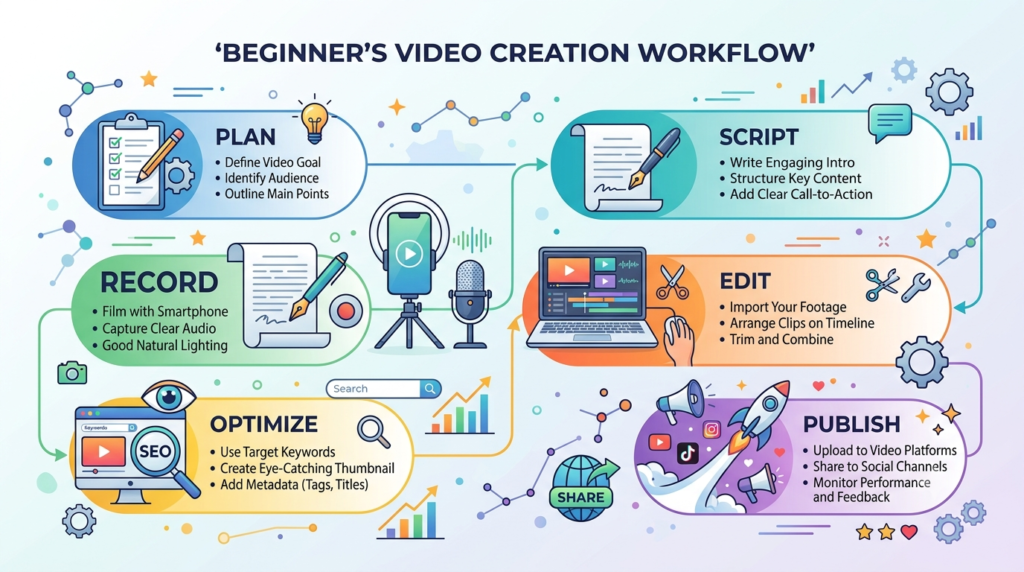
How to Create Your First Video: Beginner Workflow
You don’t need to make the process complicated.
Step 1: Choose one problem
Example:
“Why aren’t my social-media videos getting engagement?”
Step 2: Write the hook
“If people are scrolling past your videos, these three mistakes may be the reason.”
Step 3: Write three points
- Weak opening
- Too much information
- No clear CTA
Step 4: Create the visuals
Use Canva or another simple editor.
Create:
- opening screen
- three teaching sections
- final CTA
Step 5: Add captions
Many viewers consume social content without relying on audio, so readable captions and on-screen text can improve accessibility and comprehension.
Step 6: Add branding
Use your:
- logo
- brand colors
- consistent typography
- website address where appropriate
Step 7: Export
For vertical short-form content, a common starting format is:
1080 × 1920 pixels
For landscape YouTube content:
1920 × 1080 pixels
Step 8: Publish
Use an accurate title, relevant description and strong thumbnail.
Step 9: Measure
After publication, examine retention, engagement and clicks.
Step 10: Improve
Don’t immediately assume the entire strategy failed.
Instead ask:
- Did people click?
- Did they stay?
- Where did they leave?
- Was the CTA clear?
- Did the thumbnail accurately represent the video?
- Was the topic relevant?
Then improve the next video.
How Video Creation to increase engagement and conversion, Becomes the Backbone of Your Content Strategy
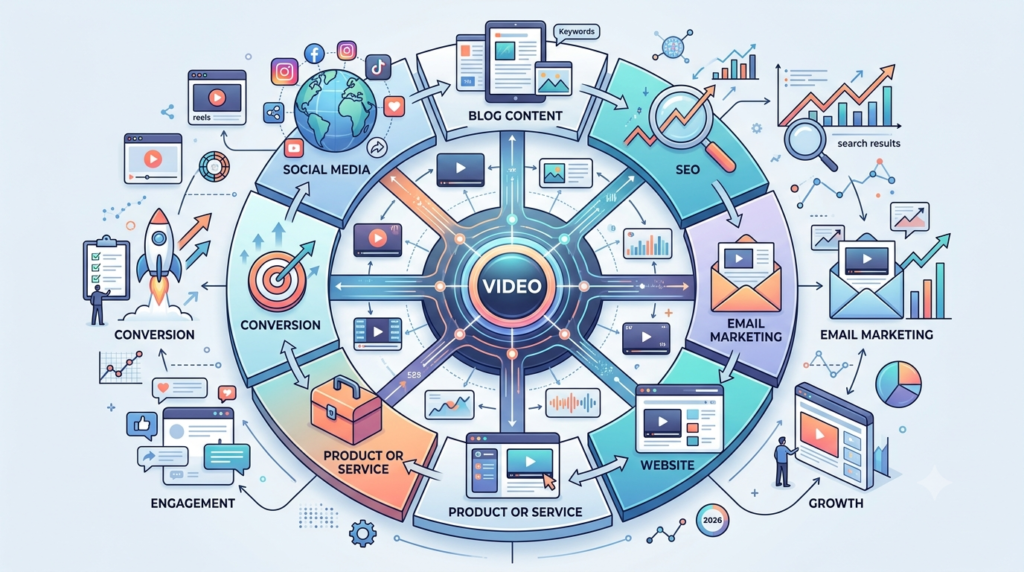
One of the biggest advantages of video is content repurposing.
Imagine you create one 8-minute educational video.
You can turn it into:
1 long-form video
↓
3 short videos
↓
1 blog article
↓
5 social-media posts
↓
1 carousel
↓
1 email
↓
10 short tips
This creates a content ecosystem.
That is why video can become the backbone of an entity-based content strategy.
Your brand is the central entity.
Your website is the primary owned property.
Your video explains the subject.
Your blog expands the subject.
Your social posts distribute the subject.
Your product or service provides the solution.
Search engines then have multiple connected signals describing what your brand does and what topics it is associated with.
This does not mean that simply adding video automatically creates an entity in Google’s Knowledge Graph. Rather, consistent, accurate and interconnected information helps search engines understand relationships between your brand, people, products, services and topics.
Video SEO and Google’s VideoObject Schema
If you embed an important video on your website, you can consider using VideoObject structured data.
Google states that VideoObject markup can help it understand information such as the video’s title, thumbnail, upload date and duration, and videos can appear in places including Google Search, Video mode, Google Images and Discover.
Important properties include:
namethumbnailUrluploadDatedescriptiondurationcontentUrlorembedUrl
Google specifically identifies name, thumbnailUrl and uploadDate as required properties for VideoObject eligibility.
You can also use video chapters or Clip structured data for important moments when appropriate.
Frequently Asked Question on Video Creation to Increase Engagement and Conversion
What is video creation in digital marketing?
Video creation to Increase Engagement and Conversion, in digital marketing is the process of producing video content to educate, attract, engage or convert a specific audience.
How does video increase engagement?
Video combines visuals, audio, storytelling and movement, making it possible to communicate information quickly while encouraging actions such as watching, commenting, sharing, saving or clicking.
How can beginners create marketing videos?
Beginners can start with a smartphone, simple lighting, Canva or another accessible editing tool, a short script and a clear CTA.
How long should a marketing video be?
There is no universal ideal length. The video should be as long as necessary to deliver the promised value without unnecessary filler.
What is video SEO?
Video SEO is the process of optimizing video content and the webpage around it so search engines and viewers can understand, discover and engage with the content.
Does video guarantee more conversions?
No. Video can support conversions, but results depend on audience relevance, offer quality, messaging, distribution, landing-page experience and the CTA.