
Google Search Console: The Backbone of Modern SEO and Website Entities
In today’s digital ecosystem, every website owner, blogger, startup, and digital marketer needs accurate data to improve visibility on search engines. This is where Google created Google Search Console, one of the most powerful free SEO tools available.
Search performance monitoring is not just a reporting platform. It acts as the communication bridge between your website and Google Search. It helps website owners understand how Google crawls, indexes, ranks, and displays pages in search results.
Whether you run a blog, ecommerce store, agency website, or startup platform, Search Console is the backbone for:
- Website indexing
- Technical SEO optimization
- Entity recognition
- Search visibility
- Crawl monitoring
- Performance tracking
- Mobile usability
- Schema validation
- Internal linking improvements
Without Search Console, you are essentially running a website without understanding how search engines actually view it.
What is Google Webmaster tools ?
Google Webmaster tools is a free web service by Google that helps website owners monitor, troubleshoot, and optimize their presence in Google Search results.
It provides direct insights into:
- Organic traffic
- Search impressions
- Click-through rates
- Indexing issues
- Sitemap submissions
- Technical SEO problems
- Structured data errors
- Core Web Vitals
- Mobile usability
Official Website:
Google Search Console
Why Google Search Console SEO is the Backbone of Website Entities
Search engines now rely heavily on entities instead of only keywords.
An entity can be:
- A person
- Brand
- Business
- Product
- Organization
- Service
- Place
Google Webmaster Tools helps Google understand these entities by analyzing:
- Structured data
- Internal links
- Website hierarchy
- Search intent
- Schema markup
- Topic relevance
- User behavior
For example:
If your website consistently publishes content about SEO optimization, schema markup, technical SEO, crawling, and indexing, Google begins identifying your site as an SEO-related entity.
This improves:
- Topical authority
- Knowledge Graph relevance
- Featured snippet opportunities
- Search rankings
- AI search visibility
That is why Google’s webmaster platform is considered the backbone of entity SEO.
How to Set Up Google Webmaster Tools
Step 1: Open Search Console
Visit:
Google Search Console Setup Page
Step 2: Add Property
You can add:
- Domain Property
- URL Prefix Property
The domain property is recommended because it tracks all subdomains and protocols.
Step 3: Verify Ownership
Verification methods include:
- DNS record
- HTML file upload
- Google Analytics
- Google Tag Manager
Step 4: Submit XML Sitemap
Example sitemap URL:
https://yourwebsite.com/sitemap.xmlSubmitting a sitemap helps Google discover pages faster.
Major Elements of Google Webmaster Tools Explained
1. Overview Section
The Overview section gives a quick summary of:
- Website performance
- Indexing status
- Experience metrics
- Enhancements
It acts like a dashboard where website owners can immediately detect major SEO issues.
Benefits
- Fast SEO monitoring
- Quick issue detection
- Website health overview
2. Performance Report
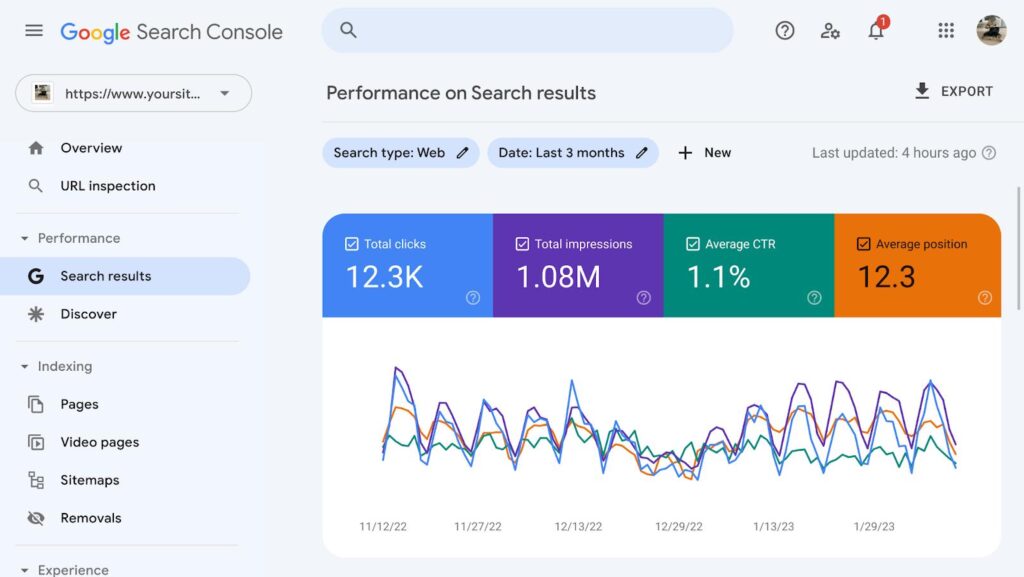
The Performance Report is one of the most important features in Search Console.
It shows:
- Total clicks
- Total impressions
- Average CTR
- Average position
You can filter data by:
- Queries
- Pages
- Countries
- Devices
- Search appearance
- Dates
Why It Matters
This report helps identify:
- High-performing keywords
- Pages losing rankings
- CTR improvement opportunities
- Search trends
SEO Tip
Improve pages with:
- High impressions
- Low clicks
These pages usually need better:
- Meta titles
- Meta descriptions
- Search intent optimization
3. URL Inspection Tool
The URL Inspection Tool checks how Google views a specific page.
It tells you:
- Whether the page is indexed
- Crawl status
- Canonical URL
- Mobile usability
- Schema issues
Why It Is Important
This tool is extremely useful after:
- Publishing a blog
- Updating content
- Fixing SEO issues
You can also request indexing manually.
4. Indexing Section
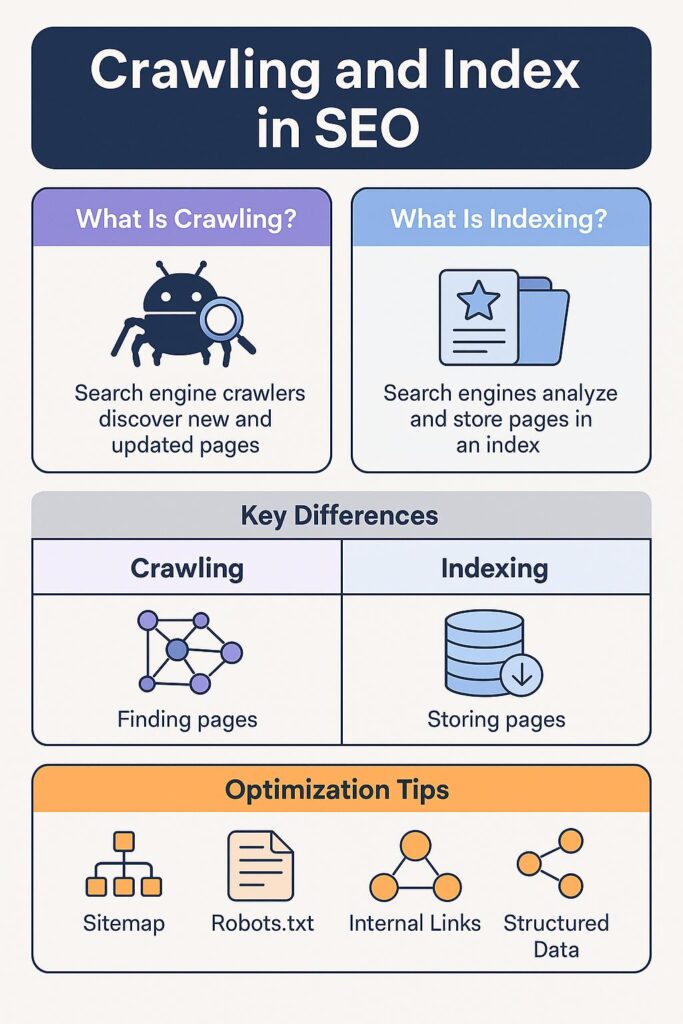
The Indexing section shows whether your pages are indexed correctly.
It contains:
- Indexed pages
- Non-indexed pages
- Crawl issues
- Redirect errors
- Soft 404 errors
Common Problems
- Duplicate content
- Blocked pages
- Noindex tags
- Server issues
SEO Advantage
Fixing indexing issues improves:
- Organic visibility
- Crawl efficiency
- Search rankings
5. Sitemaps Feature
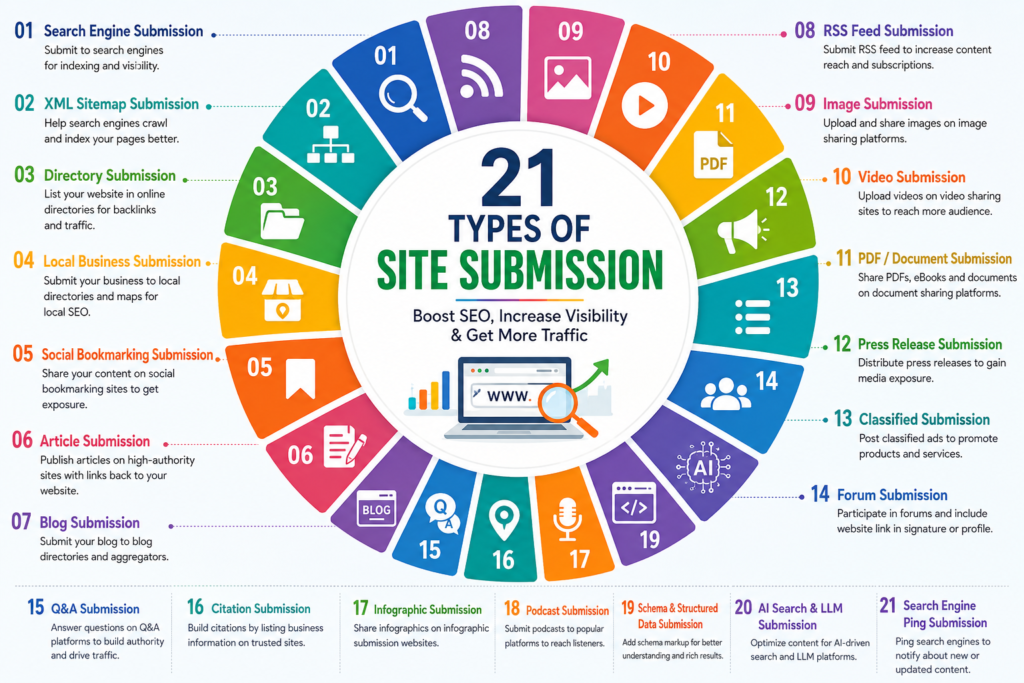
The Sitemap feature helps Google discover your content structure.
Benefits of XML Sitemaps
- Faster crawling
- Better indexing
- Improved content discovery
Recommended sitemap tools:
- Yoast SEO
- Rank Math
- XML Sitemap Generator
Official sitemap guidelines:
6. Experience Section
The Experience section focuses on user experience signals.
It includes:
- Core Web Vitals
- HTTPS status
- Mobile usability
Google prioritizes websites that offer good user experience.
7. Core Web Vitals
Core Web Vitals are ranking signals introduced by Google.
Main metrics include:
- Largest Contentful Paint (LCP)
- Interaction to Next Paint (INP)
- Cumulative Layout Shift (CLS)
Why Core Web Vitals Matter
Good scores improve:
- User engagement
- Bounce rate
- SEO rankings
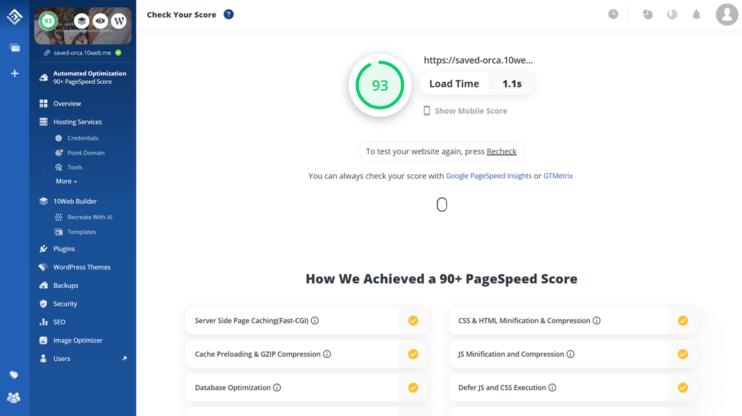
The Core Web Vitals report in Google Search Console helps identify loading, responsiveness, and visual stability issues. Read our complete guide on Core Web Vitals to learn how to improve website performance.
Optimization Tips
- Compress images
- Use caching
- Minify CSS and JavaScript
- Improve hosting speed
8. Mobile Usability
Most users now browse through smartphones.
Google uses mobile-first indexing, meaning the mobile version of your site is the primary version.
The Mobile Usability report checks:
- Text readability
- Button spacing
- Responsive design
- Screen compatibility
SEO Impact
Poor mobile usability can reduce rankings significantly.
9. HTTPS Report
HTTPS is now a trust and ranking factor.
This report identifies:
- Secure pages
- Non-secure URLs
- SSL problems
Benefits
HTTPS improves:
- Security
- User trust
- SEO performance
10. Enhancements Section
This section analyzes structured data and schema markup.
It helps websites qualify for:
- Rich snippets
- FAQ results
- Review stars
- Product listings
Types of Schema
- FAQ schema
- Article schema
- Product schema
- Breadcrumb schema
- Local business schema
SEO Benefits
Schema markup improves:
- Click-through rates
- Search visibility
- Entity understanding
Structured data guide:
Google Structured Data Documentation
11. Links Report
The Links Report shows:
External Links
Websites linking to your content.
Internal Links
Pages connected inside your website.
Why Internal Linking Matters
Strong internal linking helps:
- Crawl efficiency
- Entity association
- Topical authority
- Page indexing
12. Manual Actions Report
If Google penalizes your website, it appears here.
Reasons may include:
- Spam content
- Artificial backlinks
- Cloaking
- Hidden text
Important Note
Always follow ethical SEO practices.
13. Security Issues Report
This section warns about:
- Malware
- Hacked content
- Phishing pages
A secure website protects both rankings and visitors.
How Google Webmaster Tools Helps SEO
Google’s webmaster platform improves SEO by helping website owners:
- Discover indexing problems
- Track keyword performance
- Improve content visibility
- Optimize technical SEO
- Understand user behavior
- Build stronger entities
- Improve crawlability
Google Webmaster Tools and Technical SEO
Technical SEO optimization depends heavily on Search Console.
It helps diagnose:
- Crawl errors
- Redirect chains
- Broken pages
- Mobile issues
- Schema problems
- Page speed issues
Without technical SEO, even quality content may fail to rank.
Google Webmaster Tools for Bloggers
Bloggers can use Search Console to:
- Find ranking keywords
- Discover low-performing pages
- Improve CTR
- Update old blogs
- Monitor indexing
This allows content creators to grow organic traffic strategically.
Google Webmaster Tools for Businesses
Businesses use Google’s webmaster platform to:
- Improve local SEO
- Monitor branded searches
- Track landing page performance
- Improve conversions
- Strengthen authority
It also helps companies build entity trust in Google Search.
Common Mistakes to Avoid
Ignoring Coverage Errors
Indexing issues can reduce traffic dramatically.
Not Submitting Sitemaps
Google may take longer to discover content.
Poor Internal Linking
Weak linking reduces crawl depth.
Ignoring Mobile Experience
Mobile-first indexing is critical.
Publishing Thin Content
Low-quality pages hurt entity authority.
Best Practices for Google Webmaster tools
Monitor Weekly
Check reports regularly.
Fix Errors Quickly
Resolve crawl and indexing issues immediately.
Optimize High-Impression Pages
Improve titles and meta descriptions.
Submit Updated Sitemaps
Keep Google informed about new pages.
Build Topic Clusters
Strengthen entity SEO using related content.
Frequently Asked Questions
What is Google Search Console?
Google Search Console is a free platform from Google that helps website owners monitor search visibility, indexing status, and overall SEO performance.
Is Search Console free to use?
Yes, the platform is completely free and available to bloggers, businesses, ecommerce websites, and digital marketers.
Why is this tool important for SEO?
It provides valuable insights into keyword rankings, crawl errors, indexing issues, user experience metrics, and organic search performance.
How do I submit a sitemap?
Navigate to the Sitemaps section, enter the XML sitemap URL, and submit it for faster content discovery and crawling.
What does the URL Inspection feature do?
This feature allows website owners to check indexing status, view crawl information, inspect canonical URLs, and request indexing of updated pages.
What are Core Web Vitals?
Core Web Vitals are performance metrics that measure page speed, responsiveness, and visual stability to improve user experience and search rankings.
How can website owners improve indexing?
Regular sitemap submissions, proper internal linking, quality content, and resolving crawl errors can improve index coverage.
Can this platform increase rankings directly?
No. It does not directly increase rankings but provides actionable data that helps improve technical SEO, content quality, and search visibility.
How does it support entity SEO?
It helps search engines better understand topics, brands, products, services, and website structure through performance data and structured markup validation.
How often should website owners review reports?
Checking reports weekly helps identify indexing issues, performance changes, technical problems, and new optimization opportunities.
Frequently Asked Questions
What is Google Search Console?
Google Search Console is a free platform from Google that helps website owners monitor search visibility, indexing status, and overall SEO performance.
Is Search Console free to use?
Yes, the platform is completely free and available to bloggers, businesses, ecommerce websites, and digital marketers.
Why is this tool important for SEO?
It provides valuable insights into keyword rankings, crawl errors, indexing issues, user experience metrics, and organic search performance.
How do I submit a sitemap?
Navigate to the Sitemaps section, enter the XML sitemap URL, and submit it for faster content discovery and crawling.
What does the URL Inspection feature do?
This feature allows website owners to check indexing status, view crawl information, inspect canonical URLs, and request indexing of updated pages.
What are Core Web Vitals?
Core Web Vitals are performance metrics that measure page speed, responsiveness, and visual stability to improve user experience and search rankings.
How can website owners improve indexing?
Regular sitemap submissions, proper internal linking, quality content, and resolving crawl errors can improve index coverage.
Can this platform increase rankings directly?
No. It does not directly increase rankings but provides actionable data that helps improve technical SEO, content quality, and search visibility.
How does it support entity SEO?
It helps search engines better understand topics, brands, products, services, and website structure through performance data and structured markup validation.
How often should website owners review reports?
Checking reports weekly helps identify indexing issues, performance changes, technical problems, and new optimization opportunities.
Conclusion
Google Search Console is the foundation of modern SEO. From website indexing in Google to technical SEO optimization and entity-based search visibility, Google webmaster tools provides the insights needed to improve rankings, increase organic traffic, and strengthen website authority. Businesses, bloggers, and marketers who regularly use Search performance monitoring reports can identify opportunities, resolve technical issues, and build long-term search engine success