
7 Powerful Traffic Campaign Strategies for Meta Ads in 2026
Introduction
A Traffic Campaign is one of the most useful campaign types in Meta Ads when your immediate goal is to bring people from Facebook or Instagram to a destination such as a website, landing page, blog, product page, app or messaging destination.
For a beginner, traffic advertising can look simple: create an advertisement, choose an audience, add a link and start spending. In reality, successful traffic generation requires the right objective, destination, audience, creative, optimization setting and measurement system.
The important point is that traffic is not simply about getting the largest possible number of clicks. You want useful visitors who have a reason to continue beyond the click.
This guide explains how a Traffic Campaign works, when to use it, how to create one step by step, what every element means, common mistakes, and how to optimize the campaign properly in 2026.
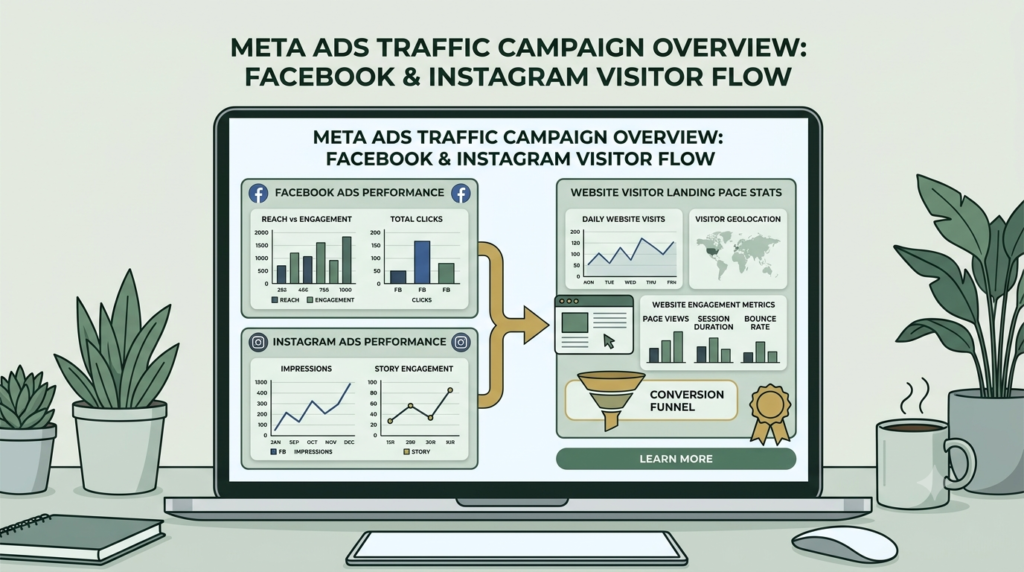
What Is a Traffic Campaign?
A Traffic Campaign is designed to send people from Meta platforms toward a selected destination.
Depending on your setup, that destination can include:
- A website
- Landing page
- Blog article
- Product page
- Online store
- App
- Messenger
- Another digital destination
Think of the campaign as a bridge:
Meta audience → Ad → Click → Destination → Further action
The Traffic Campaign is therefore particularly useful when your immediate objective is bringing qualified visitors to a destination, rather than asking Meta to optimize primarily for purchases or leads.
Why Traffic Is Important
Traffic can be the first stage of a broader customer journey:
Awareness → Traffic → Engagement → Lead → Conversion → Customer
This is why traffic can act as a backbone for a wider digital marketing ecosystem.
However, traffic itself does not automatically create sales. If your landing page is confusing, slow, irrelevant or difficult to use, inexpensive clicks can still produce poor business results.
How Traffic Campaign Works
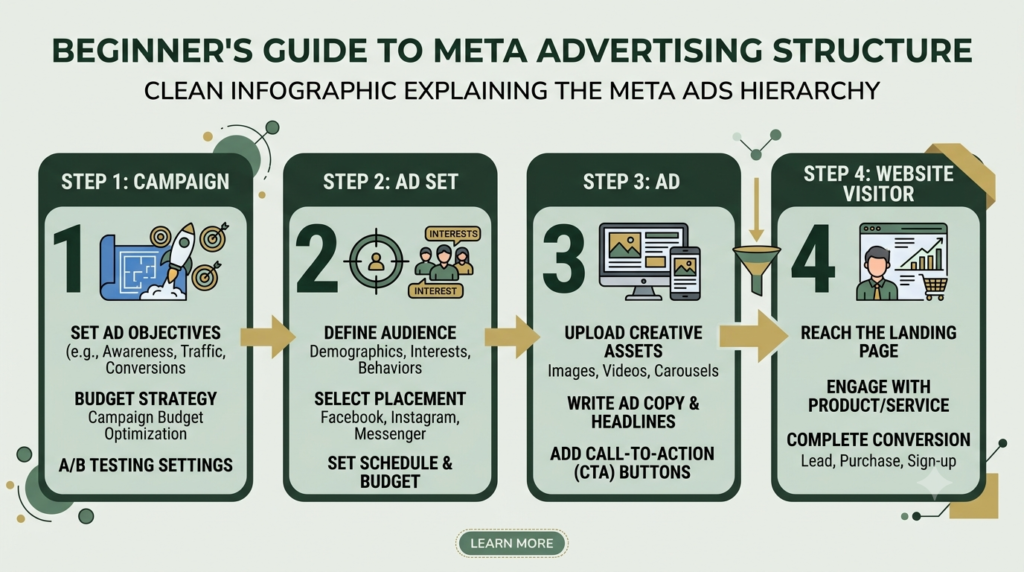
A simple Traffic Campaign has three major levels:
| Level | Main Function | Important Elements |
|---|---|---|
| Campaign | Defines the marketing objective | Traffic objective |
| Ad Set | Defines delivery and audience | Audience, budget, placements, optimization |
| Ad | Communicates the offer | Creative, copy, CTA, destination URL |
Understanding these three levels makes Meta Ads Manager much easier to use.
1. Campaign Objective
The first decision is your objective.
For a traffic-focused campaign, choose Traffic when your primary intention is to send people to a destination.
Do not choose Traffic simply because you want sales.
For example:
Good use:
“I want people to visit my new blog article.”
Different objective:
“I want Meta to optimize toward completed purchases.”
Your objective should match the result you actually want the system to optimize around.
2. Destination
The destination is where people go after interacting with your advertisement.
Possible destinations include:
- Website
- Landing page
- Product page
- Blog
- App
- Messaging destination
Your destination should match the promise made in the advertisement.
For example:
Ad:
“Download the Free 30-Day Savings Planner.”
Destination:
The page where the visitor can actually access or download the planner.
Avoid sending people to your homepage when a specific landing page would answer their intent more directly.
Destination Checklist
Before publishing, check:
- Does the URL open?
- Does it load on mobile?
- Is the headline related to the advertisement?
- Is the CTA visible?
- Is the page easy to understand?
- Does the visitor know what to do next?
- Is the page secure with HTTPS?
3. Audience
Audience selection determines who can potentially receive your advertisement.
Depending on your campaign and account setup, you may work with:
- Broad audiences
- Demographic targeting
- Interest-based audiences
- Custom audiences
- Website visitors
- Engagement audiences
- Lookalike audiences where available and appropriate
The correct audience depends on the offer.
For example, an article about startup marketing should not automatically be shown to everyone simply because they can technically click it.
Beginner Tip
Start with a clear audience hypothesis.
Ask: Who would genuinely find this destination useful?
Then define your audience around that person.
4. Budget and Schedule
Your budget controls how much you are willing to spend.
You may encounter options such as:
- Daily budget
- Lifetime budget
- Campaign-level budgeting
- Ad-set-level budgeting
For beginners, the important lesson is not to change the budget repeatedly without a reason.
Constant changes make it harder to understand what is actually working.
A simple testing approach is:
- Set a controlled budget.
- Launch.
- Allow sufficient data to accumulate.
- Examine performance.
- Identify the strongest signal.
- Make one meaningful change.
- Continue monitoring.
5. Placements
Placements determine where the advertisement may appear across Meta’s ecosystem.
Depending on the available configuration, placements can include areas such as:
- Facebook Feed
- Instagram Feed
- Instagram Stories
- Facebook Stories
- Reels
- Audience Network
- Other eligible Meta surfaces
Meta recommends Advantage+ placements in many advertising scenarios because the delivery system can distribute ads across eligible placements. Meta’s current Reels guidance, for example, describes Advantage+ placements as a way to allow delivery across Facebook, Instagram, Messenger and Audience Network where eligible.
For beginners, avoid removing placements simply because you personally prefer one platform.
Instead, monitor the actual performance data.
6. Ad Creative
Creative is what people see.
It can include:
- Image
- Video
- Carousel
- Primary text
- Headline
- Description
- Call-to-action button
Your creative needs to answer three questions quickly:
What is this?
Why should I care?
What should I do next?
A strong traffic advertisement does not need to be complicated.
For example:
Headline:
Learn SEO Without the Confusion
Primary Text:
Starting SEO can feel overwhelming. This beginner-friendly guide explains the essential steps in simple language.
CTA:
Learn More
Destination:
Your SEO guide.
7. Optimization and Measurement
This is where beginners often make mistakes.
A campaign can generate many clicks but still fail to generate meaningful visitors.
Important metrics may include:
- Impressions
- Reach
- Link clicks
- Click-through rate
- Cost per link click
- Landing page views
- CPM
- Frequency
- Engagement
- Website behavior
- Leads or purchases after the visit
Do not judge a Traffic Campaign using only one metric.
Meta’s own Audience Network guidance distinguishes impressions from more meaningful advertiser outcomes and notes that post-click actions such as purchases and sign-ups matter when evaluating advertising value.
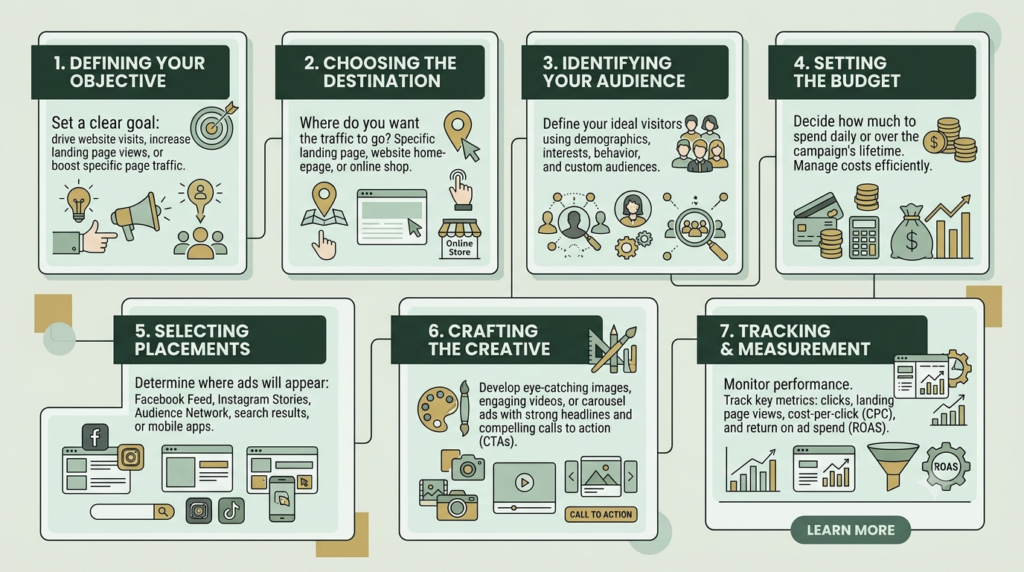
How to Create a Traffic Campaign in Meta Ads Manager
Step 1: Open Meta Ads Manager
Log into your Meta advertising account and create a new campaign.
Choose the Traffic objective.
The exact interface can change as Meta updates Ads Manager, so labels and available options may differ slightly between accounts.
Step 2: Name Your Campaign
Use a naming system that makes the campaign easy to identify.
Example:
Traffic | SEO Guide | India | Sept 2026
This is much better than:
Campaign 1
A good naming convention saves time when you eventually have several campaigns.
Step 3: Select Your Conversion Destination
Choose the destination that matches your objective.
For a website campaign, select your website destination and enter the relevant URL.
Do not send every advertisement to the same generic page.
Match:
Creative → Message → Destination
Step 4: Define Your Audience
Create an audience based on your customer’s actual interests and needs.
For example, for a startup marketing article, you could investigate audiences connected with:
- Entrepreneurship
- Startup business
- Digital marketing
- Small business
- Online business
- Website development
Treat these as audience research ideas rather than a requirement to select every available interest.
Step 5: Set Budget and Schedule
Choose a realistic budget that you can afford to test.
If you have a limited budget, avoid creating many ad sets simultaneously.
A simple structure is easier to understand:
1 Campaign → 1–2 Ad Sets → 2–3 Ads
This gives you enough variation to learn without creating unnecessary complexity.
Step 6: Select Placements
Start by reviewing the available placement options.
If using Advantage+ placements, make sure your creative assets work across different formats.
For example:
- Square image: 1:1
- Feed creative: approximately 4:5
- Stories/Reels: 9:16
Meta specifically recommends designing Reels creative for vertical viewing and keeping important messaging within the safe zone.
Step 7: Create Your Advertisement
Create the ad using:
Visual + Primary Text + Headline + CTA + Destination
Keep your message focused.
Do not try to communicate five different offers in one advertisement.
Step 8: Check the Final Experience
Before publishing, click the destination yourself.
Check:
- Mobile display
- Page speed
- Headline
- CTA
- Images
- Forms
- Buttons
- Checkout if applicable
- Broken links
The advertisement may be excellent, but a poor destination can waste the traffic you paid to generate.
Traffic Campaign Strategy: How to Make It More Effective
A useful framework is:
1. Strong Hook
Capture attention with a clear benefit.
2. Relevant Message
Explain what the visitor will get.
3. Simple CTA
Tell people what to do.
4. Relevant Destination
Deliver exactly what the ad promised.
5. Measurement
Track what happens after the click.
6. Testing
Test one meaningful variable at a time.
This creates a complete system rather than simply “running an ad.”
Common Traffic Campaign Mistakes
Mistake 1: Optimizing for Cheap Clicks Alone
A cheap click is not necessarily a valuable visitor.
Look beyond cost and examine what visitors do after arriving.
Mistake 2: Sending Traffic to a Poor Landing Page
If the landing page is confusing, the campaign cannot compensate for it.
Mistake 3: Using Clickbait
Your advertisement should accurately represent the destination.
Misleading promises may create clicks but damage trust.
Mistake 4: Changing Everything Every Day
Do not simultaneously change:
- Audience
- Budget
- Creative
- Copy
- Placement
- Destination
You will not know what caused the performance change.
Mistake 5: Ignoring Mobile Users
A large amount of social-media advertising consumption happens on mobile devices.
Your landing page must therefore be easy to read and use on a small screen.
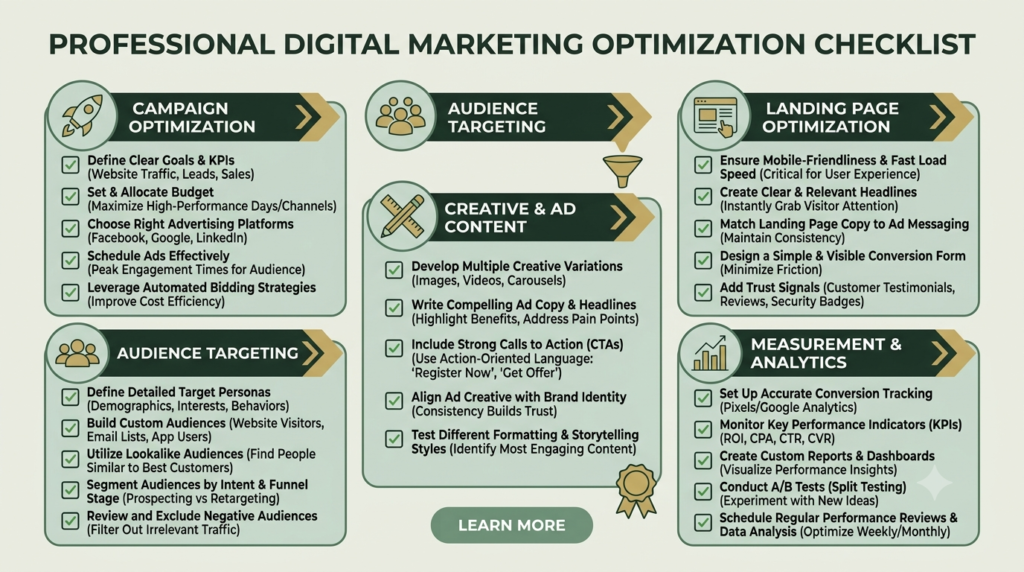
How to Optimize a Traffic Campaign Toward 100%
There is no single “100% optimization” button in Meta Ads.
Instead, think of optimization as a checklist.
Campaign Level
✓ Correct Traffic objective
✓ Clear campaign name
✓ Appropriate budget
✓ Correct destination
Ad Set Level
✓ Relevant audience
✓ Appropriate locations
✓ Suitable age range
✓ Correct placements
✓ Appropriate optimization setting
✓ Reasonable budget
Ad Level
✓ Strong hook
✓ Clear visual
✓ Readable text
✓ One primary message
✓ Relevant CTA
✓ Correct URL
✓ Mobile-friendly creative
Website Level
✓ Fast loading
✓ HTTPS
✓ Mobile responsive
✓ Clear headline
✓ Strong CTA
✓ No broken buttons
✓ Relevant content
✓ Easy navigation
Measurement Level
✓ Track link clicks
✓ Review landing-page behavior
✓ Compare CTR
✓ Monitor cost
✓ Review quality of traffic
✓ Track leads or purchases where relevant
This is a much more meaningful definition of “100% optimized” than simply achieving a green score in a tool.
Traffic Campaign Metrics Explained
| Metric | What It Tells You |
|---|---|
| Impressions | How many times the ad was shown |
| Reach | Number of people reached |
| Link Clicks | Number of clicks on the destination link |
| CTR | Percentage of impressions resulting in clicks |
| CPC | Average cost associated with a click |
| CPM | Cost per 1,000 impressions |
| Landing Page Views | Visits where the destination page successfully loads |
| Frequency | Average number of times people saw the ad |
| Conversions | Desired actions completed after traffic |
A useful diagnostic approach is:
Low CTR → investigate creative/message
Good CTR but poor landing-page activity → investigate destination/page speed
Good traffic but no leads → investigate offer and landing page
Good leads but no sales → investigate sales process and offer
This prevents you from blaming the advertisement for every problem
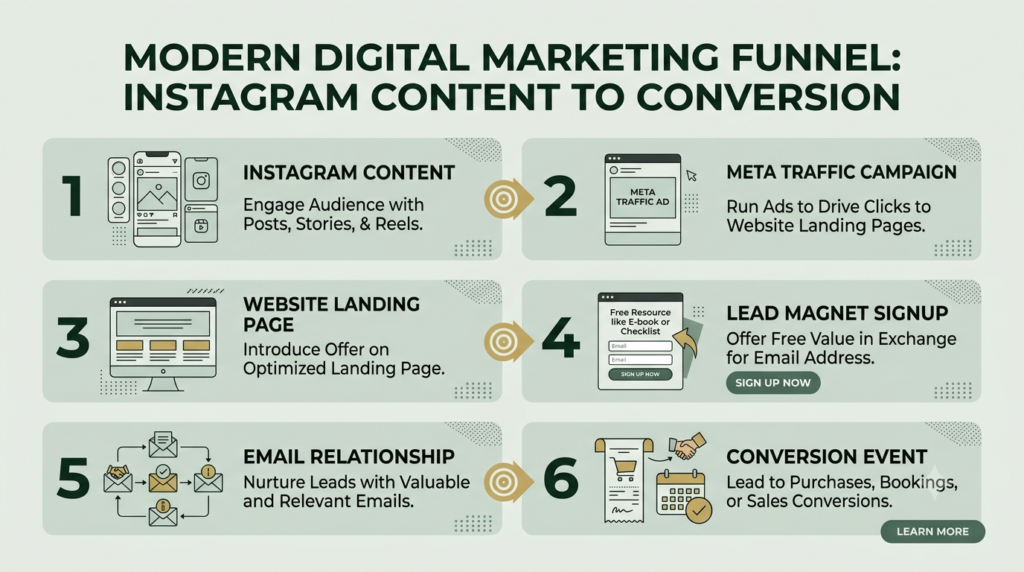
Traffic Campaign as the Backbone of the Customer Journey
Traffic can connect several parts of your digital marketing system.
For example:
Instagram Content
↓
Meta Traffic Campaign
↓
Website Article
↓
Lead Magnet
↓
Email Relationship
↓
Product or Service
↓
Conversion
That is why traffic can be considered a backbone for many digital marketing systems.
However, the backbone works only when the other components are connected properly.
Your ad cannot fix an irrelevant offer.
Your landing page cannot fix the wrong audience.
Your audience cannot fix a broken checkout.
Successful marketing is therefore a connected system.
Frequently Asked Questions
What is a Traffic Campaign in Meta Ads?
A Traffic Campaign is designed to help businesses send people from Meta platforms to a selected destination such as a website, landing page, blog, app or other eligible destination.
When should I use a Traffic Campaign?
Use it when your immediate goal is to generate visits to a destination. If your primary business goal is a specific conversion such as a purchase or lead, evaluate whether a conversion-focused objective better matches that goal.
Is a Traffic Campaign good for beginners?
Yes. It provides a straightforward way to understand the relationship between audience, creative, advertising cost and website traffic.
Does more traffic always mean more sales?
No. Traffic is only one part of the customer journey. Sales also depend on audience quality, offer, landing page, pricing, trust and the overall conversion process.
What should I optimize first?
Start with the largest identifiable problem. If people are not clicking, investigate the creative and message. If they click but do not meaningfully engage with the destination, investigate the landing page and visitor experience.
What is the difference between link clicks and landing page views?
A link click records interaction with the link. A landing page view is a stronger indication that the destination page successfully loaded for the visitor. The exact availability and definitions of metrics can depend on Meta’s current reporting interface.
How much should I spend on a Traffic Campaign?
There is no universal budget that works for every business. Use a controlled amount that you can afford to test and evaluate, then make changes based on meaningful performance data.
Should I use Advantage+ placements?
They can be useful because Meta can distribute eligible ads across available placements. However, always make sure your creative works appropriately across the placements you allow.
How long should I run a Traffic Campaign?
Avoid deciding purely on a fixed number of days. Give the campaign enough time and data to produce a meaningful signal, while monitoring budget, delivery and business relevance.
Can Traffic Campaigns help sell digital products?
Yes, they can bring people to relevant product pages or educational content. However, traffic does not guarantee purchases. The landing page, product, offer and conversion process still need to work together.
What is the biggest Traffic Campaign mistake?
The biggest practical mistake is treating clicks as the final goal. The real question is whether the visitors are relevant and whether they continue toward the business outcome you want.
Final Takeaway
A successful Traffic Campaign is not simply an advertisement with a link.
It is a connected system:
Right objective + Right audience + Right creative + Right destination + Right measurement = Better traffic strategy
For beginners, keep the structure simple. Start with one clear destination, one well-defined audience hypothesis and a small number of strong creatives. Measure the quality of the resulting traffic before making major changes.
Most importantly, remember that the click is only the beginning.
The real value comes from what happens after the visitor arrives.
Ready to build a stronger digital presence? Explore Aahraa’s digital marketing resources and learn how to turn website traffic into meaningful growth.