
What Is YouTube? 7 Powerful Beginner Tips You Need in 2026
What is YouTube? YouTube is one of the world’s largest video platforms, but it is much more than a place to watch entertaining videos. For creators, businesses, educators, freelancers, and startups, YouTube can become a powerful platform for building visibility, educating an audience, developing trust, and sending people to a website or digital product.
If you are wondering what is YouTube, the simplest answer is this: YouTube is a video-sharing platform where people can watch, upload, discover, share, and interact with video content. Anyone can watch videos with a Google Account, while creating and managing a channel gives you a public presence and allows you to upload content. This YouTube guide for beginner will help beginner to create a YouTube channel , explain how YouTube works and help them to earn money.
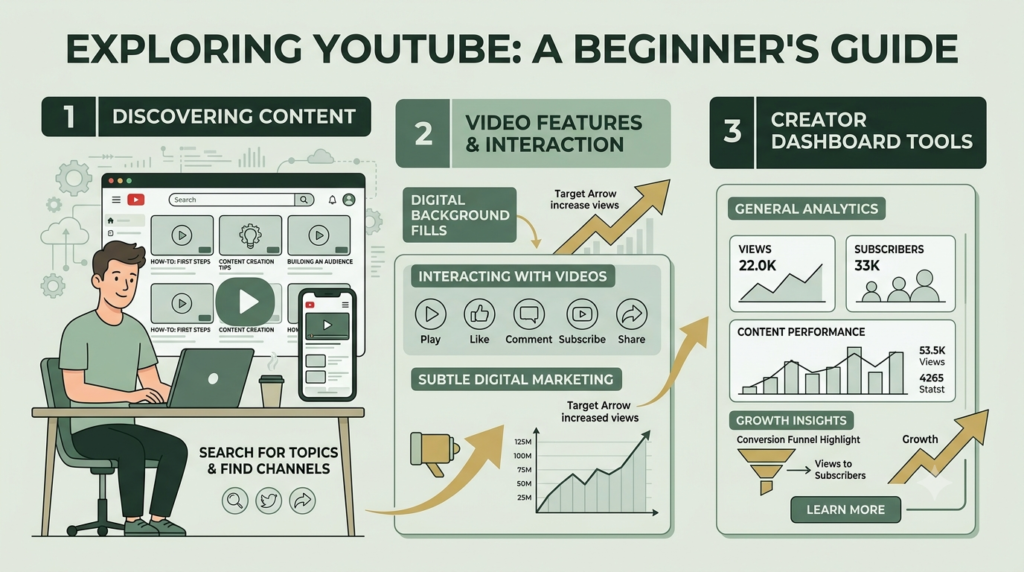
How YouTube works?
YouTube connects three important groups:
- Viewers who search for and watch content
- Creators who produce and publish videos
- Businesses and organizations that use video to communicate with audiences
A viewer might search for a tutorial, watch a Short, subscribe to a channel, and then visit the creator’s website. A business might publish educational videos that answer customer questions and introduce its products or services.
This makes YouTube more than a video library. It can become a content discovery, education, branding, and audience-building system.
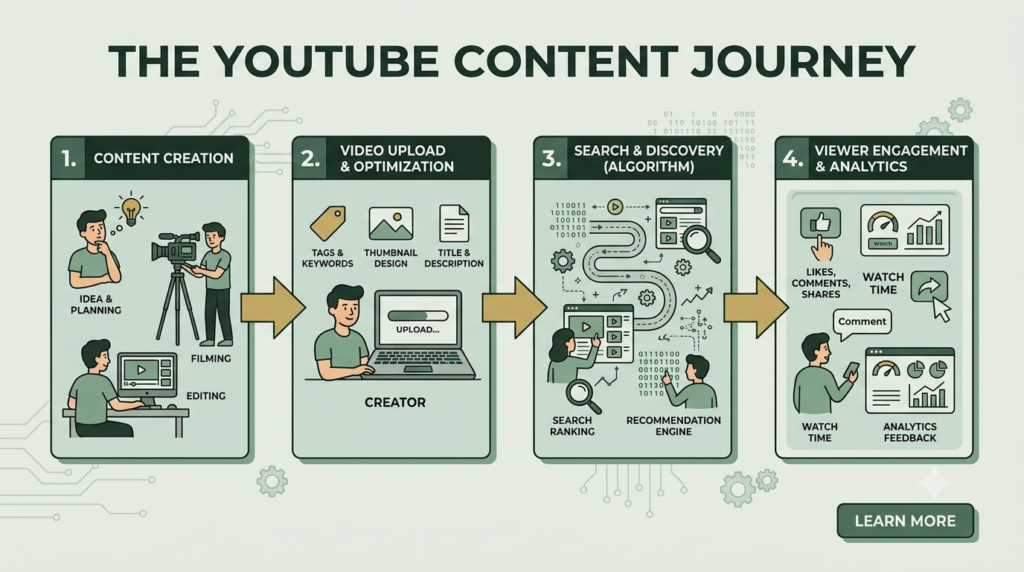
What is YouTube? And it Basic Process
The process is simple:
Create → Upload → Optimize → Publish → Reach viewers → Analyze → Improve
A creator can upload videos through YouTube Studio. YouTube guide for beginner, supports different video formats, while Shorts are designed for short-form vertical or square content.
The Main Elements of YouTube
| Element | What it means | Why it matters |
|---|---|---|
| Channel | Your public YouTube identity | Builds your creator or brand presence |
| Video | Main long-form content | Educates, entertains, or solves problems |
| Shorts | Short-form vertical videos | Helps present quick ideas |
| Title | Video’s headline | Helps viewers understand the topic |
| Thumbnail | Visual preview | Encourages clicks |
| Description | Supporting video information | Adds context and useful links |
| Playlist | Group of related videos | Helps organize content |
| Comments | Viewer interaction | Encourages community discussion |
| YouTube Studio | Creator management area | Used for uploads, settings and analytics |
| Analytics | Performance data | Helps you improve future content |
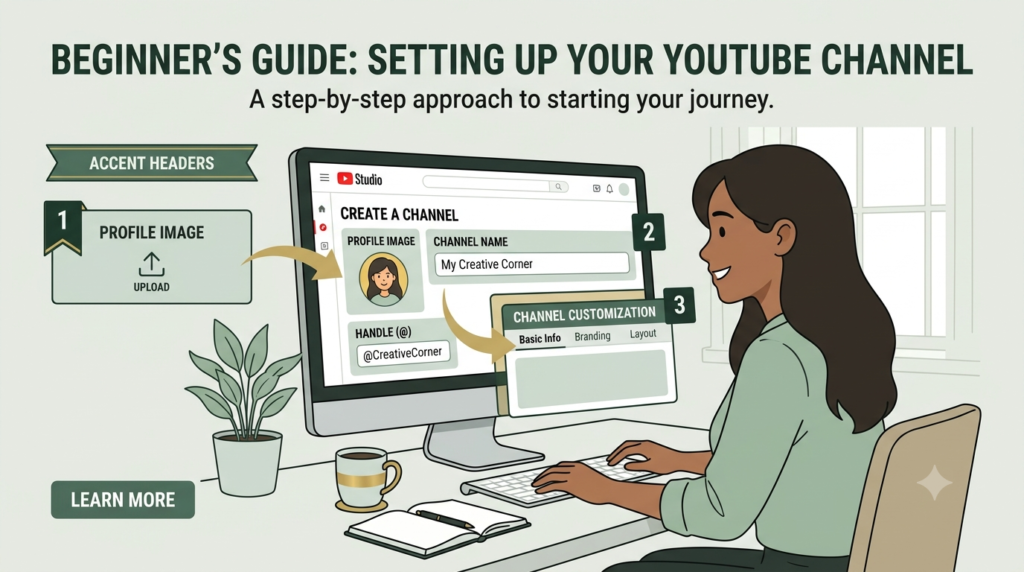
How to Create a YouTube Channel
Creating a channel is the first practical step if you want to publish your own content.
- Sign in to your Google Account.
- Open YouTube.
- Select your profile picture.
- Go to Settings.
- Select Add or manage channel(s).
- Choose Create a channel.
- Add your channel name, profile picture, and handle.
- Complete your channel information.
YouTube also provides options for channels using a business or different public name.
Choose a name that is easy to remember and connected with your subject. For example, a digital marketing channel could focus on SEO, social media, websites, or startup marketing.
What is YouTube? How to Create Your First YouTube Video
You do not need expensive equipment to begin. Start with useful content rather than waiting for perfect equipment.
Step 1: Choose One Topic
Select a topic that answers a specific audience question.
Examples:
- What is SEO?
- How does Instagram work?
- How to create a website?
- How to start digital marketing?
- How to create a YouTube channel?
Step 2: Create the Video
Prepare a simple structure:
Hook → Problem → Explanation → Steps → Example → CTA
Your opening should quickly tell viewers what they will learn.
Step 3: Upload the Video
Open YouTube Studio, select Create, then Upload videos and choose your video file. You can add video details before publishing.
Step 4: Optimize the Video
Use the main topic naturally in:
- Video title
- First part of the description
- Spoken content
- Thumbnail concept
- Relevant supporting words
Do not repeat keywords unnaturally. YouTube content should primarily help the viewer.
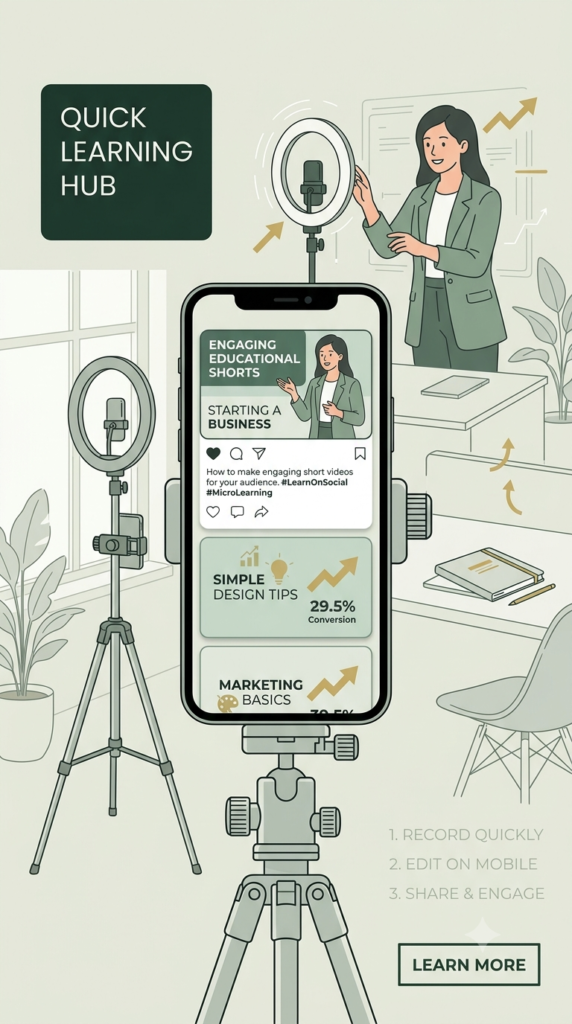
YouTube Shorts: What Beginners Should Know
YouTube Shorts are short-form videos designed for vertical or square viewing. YouTube currently allows Shorts of up to three minutes when they meet the applicable format requirements.
Shorts can be useful for:
- Quick tutorials
- Tips
- Questions and answers
- Product demonstrations
- Behind-the-scenes content
- Educational facts
- Short storytelling
A useful strategy is to turn one larger topic into several smaller pieces. For example, one article about SEO can become five Shorts covering keywords, titles, meta descriptions, backlinks, and common mistakes.
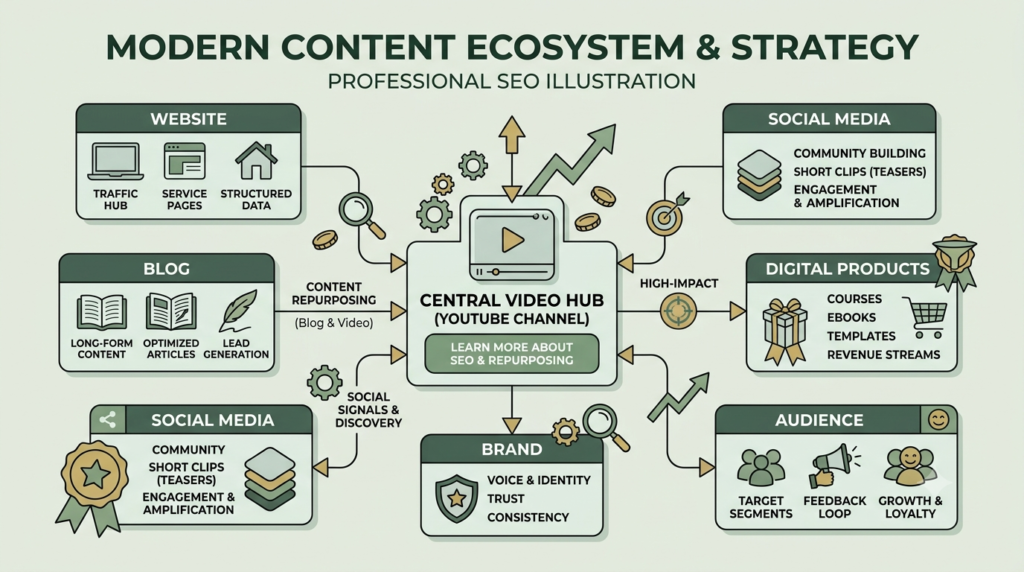
What is YouTube? Is the Backbone of Your Content Entity?
This is one of the most important concepts for a modern digital presence.
Think of your content entity as the complete identity surrounding a person, brand, topic, or business.
For example:
Aahraa → Digital Marketing → YouTube Channel → Videos → Website → Blog → Social Media → Digital Products
YouTube can connect these elements through consistent names, topics, descriptions, links, and content.
A single YouTube video can point viewers toward a related blog article. The blog can link back to the YouTube video. Social media can promote the video, while the video introduces the website or product.
This creates a connected content ecosystem rather than isolated posts.
For your website, related resources can include Digital Marketing for Startups, SEO Services, and Website Development Services for Startups.
YouTube SEO: 7 Simple Optimization Steps
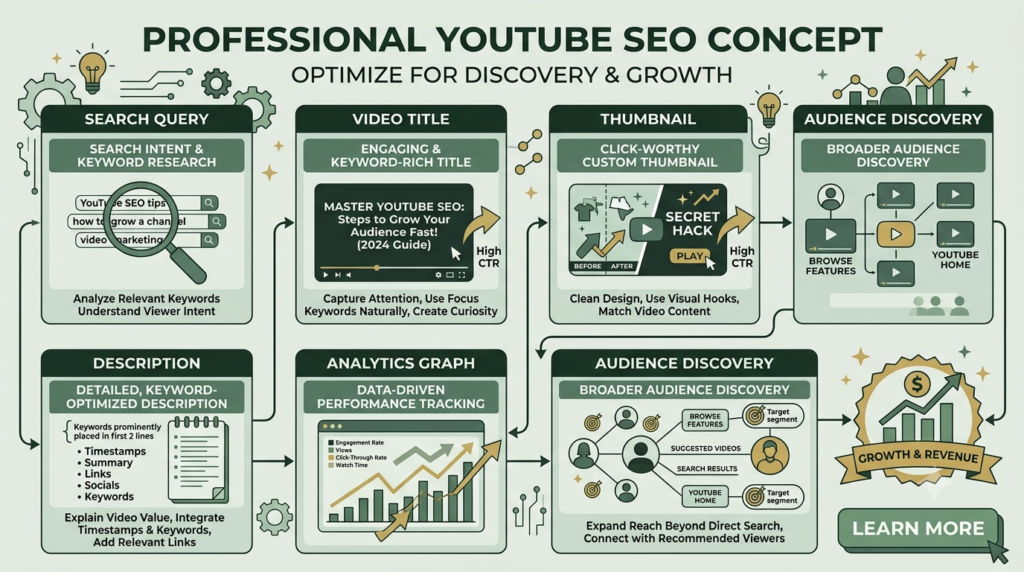
To improve the discoverability of your videos, follow this beginner-friendly process:
- Research the search intent behind your topic.
- Choose one primary keyword for the video.
- Write a clear title that accurately describes the content.
- Create a useful thumbnail that is easy to understand on mobile.
- Write a helpful description rather than a collection of keywords.
- Organize related videos into playlists.
- Study analytics and improve future videos based on audience behavior.
Remember: SEO can help people discover content, but useful content gives them a reason to continue watching.
How Can YouTube guide for beginner help a business?
YouTube can support several business goals:
- Brand awareness
- Educational marketing
- Search visibility
- Customer education
- Product demonstrations
- Lead generation
- Website traffic
- Community building
- Digital product promotion
For example, a startup selling an SEO tool could create tutorials explaining common SEO problems. Instead of simply saying “buy our product,” the business can demonstrate how to solve a real problem.
That approach makes the content more useful and human.
Can You Make Money on YouTube?
Yes, but monetization is not automatic.
Eligible creators may access different monetization features through the YouTube Partner Program (YPP). Current requirements include following YouTube’s monetization policies, being in an eligible location, having no active Community Guidelines strikes, enabling two-step verification, and meeting the applicable eligibility thresholds.
YouTube’s current YPP information also states that India is among the countries where the expanded program has rolled out.
Potential income sources can include:
- Advertising revenue
- Channel memberships
- Fan-funding features
- Shopping-related opportunities
- Brand partnerships
- Selling your own products or services
Eligibility and program requirements can change, so always check the current official YouTube requirements before planning around monetization.
What is YouTube 7 Beginner Mistakes to Avoid
Avoid these common mistakes when starting:
- Copying other creators instead of developing your own angle
- Using misleading titles or thumbnails
- Uploading without understanding your audience
- Ignoring audio quality
- Making videos unnecessarily complicated
- Stuffing keywords into titles and descriptions
- Expecting immediate results
Your first goal should be learning, publishing, measuring, and improving.
What is YouTube making strategy for beginners
Start with one clear subject.
For example:
Topic: Digital Marketing
Audience: Startup beginners
Pillar: Digital Marketing for Startups
Supporting videos: SEO, Instagram, websites, YouTube, Meta Ads, content marketing
Then create a series of related videos instead of publishing completely unrelated topics.
This makes your channel easier for viewers to understand and gives you a foundation for building a larger content entity across your website and social platforms.
Your First YouTube Action
Do not wait until everything is perfect.
Choose one question your audience frequently asks, create a simple helpful video, optimize its title and description, publish it, and then use the results to improve your next video.
CTA: Ready to build your YouTube presence? Start with one useful topic today and connect the video to a relevant article or resource on your website.
Frequently Asked Questions
1. What is YouTube?
YouTube is a video-sharing platform where people can watch, discover, upload, share, and interact with video content.
2. Is YouTube free?
Watching and creating a basic YouTube channel is generally free. Some optional services and monetization-related features have separate requirements.
3. Do I need a YouTube channel to watch videos?
You can watch many YouTube videos without creating a channel. However, creating a channel is required for activities such as uploading videos and building a public creator presence.
4. What are YouTube Shorts?
YouTube Shorts are short-form videos designed for vertical or square viewing. Current YouTube guidance supports Shorts of up to three minutes when the applicable requirements are met.
5. Can beginners make money on YouTube?
Yes, eligible creators can apply for the YouTube Partner Program and may access different monetization features after meeting the relevant requirements and passing YouTube’s review process.
6. Is YouTube useful for businesses?
Yes. Businesses can use YouTube for education, demonstrations, brand communication, audience building, website traffic, and other marketing activities.
7. What should I upload first?
Start with a useful video answering one specific question your target audience has. Keep the subject focused and make the video genuinely helpful.
Conclusion
YouTube is much more than a platform for watching videos. For beginners, it can become a powerful place to learn, create, build an audience, strengthen a brand, and connect video content with a wider digital presence.
Now that you understand what is YouTube, how YouTube works, how to create a YouTube channel, how Shorts work, and the basics of YouTube SEO, the next step is simple: start creating useful content for a specific audience.
You do not need expensive equipment or perfect videos to begin. Focus on answering real questions, use clear titles and thumbnails, organize related content, and study your analytics to improve over time.
Most importantly, connect your YouTube content with your website, blog, social media, and other digital assets. This creates a stronger content ecosystem and helps YouTube become an important part of your overall digital marketing strategy.
Start with one useful video, learn from the results, and improve with every upload.