
50 Powerful YouTube Video Ideas to Grow Your Channel in 2026
Introduction
Finding something new to publish every week can feel difficult, especially when you are a beginner. The good news is that you do not need to wait for inspiration. You can systematically discover YouTube video ideas from your audience, search behavior, competitors, trends, questions, comments, and your own experience.
YouTube Studio currently provides tools such as the Trends tab to explore what audiences are searching for and identify content gaps. YouTube also provides analytics that can show what your viewers watch and how they discover your content.
This guide gives you 50 practical ways to find YouTube video ideas and explains how to turn those ideas into a simple, repeatable content system.

Why YouTube Video Ideas Are the Backbone of Your Channel
Your ideas are the foundation of your channel because every video begins with a topic that solves a problem, answers a question, entertains someone, or satisfies a specific interest.
A strong idea can become:
- A long-form YouTube video
- A YouTube Short
- A tutorial
- A comparison
- A case study
- A livestream
- A community post
- A blog article
- An email or social-media post
Think of one main topic as an entity or subject hub. You can then create related videos around its questions, problems, tools, examples, mistakes and solutions. This creates a connected content ecosystem instead of random uploads.
YouTube itself recommends grouping channel content by factors such as format, audience, longevity and production cost, then using analytics to identify patterns.
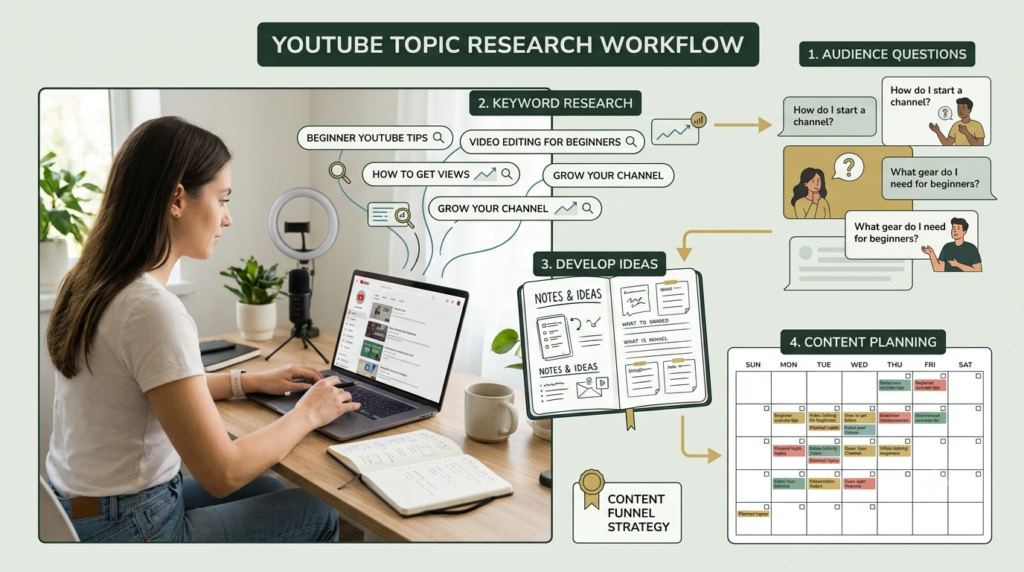
50 Ways to Find YouTube Video Ideas
Search-Based YouTube Topic Ideas
1. YouTube search suggestions
Start typing your main topic into YouTube’s search box and record the autocomplete phrases.
2. YouTube Trends tab
Use YouTube Studio → Analytics → Trends to explore searches, breakout videos and content gaps available for your audience.
3. Content gaps
Look for searches where viewers cannot find enough relevant, current or useful content.
4. Google search suggestions
Type your topic into Google and examine related searches and question-style queries.
5. Google Trends
Compare topics over time and look for subjects gaining interest.
Audience-Based Ideas
6. Read YouTube comments
Questions in your comments can become your next tutorial.
7. Study frequently asked questions
Collect questions people repeatedly ask about your niche.
8. Ask your audience directly
Use community posts, polls or comments to ask what viewers want next.
9. Study your Audience tab
YouTube Analytics provides audience insights that can help you understand who watches your content and when they are active.
10. Examine returning viewers
Look at subjects that encourage viewers to return and develop them into a series.
Competitor and Market Research
11. Study successful channels
Look at channels serving a similar audience and identify recurring subjects.
12. Find their most-viewed videos
Do not simply copy them. Identify the underlying problem or search intent.
13. Study newer videos
Recent uploads can reveal emerging subjects within your niche.
14. Read competitor comments
Audience questions often reveal missing topics.
15. Find weak or outdated content
An old video may represent an opportunity for a clearer, newer and more useful explanation.
Transform Existing Topics
16. Turn a beginner topic into an advanced topic
Example: “YouTube Basics” → “Advanced YouTube Analytics.”
17. Turn one guide into a checklist
Convert a detailed tutorial into a practical step-by-step video.
18. Turn mistakes into a video
“10 YouTube mistakes beginners should avoid” is a useful educational format.
19. Create a before-and-after video
Show how a process, channel, thumbnail or strategy changed.
20. Create a case study
Explain what happened, what was tested and what was learned.
21. Create a comparison
Compare two tools, methods, formats or workflows.
22. Create a myth-busting video
Address common misunderstandings with evidence and examples.
23. Create a beginner version
Take a complex subject and explain it using simple language.
24. Create an updated version
Revisit an older subject when tools, features or best practices change.
25. Turn a list into a tutorial
Instead of simply listing tools, demonstrate how to use them.
Personal Experience Ideas
26. Document what you are learning
Your learning journey can become valuable educational content.
27. Share a lesson learned
Explain a mistake and what you would do differently.
28. Show your workflow
People often want to see how a task is actually completed.
29. Explain your tools
Show the software, equipment or resources you use.
30. Share your process
Break one task into clear steps.
31. Answer a question you recently solved
A problem you personally solved may be a problem for other beginners too.
32. Share a personal experiment
Test one approach and document the result without promising guaranteed outcomes.
Trend and News-Based Ideas
33. Follow YouTube trends
Use current YouTube data to discover subjects gaining attention.
34. Watch industry announcements
New products, features or platform changes can create timely topics.
35. Explain a new feature
When a tool changes, beginners often need simple explanations.
36. Create an “explained” video
Take a complicated trend and explain what it means for your audience.
37. Connect a trend to your niche
A broad trend becomes more useful when you explain its relevance to a specific audience.

Creative Idea Generation
38. Use “How to…” questions
Start with a practical problem your audience wants solved.
39. Use “Why…” questions
Explain causes, reasons and principles.
40. Use “What if…” questions
Create educational scenarios around possible situations.
41. Use “X mistakes” formats
Identify common errors and explain how to avoid them.
42. Use “X ways” formats
Create practical collections of solutions.
43. Build a series
One successful subject can become five or ten connected videos.
44. Create a challenge
Document a measurable experiment or learning challenge.
45. Turn FAQs into Shorts
One question can become one concise Short.
Data-Driven Ideas
46. Review your top videos
Find patterns in subjects, formats and audience response.
47. Study traffic sources
The Reach report can show how viewers discover your content, including YouTube Search and external sources.
48. Compare video groups
YouTube Studio’s Advanced Mode allows creators to compare videos, groups and periods and export data.
49. Look for repeatable winners
If several videos around one subject perform well, investigate the common audience need.
50. Build a content database
Keep every idea in one spreadsheet with columns for topic, keyword, audience, format, search intent, priority and publication status.
How to Turn an Idea Into a Video
Finding ideas is only step one. Use this simple process:
Step 1: Define the audience.
Who exactly is the video for?
Step 2: Identify the problem.
What question or problem does the viewer have?
Step 3: Check demand.
Use YouTube search, Trends and your own Analytics where available.
Step 4: Choose the format.
Select tutorial, list, comparison, case study, review, Short or another suitable format.
Step 5: Create the promise.
Write one sentence explaining what the viewer will learn or gain.
Step 6: Create the title and thumbnail concept.
YouTube recommends searchable titles that clearly communicate what viewers can expect, while intriguing titles can create curiosity.
Step 7: Review performance.
After publishing, use Analytics to understand reach, engagement and audience response.
Simple YouTube Video Ideas Planning Table
| Idea source | Example | Best format |
|---|---|---|
| Search suggestion | How to start YouTube | Tutorial |
| Audience question | How do I make thumbnails? | How-to |
| Content gap | Missing beginner guide | Long-form |
| Comment | Tool question | Short |
| Trend | New YouTube feature | Explainer |
| Existing video | Successful topic | Series |
| Personal experience | My learning process | Story |
| Analytics | Top-performing topic | Follow-up |

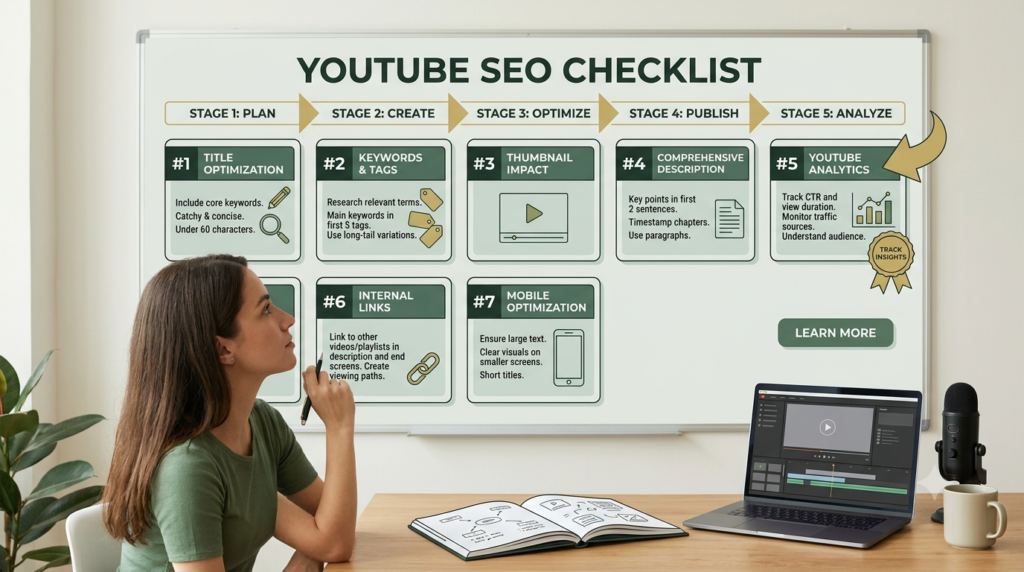
How to Optimize the Article and Video to 99/100 SEO
Use this final checklist before publishing:
- Put the primary keyword in the SEO title.
- Use the primary keyword naturally in the introduction.
- Include it in one H2.
- Use related terms naturally throughout the article.
- Keep paragraphs short.
- Use descriptive H2 and H3 headings.
- Add a useful table.
- Add internal links to relevant Aahraa content.
- Add authoritative external references.
- Add descriptive image alt text.
- Use one clear CTA.
- Add FAQ content that genuinely answers beginner questions.
- Check mobile readability.
- Remove unnecessary repetition.
- Proofread grammar and spelling.
- Verify that the URL works.
- Submit the published URL for indexing through Google Search Console.
Important: A 99/100 Rank Math score is an optimization target, not a guarantee of rankings. Avoid adding keywords merely to increase a plugin score.
One Clear CTA
Ready to stop guessing what to publish? Start with five ideas from this list, research each one, choose the strongest topic for your audience, and create your next YouTube video today.
FAQ
1. What are YouTube video ideas?
YouTube video ideas are potential topics or concepts that can be developed into videos, Shorts, livestreams or educational content for a specific audience.
2. How can beginners find YouTube video ideas?
Beginners can use YouTube search suggestions, the Trends tab, audience questions, comments, competitor research, Google Trends and their own Analytics.
3. What is the easiest way to find YouTube content ideas?
Start with questions your target audience is already asking. Then check YouTube search suggestions and Trends to see whether the topic has relevant audience interest.
4. How often should I research new video topics?
A practical approach is to collect ideas continuously and review your idea database once a week. This prevents the pressure of finding a topic immediately before publishing.
5. Can one YouTube topic create multiple videos?
Yes. One subject can become tutorials, mistakes, comparisons, case studies, FAQs, Shorts, advanced guides and beginner explanations.
6. Does YouTube Analytics help find new ideas?
Yes. YouTube Analytics includes reports that can help creators understand what audiences watch, how viewers discover content and which content patterns are performing.
7. What should I do when I run out of ideas?
Return to your audience’s questions, comments, search suggestions, content gaps and previously successful topics. Instead of abandoning a subject, look for a different problem or audience level.
8. Should I copy popular YouTube videos ?
No. Use successful videos as research for understanding audience needs and formats, then create your own original explanation, examples and perspective.
9. What makes a YouTube idea strong?
A strong idea is relevant to a defined audience and has a clear reason for someone to watch. It should solve a problem, answer a question, provide useful information or deliver entertainment.
10. How do I organize 50 YouTube video ideas?
Create a spreadsheet with columns for topic, keyword, audience, search intent, format, title, priority, production status and publication date. This turns random ideas into a repeatable content system.
11. Can we change video content strategy ?
Yes we can change content strategy according to satisfying Audience pain points.
Conclusion
Conclusion
Finding YouTube video ideas does not have to be a constant struggle. With the right research process, you can turn audience questions, YouTube searches, trends, comments, analytics, and your own experience into a steady stream of useful content.
The best YouTube video ideas are not simply popular topics. They are topics that match your audience’s needs, solve real problems, answer important questions, or provide useful information. Use the 50 methods in this guide to build a reliable content bank instead of waiting for inspiration.
Once you have several YouTube video ideas, validate them using search suggestions, YouTube Trends, audience feedback, and your channel analytics. Then choose the strongest topic, create a useful video, and study the results after publishing.
Remember, consistency becomes much easier when you have a repeatable system for finding YouTube video ideas. Start building your idea bank today, choose one promising topic, and turn it into your next valuable YouTube video.