
10 Proven Ways to Turn One Idea Into YouTube Videos in 2026
Creating fresh YouTube content every week can feel exhausting, especially when you are a beginner. The good news is that you do not need 10 completely different ideas to create 10 useful videos. You can turn one idea into 10 YouTube videos by approaching the same topic from different angles, formats, questions, and audience needs.
This content-repurposing method saves time, keeps your channel focused, and helps you build a connected library of videos around one subject. In this guide, you will learn how to turn one strong idea into a complete YouTube content strategy without making your content repetitive. Learning to turn one idea into 10 YouTube videos gives beginners a practical way to plan consistent content without searching for a new topic every day.
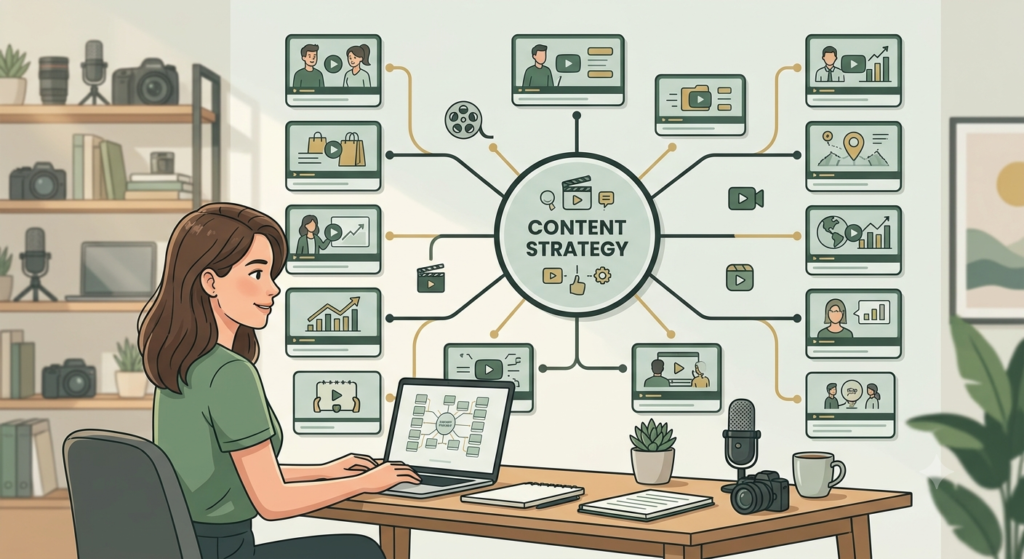
Why Turn One Idea Into 10 YouTube Videos?
When you turn one idea into 10 YouTube videos, you can answer different audience questions while keeping your channel focused on one core subject. A strong idea usually contains several smaller questions.
For example, imagine your main idea is “How to Start Digital Marketing.”
Instead of creating only one long video, you can develop a content series:
| Video | Content angle |
|---|---|
| 1 | How to Start Digital Marketing |
| 2 | Digital Marketing Basics for Beginners |
| 3 | 10 Digital Marketing Mistakes to Avoid |
| 4 | Free Digital Marketing Tools |
| 5 | How to Create a Digital Marketing Strategy |
| 6 | Digital Marketing Skills Beginners Need |
| 7 | How to Find Your First Digital Marketing Topic |
| 8 | SEO vs Social Media Marketing |
| 9 | How to Measure Digital Marketing Results |
| 10 | 30-Day Digital Marketing Learning Plan |
The central idea stays connected, but every video gives viewers a different reason to watch.
1. Start With One Core Idea
Choose a topic that solves a genuine problem for your target viewer.
Your core idea should be:
- Useful to your audience
- Specific enough to explain
- Broad enough to create subtopics
- Relevant to your channel
- Connected to your expertise
Write the main idea in the center of a notebook or document. Then ask:
What would a beginner want to know before, during, and after learning this topic?
These questions become your next video opportunities.
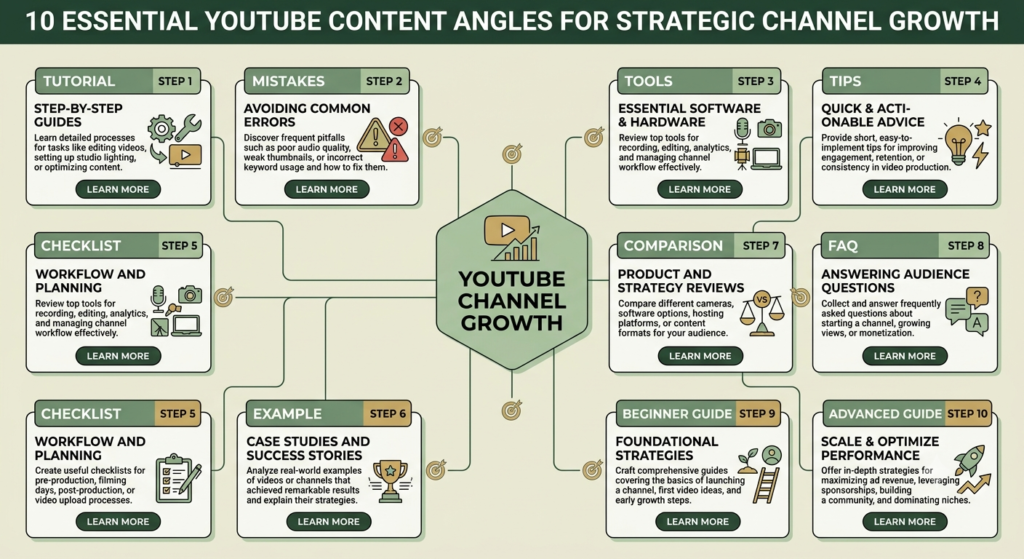
2. Use the 10-Angle Method
The easiest way to turn one idea into multiple videos is to change the angle.
Try these 10 angles:
- Beginner guide – Explain the topic from zero.
- How-to tutorial – Show viewers exactly how to do it.
- Mistakes – Explain common errors and how to avoid them.
- Tools – Introduce useful free or paid tools.
- Tips – Share practical shortcuts.
- Checklist – Give viewers an actionable checklist.
- Case example – Demonstrate the concept with an example.
- Comparison – Compare two approaches, tools, or methods.
- Frequently asked questions – Answer common audience questions.
- Advanced next step – Show viewers what to do after mastering the basics.
This creates a natural YouTube video series rather than 10 disconnected uploads.
3. Turn Questions Into Videos
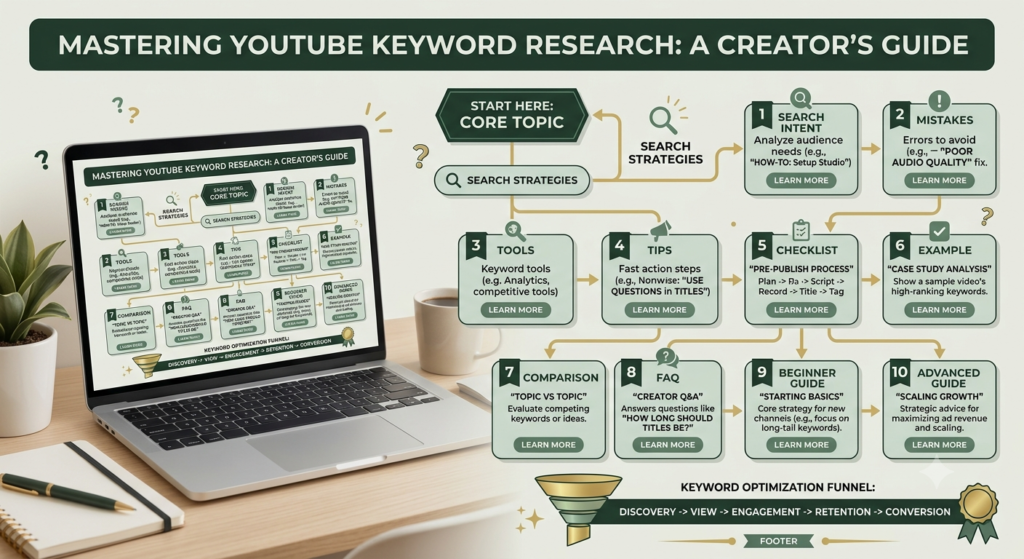
Questions are excellent sources for YouTube video ideas.
Start with your main topic in developing YouTube content strategy and write questions beginning with:
- What?
- Why?
- How?
- When?
- Where?
- Which?
- Who?
For example, from “YouTube SEO,” you could create:
- What is YouTube SEO?
- Why does YouTube SEO matter?
- How do you find YouTube keywords?
- Which YouTube SEO mistakes should beginners avoid?
- How do you optimize a YouTube title?
Each question can become a focused video.
4. Change the Content Format
The subject does not always need to change. The format can change.
For one topic, create:
- A beginner tutorial
- A list video
- A screen-recording tutorial
- A Shorts video
- A Q&A
- A checklist
- A myth-busting video
- A comparison
- A case study
- A step-by-step challenge
This is one of the simplest content repurposing techniques because you are developing new presentations from the same knowledge.
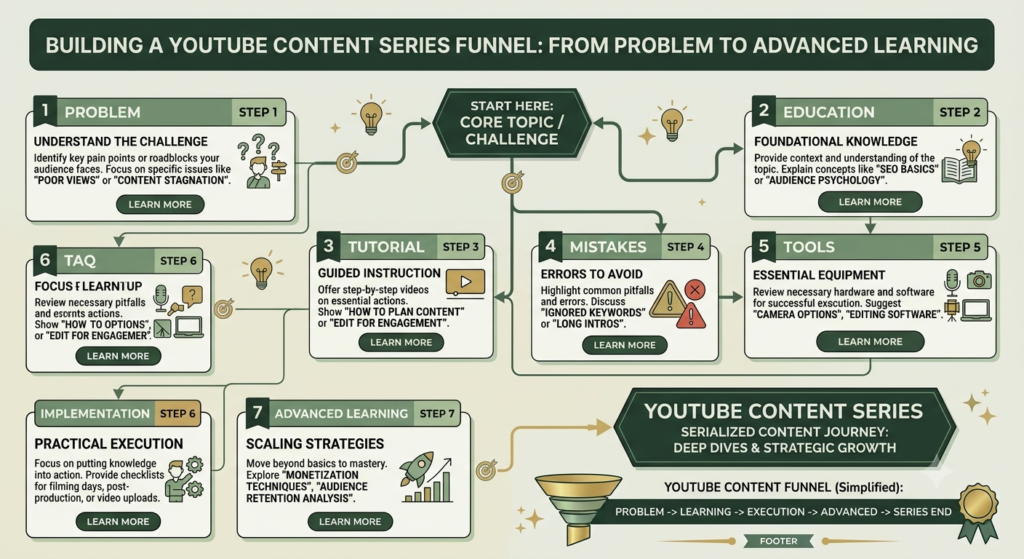
5. Build a YouTube Content Funnel
Your 10 videos should ideally have a logical relationship.
Think of your content as a journey:
Problem → Beginner education → Tutorial → Mistakes → Tools → Implementation → Results → Advanced learning
For example, Video 1 could introduce YouTube SEO. Video 2 could explain keyword research. Video 3 could demonstrate optimization. Video 4 could explain mistakes. Video 5 could introduce analytics.
Then connect the videos through relevant descriptions, cards where available, end screens, and playlists.
YouTube officially supports playlists for organizing related videos, and YouTube Studio provides playlist analytics.
6. Research Before Creating the Videos
Do not assume that every variation will interest your audience.
Use YouTube search suggestions, comments, competitor topics, your own audience questions, and YouTube Analytics to identify useful subtopics.
YouTube Analytics includes reports covering content performance, reach, engagement, audience, and trends.
Look for patterns such as:
- Topics viewers already watch
- Questions viewers repeatedly ask
- Videos with strong engagement
- Search terms connected to your subject
- Content gaps you can explain more clearly
YouTube also recommends grouping content by formats, audience, topic longevity, and production cost when evaluating content patterns.
7. Give Every Video a Different Promise
Avoid making 10 videos that sound like the same video.
Instead, give every upload one clear promise.
For example:
Weak:
“Everything About YouTube SEO”
Stronger:
“How to Find YouTube Keywords as a Beginner”
The second title tells viewers exactly what they will learn.
Your thumbnail should support the promise rather than simply repeat the title.
8. Connect Your 10 Videos
Once you have created the videos, organize them into a series or playlist.
Use natural connections such as:
“If you are starting from zero, watch Video 1 first.”
Then direct viewers to the next relevant lesson.
A playlist can group related videos and make it easier to analyze their combined performance in YouTube Studio.
9. Optimize Each Video Separately
Creating 10 videos from one idea does not mean copying the same SEO elements ten times.
For each video, create:
- A unique keyword
- A clear title
- A useful description
- A relevant thumbnail
- Natural keyword usage
- Accurate chapters where appropriate
- Relevant hashtags where useful
- A strong opening hook
- One clear viewer action
For your website articles supporting the videos, follow Google’s current Search guidance rather than stuffing keywords. Google provides its SEO Starter Guide and Search Essentials for current optimization principles.
10. Review and Improve
After publishing, do not immediately assume that the content has failed.
Give your videos time to collect data, then review the available analytics.
Look at:
- Impressions
- Click-through rate
- Views
- Watch time
- Average view duration
- Audience retention
- Subscribers
- Traffic sources
Use what you learn to improve the next video.
One successful topic can become another 10-video series when your analytics show that viewers respond positively to a particular subject or format.
How This Becomes the Backbone of Your Content Strategy
The real power of this method is not simply producing 10 videos.
It creates a content backbone.
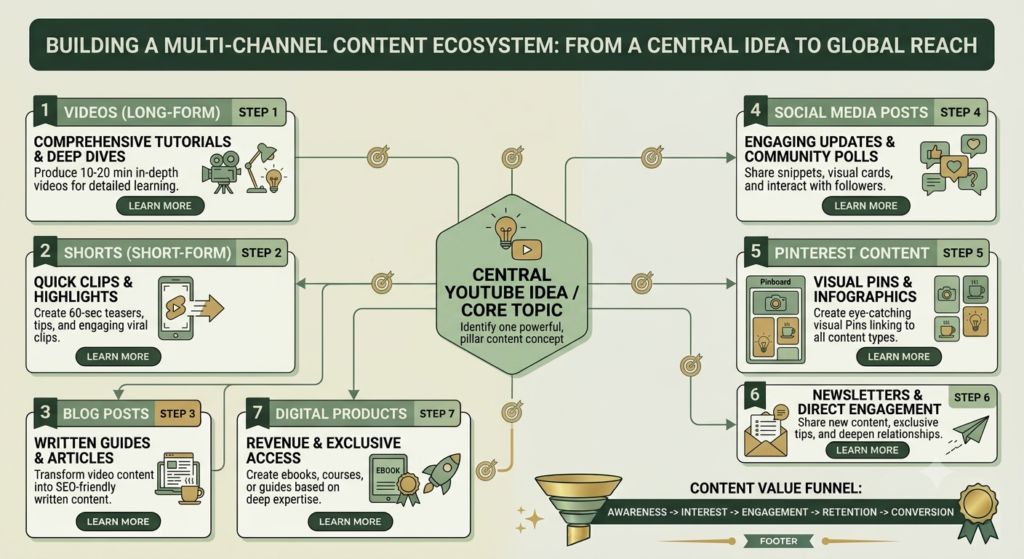
One pillar idea can support:
1 core topic → 10 YouTube videos → Shorts → social posts → blog articles → Pinterest content → email content → lead magnet ideas
This gives your brand a consistent message across multiple channels.
Instead of constantly asking, “What should I post today?” you start with one meaningful subject and build an organized content ecosystem around it.
Simple 10-Video Planning Template
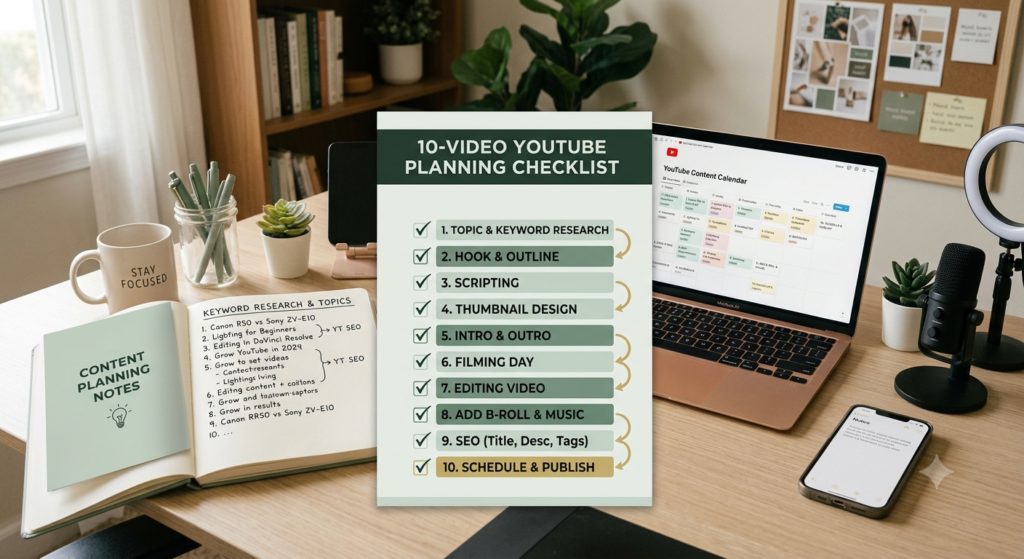
Before recording, create a table like this:
| Video | Angle | Keyword | Viewer problem | CTA |
|---|---|---|---|---|
| 1 | Beginner guide | Main keyword | Understand topic | Watch next |
| 2 | Tutorial | Related keyword | Learn process | Subscribe |
| 3 | Mistakes | Related keyword | Avoid errors | Watch tutorial |
| 4 | Tools | Related keyword | Find tools | Visit resource |
| 5 | Tips | Related keyword | Improve results | Watch next |
| 6 | Checklist | Related keyword | Take action | Download resource |
| 7 | Example | Related keyword | Understand practically | Comment |
| 8 | Comparison | Related keyword | Choose approach | Watch next |
| 9 | FAQ | Related keyword | Solve questions | Subscribe |
| 10 | Advanced guide | Related keyword | Take next step | Explore offer |
One Clear CTA
Do not give viewers five different actions at once.
Choose one primary CTA for each video, such as:
“Watch the next video in this series to continue learning.”
For a business channel, your CTA could instead direct viewers to a relevant service, free resource, blog article, or digital product.
FAQ: Turn One Idea Into 10 YouTube Videos
Can one idea really become 10 YouTube videos?
Yes. A broad topic can usually be divided into tutorials, questions, mistakes, tools, examples, comparisons, checklists, and advanced lessons. The key is giving every video a distinct purpose.
Will 10 videos about one topic become repetitive?
They can if you simply repeat the same explanation. Use different viewer questions, formats, examples, and outcomes to make each video useful on its own.
Should I make all 10 videos at once?
Not necessarily. You can plan all 10 first and publish them according to your schedule. Reviewing performance as you publish can help you refine later topics.
How do I find more ideas from one topic?
Use YouTube search suggestions, viewer comments, Analytics, related questions, competitor research, and content gaps. YouTube’s Analytics tools also include a Trends area designed to help creators explore what audiences are viewing.
Should the 10 videos be in a playlist?
If the videos are closely related, a playlist can help organize the series. YouTube allows creators to create and manage playlists in YouTube Studio.
Final Thoughts
Learning to turn one idea into 10 YouTube videos can make content creation much more manageable for beginners. You are not repeating yourself; you are answering different questions around the same valuable subject.
Start with one strong idea, divide it into questions and angles, select 10 distinct video promises, optimize each video individually, and connect the finished videos into a useful content journey.
Start today and turn one idea into 10 YouTube videos by choosing a topic, listing 10 distinct angles, and planning your next uploads. Consistency becomes easier when your content system is planned before you press the record button.
Ready to create your next content series? Choose one core idea today and write down 10 questions your ideal viewer would ask about it.