
7 Powerful YouTube Playlists Tips for Faster Channel Growth!
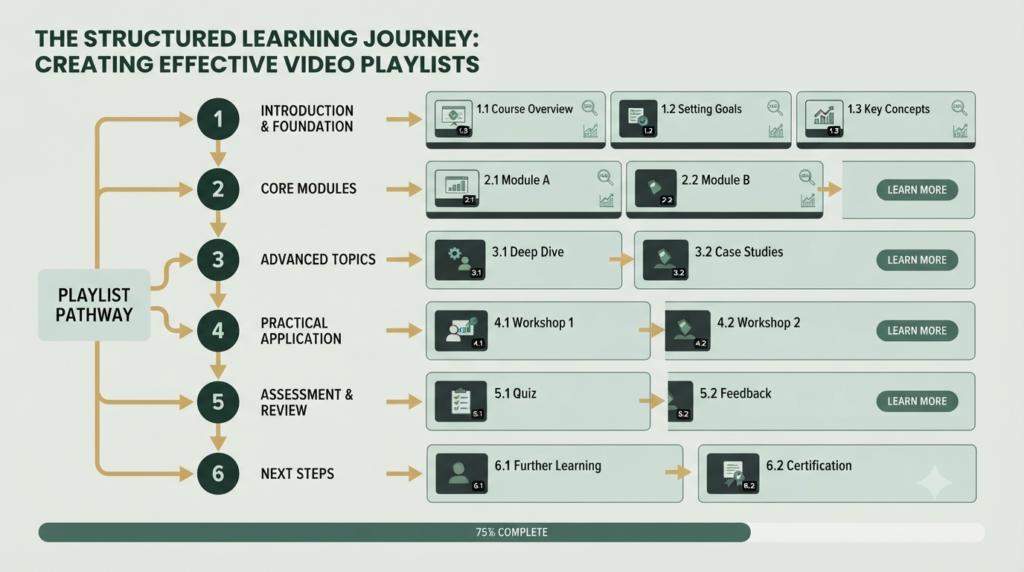
If you have several YouTube videos covering the same subject, leaving them scattered across your channel can make it harder for viewers to know what to watch next. YouTube Playlists solve this problem by grouping related videos into an organized viewing experience.
A well-planned playlist can help beginners move naturally from one video to another. It can also make your channel easier to understand, encourage viewers to explore related content, and create a stronger topical structure.
Think of a playlist as a learning path rather than simply a folder of videos.
For example, a YouTube SEO channel could create a playlist called “YouTube SEO for Beginners” and arrange videos in a logical order: keyword research → titles → thumbnails → descriptions → tags → playlists → analytics.
That structure is useful for both viewers and creators.
What Are YouTube Playlists?
A YouTube playlist is a collection of videos organized around a topic, audience, goal, or viewing journey.
You can create playlists containing your own videos and, depending on the situation, other publicly available videos. YouTube allows creators to give playlists titles and descriptions, select visibility settings, add videos, and change their order.
Main elements of a YouTube playlist
| Element | Purpose | Optimization Tip |
|---|---|---|
| Playlist title | Identifies the topic | Use a clear keyword |
| Description | Explains what viewers will learn | Write useful, natural text |
| Videos | Provide the actual content | Keep them closely related |
| Video order | Creates the viewing journey | Put the best starting point first |
| Visibility | Controls who can see it | Use Public for discoverable playlists |
| Thumbnail/content | Helps visual recognition | Maintain consistent branding |
| Analytics | Measures performance | Review viewer behavior |
| Share URL | Makes the playlist easy to distribute | Share the playlist page, not just one video |
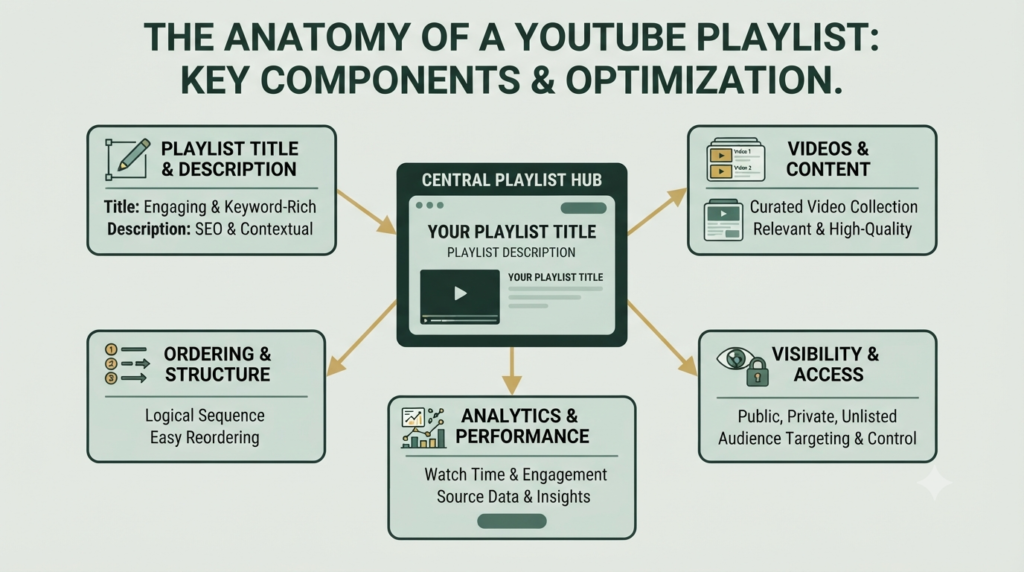
YouTube currently allows playlist titles up to 150 characters and descriptions up to 5,000 characters, giving creators plenty of room to explain the playlist clearly.
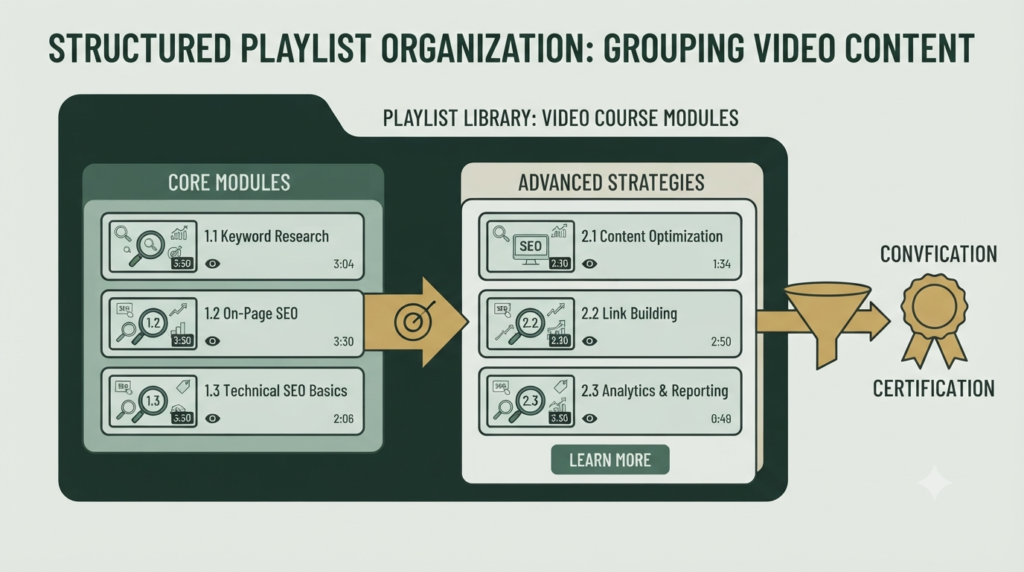
Why YouTube Playlists Matter for Channel Growth
A playlist becomes especially valuable when your channel covers a topic in depth.
Instead of asking viewers to search through your channel manually, you can guide them through connected videos.
For example:
YouTube SEO Beginner Journey
- What Is YouTube?
- YouTube Basics
- YouTube Keyword Research
- YouTube Video SEO
- YouTube Titles
- YouTube Thumbnails
- YouTube Descriptions
- YouTube Tags
- YouTube Playlists
- YouTube Analytics
This creates a clear content journey.
It also helps you think about your channel as a topic entity rather than a collection of unrelated videos.
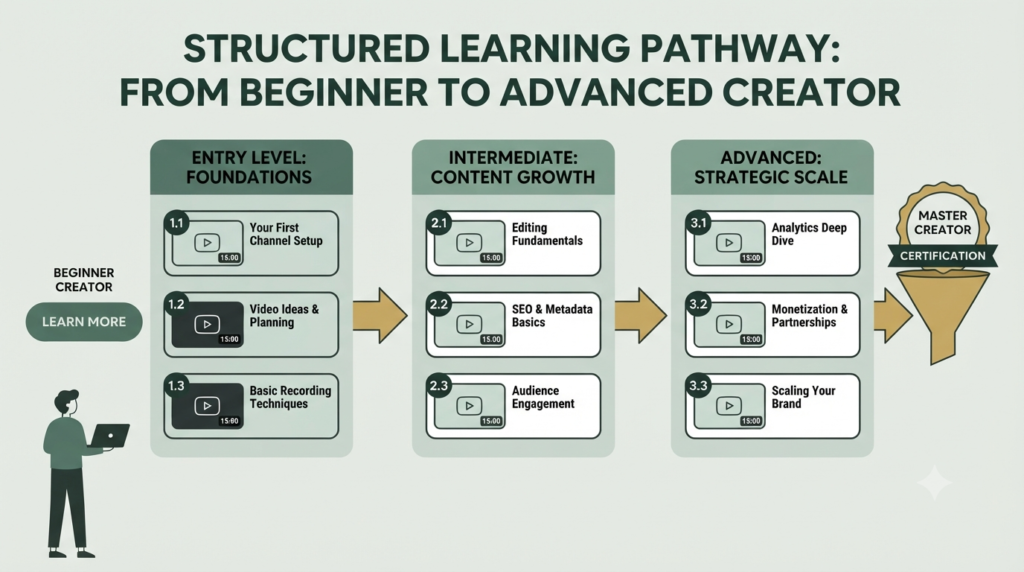
How playlists support your content entity
Your channel can be viewed as the main entity.
Your videos become supporting content entities.
Your playlists connect those videos around a specific topic.
For example:
Channel → YouTube SEO → Keyword Research → Titles → Thumbnails → Descriptions → Tags → Playlists → Analytics
This connected structure makes your content easier for people to understand and navigate.
A playlist therefore acts as a backbone for your content organization: it connects individual videos into a meaningful topical relationship. It does not guarantee higher rankings by itself, but it can create a much clearer viewing experience.
How to Create YouTube Playlist
Creating a playlist is straightforward.
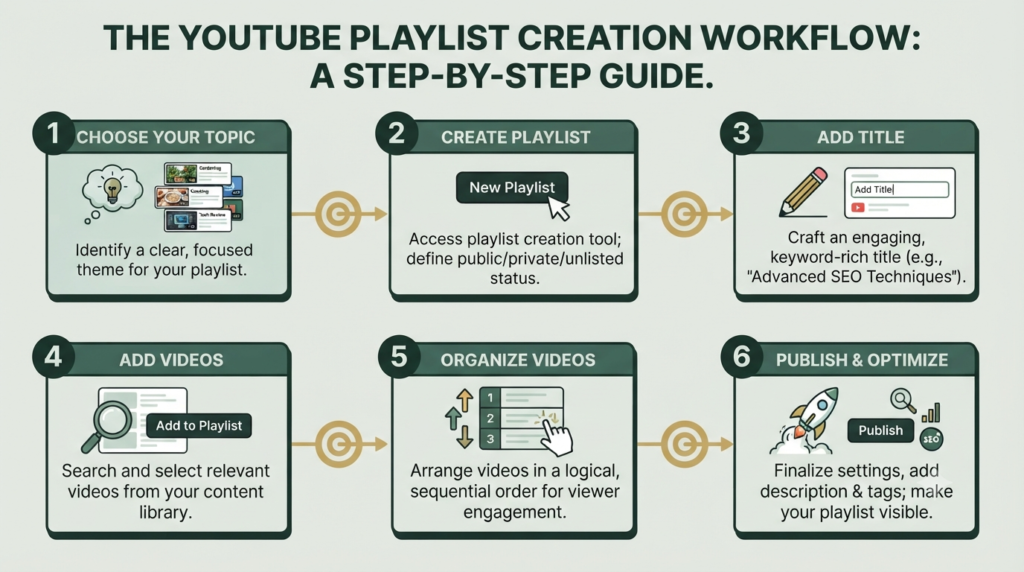
Step 1: Choose a focused topic
Start with one specific audience need.
Good examples include:
- YouTube SEO for Beginners
- YouTube Shorts SEO
- YouTube Monetization Basics
- YouTube Channel Setup
- YouTube Keyword Research
Avoid creating a playlist that mixes unrelated subjects.
Step 2: Create the playlist
In YouTube Studio, go to Create → New playlist.
Add your playlist title and description, choose the visibility setting, select how videos should be arranged, add videos, and create the playlist.
You can also create a playlist directly from a video by selecting Save → Create new playlist.
Step 3: Write an optimized title
Your title should immediately tell viewers what the playlist contains.
Instead of:
My Videos
Use:
YouTube SEO for Beginners
Instead of:
Useful YouTube Videos
Use:
YouTube Keyword Research Tutorials
The goal is clarity first.
How to Optimize YouTube Playlists
Good playlist optimization is not about repeating keywords everywhere. It is about making the playlist useful and logically organized.
1. Use a descriptive title
Include your main topic naturally.
2. Write a useful description
Explain:
- Who the playlist is for
- What viewers will learn
- What order they should follow
- What problem the playlist solves
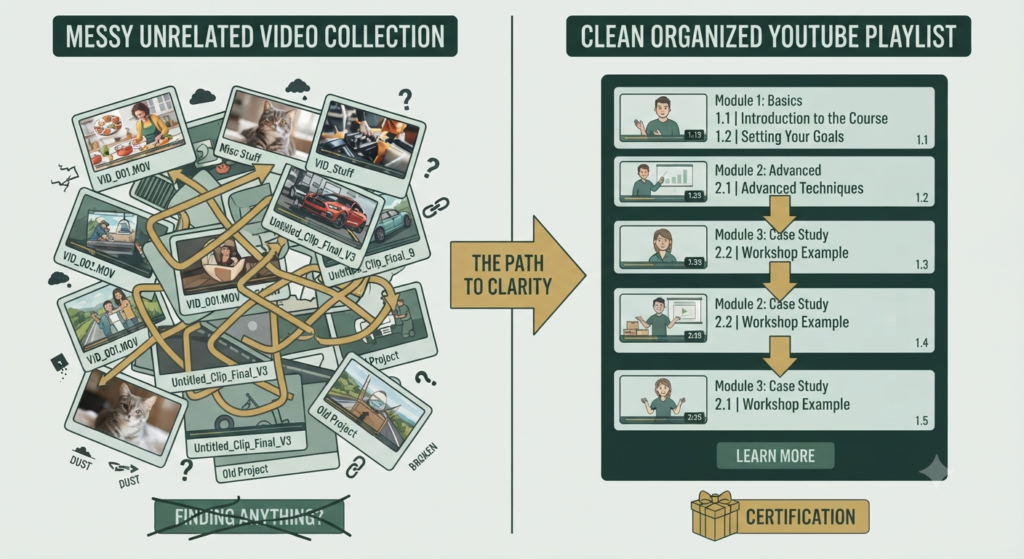
3. Arrange videos logically
Put introductory content before advanced content.
For a beginner playlist, the sequence could be:
Basics → Setup → Keyword Research → Optimization → Analytics
YouTube allows creators to reorder playlist videos by dragging them into the desired position.
4. Remove unrelated videos
A playlist should have one clear purpose.
If a video does not help the viewer complete the playlist’s learning journey, consider removing it.
5. Keep the playlist updated
When you publish a better or newer video, review older playlists.
Remove outdated material when necessary and add relevant new videos.
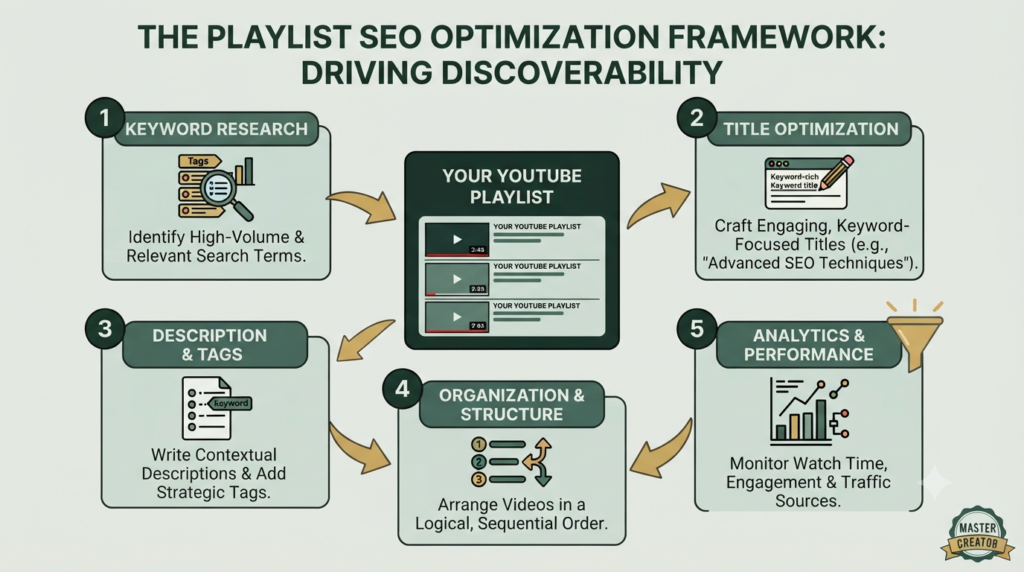
YouTube Playlist SEO: What Should You Optimize?
Your YouTube playlist SEO checklist can be simple:
- Use the primary topic in the playlist title.
- Write a natural description.
- Use related terminology where appropriate.
- Group closely related videos.
- Arrange videos according to viewer intent.
- Keep the playlist public when discoverability is the goal.
- Add new relevant videos regularly.
- Remove confusing or outdated content.
- Share the playlist URL when promoting the topic.
YouTube also provides playlist analytics. In YouTube Studio, playlist analytics can include aggregated information across the videos in the playlist, including Overview, Content, Audience, and Revenue information.
Common YouTube Playlist Mistakes
Avoid these beginner mistakes:
Mistake 1: Using vague titles
“Videos,” “My Tutorials,” or “Important Stuff” tells viewers almost nothing.
Mistake 2: Mixing unrelated topics
A playlist about YouTube SEO should not suddenly contain unrelated cooking, travel, or personal videos.
Mistake 3: Random video order
A learning playlist should have a logical progression.
Mistake 4: Ignoring descriptions
The description is an opportunity to explain the playlist’s purpose.
Mistake 5: Creating too many tiny playlists
Every playlist should have a clear reason to exist.
Mistake 6: Never reviewing performance
Use playlist analytics to understand whether the collection is actually useful to your audience.
A Simple 100% YouTube Playlist Optimization Checklist
Before publishing, check:
☐ Primary keyword appears naturally in the playlist title
☐ Playlist has a clear audience
☐ Description explains the benefit
☐ Videos match one central topic
☐ Videos are arranged logically
☐ First video provides a strong starting point
☐ Unrelated videos are removed
☐ Playlist visibility is correct
☐ New relevant videos are added over time
☐ Playlist URL is shared instead of only one video
☐ Performance is reviewed in YouTube Studio
This approach gives you a practical path toward a 99/100-style SEO setup without relying on keyword stuffing.
How to Connect Playlists With Your YouTube SEO Strategy to measure YouTube channel growth?
Your playlist should not operate alone.
Connect it with your other content.
For example, your YouTube Keyword Research video can lead viewers into a broader YouTube SEO for Beginners playlist.
Your title optimization video can point viewers toward the same learning path.
Your thumbnail, description, tags, and analytics videos can then become additional steps.
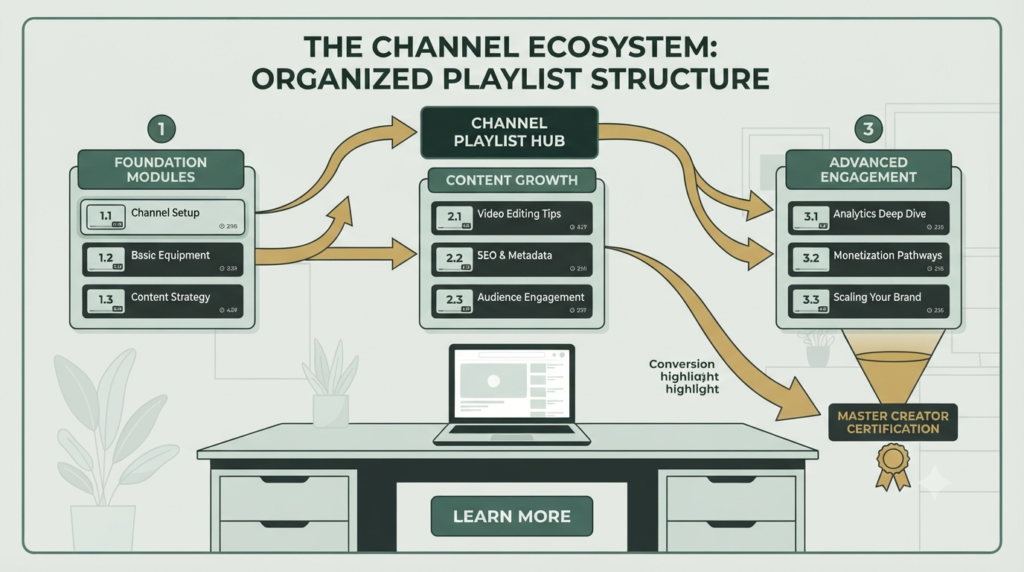
This creates a connected content ecosystem:
Keyword → Video → Related Video → Playlist → Next Video → Deeper Topic
That is much stronger than publishing isolated videos without a clear relationship.
For the broader SEO foundation, see Aahraa’s YouTube Basics guide, YouTube Keyword Research guide, and YouTube SEO Strategies guide.
For official guidance, use YouTube’s playlist management documentation and YouTube’s playlist creation and management guide.
Your Next Step
Do not create ten playlists just because you have ten categories.
Start with one important topic.
Choose your strongest related videos, create a clear title, write a helpful description, arrange the videos from beginner to advanced, publish it, and then monitor its performance.
A good playlist should answer one simple question:
“What should my viewer watch next?”
When every video has a logical next step, your channel becomes easier to navigate and more valuable to the viewer.
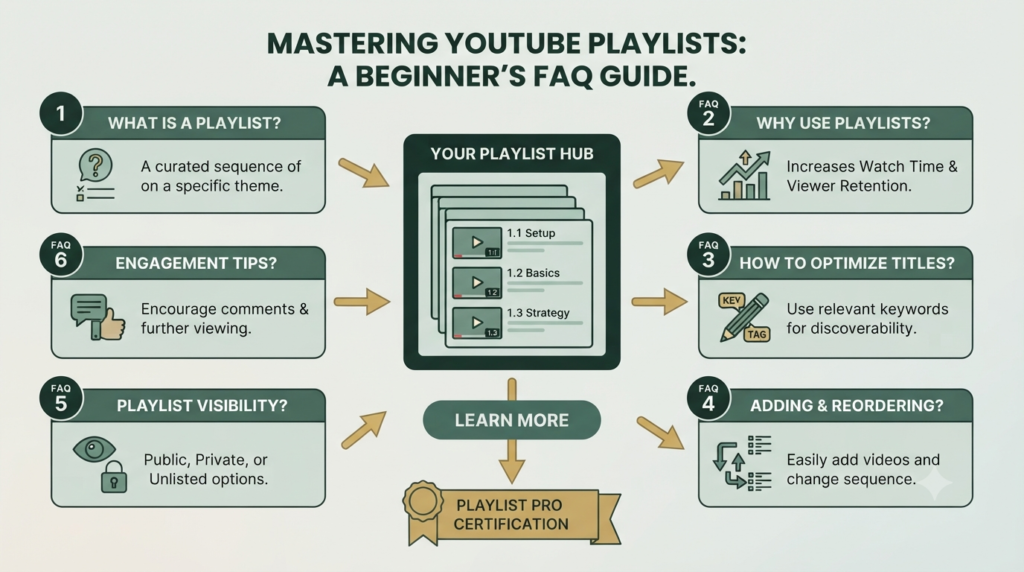
FAQ: YouTube Playlists
1. What are YouTube Playlists?
YouTube Playlists are organized collections of videos grouped around a topic, audience, or viewing goal.
2. Do YouTube Playlists help channel growth?
They can support channel growth by organizing related content and giving viewers a clearer path through your videos. They are not a guaranteed ranking factor or automatic growth strategy.
3. How many videos should a playlist have?
There is no universal ideal number. Use enough videos to provide a meaningful viewing journey without adding unrelated content.
4. Should YouTube Playlists be public?
If your objective is discoverability and sharing, a public playlist is generally the appropriate choice. YouTube also provides private and other visibility options.
5. Can I reorder videos in a playlist?
Yes. YouTube allows creators to reorder playlist content.
6. Can I add Shorts to a playlist?
Yes. YouTube supports adding Shorts to playlists, although some playlist management and ordering features can differ for playlists containing only Shorts.
7. Can I analyze a YouTube Playlist?
Yes. YouTube Studio provides playlist analytics with aggregated insights for videos included in the playlist.
8. What is the biggest playlist SEO mistake?
The biggest mistake is creating a playlist without a clear topic or viewer journey. Relevance and organization should come before keyword repetition.
Start with one focused playlist, organize it around one viewer problem, and build from there.