
7 Powerful WhatsApp Business Automation Tips for Growth 2026
Imagine a potential customer visits your website at 10:30 PM, has a question about your service, and sends a message. Instead of waiting until morning, they immediately receive a helpful response explaining what to do next.
That is where WhatsApp Business automation becomes valuable.
For startups, small businesses, freelancers, coaches, agencies, consultants, and online sellers, WhatsApp can become much more than a messaging application. With the right setup, it can support customer communication, lead generation, product enquiries, follow-ups, appointment requests, order updates, and customer support.
In this complete beginner’s guide to WhatsApp Business automation in 2026, you will learn what it is, how it works, which tools you need, how to create useful automated workflows, common mistakes to avoid, and how WhatsApp can become a connecting layer between your website, social media, marketing, sales, and customer service.
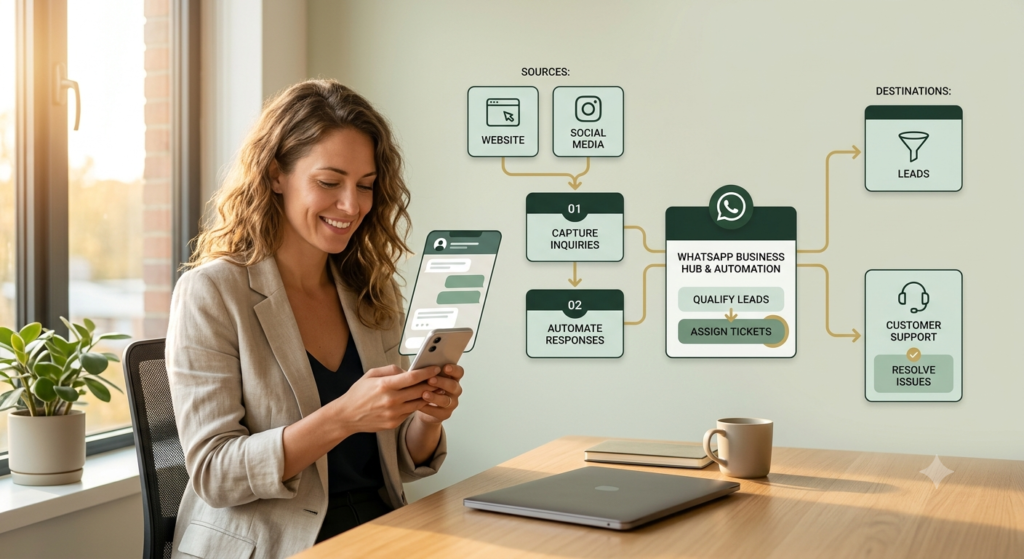
What Is WhatsApp Business Automation?
WhatsApp Business automation means using built-in business features, approved automation systems, or the WhatsApp Business Platform to automatically handle selected customer interactions.
Instead of manually answering the same questions repeatedly, automation can help with tasks such as:
- Welcoming a new customer
- Sending an away message
- Providing frequently requested information
- Answering common questions
- Sharing product or service information
- Directing customers to a website
- Collecting basic enquiry information
- Sending approved notifications
- Routing conversations to a human
- Supporting lead-generation workflows
There are two important levels to understand.
1. WhatsApp Business App
The WhatsApp Business app is suitable for many small businesses that are beginning their digital journey.
It can provide business-profile information, catalog features, quick replies and automated greeting or away messages, depending on the current app functionality available to the account.
2. WhatsApp Business Platform
The WhatsApp Business Platform is designed for more advanced business communication and integrations.
It can connect WhatsApp with software systems, customer relationship management tools, websites and other business workflows.
The Platform includes WhatsApp APIs, including Meta-hosted Cloud API.
Simple rule: start with the WhatsApp Business app if your communication volume is small. Consider the Platform when you need integrations, structured workflows, multiple users, or more sophisticated automation.
Why WhatsApp Business Automation Matters for Startups
A startup often has limited time and resources.
The founder may be handling marketing, sales, customer service, website updates and administration at the same time.
Automation can reduce repetitive communication without removing the human element.
For example:
Customer sees Instagram post → clicks WhatsApp → receives welcome message → chooses enquiry type → receives relevant information → human takes over when necessary.
This creates a simple customer journey.
For startups, WhatsApp can connect several parts of the digital marketing ecosystem:
| Social media | Convert interest into conversation |
| Website | Answer enquiries |
| SEO | Turn search traffic into leads |
| Lead generation | Capture and qualify enquiries |
| Sales | Answer questions and follow up |
| Customer service | Provide quick information |
| E-commerce | Support product enquiries |
| Retention | Maintain customer communication |
You can also connect your WhatsApp strategy with your digital marketing services for startups, SEO services, and social media optimization services.
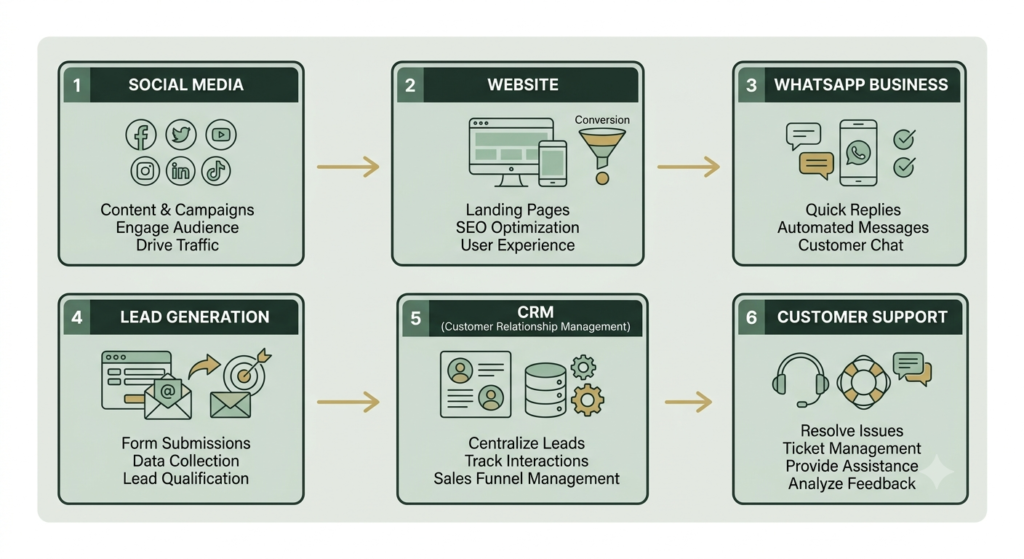
WhatsApp Business Automation: The 7 Essential Elements
Before creating complicated workflows, understand the seven basic elements.
1. Business Profile
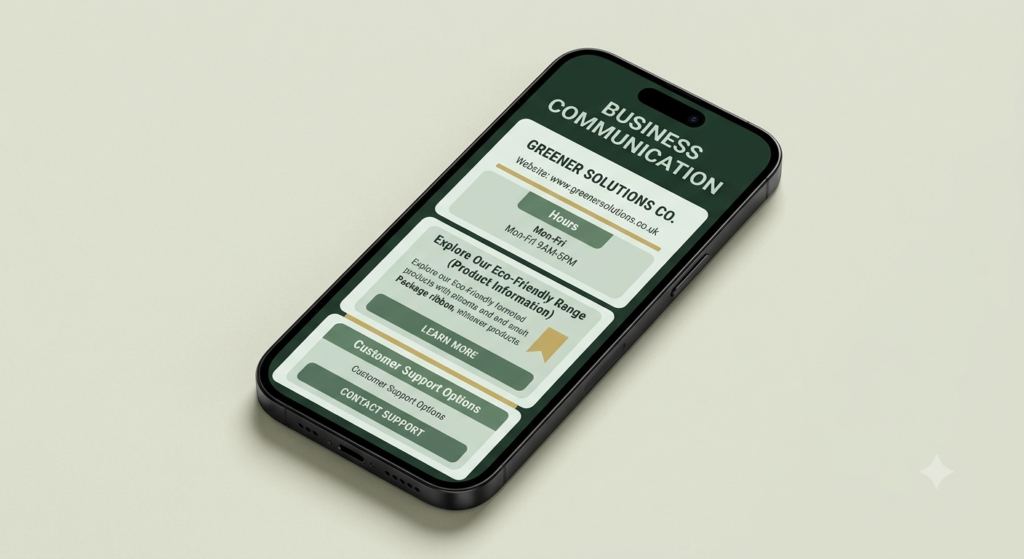
Your profile is the first layer of trust.
Complete important information such as:
- Business name
- Category
- Description
- Website
- Business hours
- Location, if relevant
- Profile image or logo
Keep the description simple.
Explain what you do, who you help, and what customers can expect.
WhatsApp’s business policy specifically recommends maintaining customer-support contact information such as an email address, website or phone number.
2. Greeting Message
A greeting message can automatically welcome customers when appropriate.
Example:
Hi! Welcome to Aahraa. Thank you for reaching out. Please tell us what you would like help with, and we’ll guide you to the right information.
The message should be short.
Do not immediately send a long sales pitch.
3. Away Message
An away message manages expectations when you are unavailable.
For example:
Thank you for your message. We’re currently unavailable, but we’ve received your enquiry and will respond during our business hours.
This is particularly useful for solo entrepreneurs.
4. Quick Replies
Quick replies save frequently used responses.
Create shortcuts for questions such as:
- Pricing
- Services
- Working hours
- Website
- Product information
- Payment information
- Delivery
- Booking process
- Frequently asked questions
Instead of typing the same answer repeatedly, you can insert your prepared response.
Remember: a quick reply is not necessarily the same thing as fully automated customer communication. It is primarily a productivity tool.
5. Catalog
If applicable to your business, use the catalog to present products or services clearly.
Each item should contain:
- Product/service name
- Short description
- Price, where appropriate
- Relevant image
- Important purchasing information
- Link or next step
Avoid creating a catalog that looks crowded.
A customer should understand an item quickly.
6. Automated Workflow
An automated workflow defines what happens after a customer takes an action.
A basic workflow might look like:
Instagram → WhatsApp → Welcome → Customer question → Information → Human support → Purchase
A more advanced workflow could be:
Advertisement → WhatsApp → Lead qualification → CRM → Follow-up → Sales representative
Automation should solve a specific business problem rather than exist simply because automation is available.
7. Human Handoff
This is one of the most important elements.
Automation should not trap customers inside an endless bot conversation.
A customer should have a clear path to a person when they need human assistance.
WhatsApp’s current policy allows automated responses during the applicable customer-service window but requires clear and direct escalation options. These can include a human agent, phone, email, website support or a support form.
How to Set Up WhatsApp Business Automation Step by Step
Step 1: Create or optimize your WhatsApp Business profile
Download or open the WhatsApp Business app and complete your business profile.
Use consistent branding across:
- Website
Your customer should recognize the business wherever they find you.
Step 2: Define your most common customer questions
Before creating automation, write down the questions customers ask repeatedly.
For example:
- What services do you provide?
- How much does it cost?
- How can I place an order?
- How long does delivery take?
- How can I contact support?
These questions become your automation building blocks.
Step 3: Create your first quick replies
Start with only your most common answers.
Do not create 50 replies on day one.
Start with approximately five.
Test them.
Then expand.
Step 4: Create a useful greeting
Your greeting should answer one question:
“What should the customer do next?”
For example:Welcome! Please choose what you need help with:
General enquiry
Services
Products
Pricing
Keep the customer journey simple.
Step 5: Create your away message
Tell customers when you are unavailable and when they can expect a response.
Do not promise a response time you cannot consistently maintain.
Step 6: Connect WhatsApp with your marketing channels
Place your WhatsApp contact option where customers already interact with you.
Possible locations include:
- Website
- Instagram profile
- Facebook page
- Email signature
- Landing pages
- Product pages
- Digital advertisements
Your website can act as the information hub, while WhatsApp becomes the conversation layer.
For website-related startup support, you can also explore website development services for startups.
Step 7: Test the complete customer journey
Never assume automation works simply because you created it.
Test it from the customer’s perspective.
Check:
- Does the link open?
- Does the welcome message appear correctly?
- Are the replies understandable?
- Are links working?
- Can customers reach a human?
- Is the information accurate?
- Does the workflow stop when it should?
Testing is part of automation—not an optional extra.
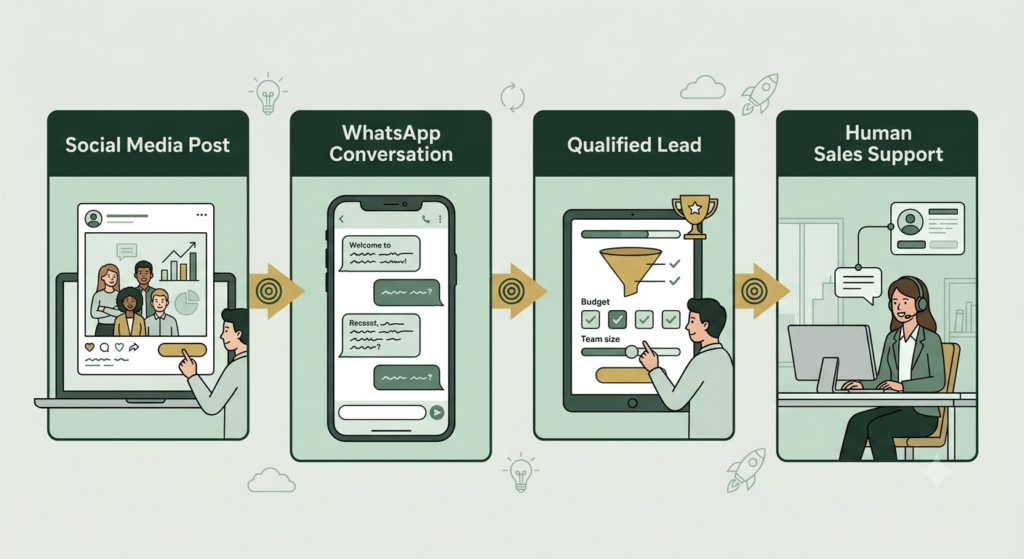
1. WhatsApp Automation for Lead Generation
WhatsApp automation can support lead generation by moving prospects from interest to conversation.
A simple workflow is:
Content → WhatsApp click → Welcome → Qualification → Relevant information → Human conversation
For example
Hi! Thanks for contacting us. What are you looking for today?
A. Website
B. SEO
C. Social media
D. General information
The answers can help organize the conversation.
However, avoid collecting unnecessary personal information.
The purpose should be to make the customer’s journey easier, not to build a huge database simply because technology allows it.
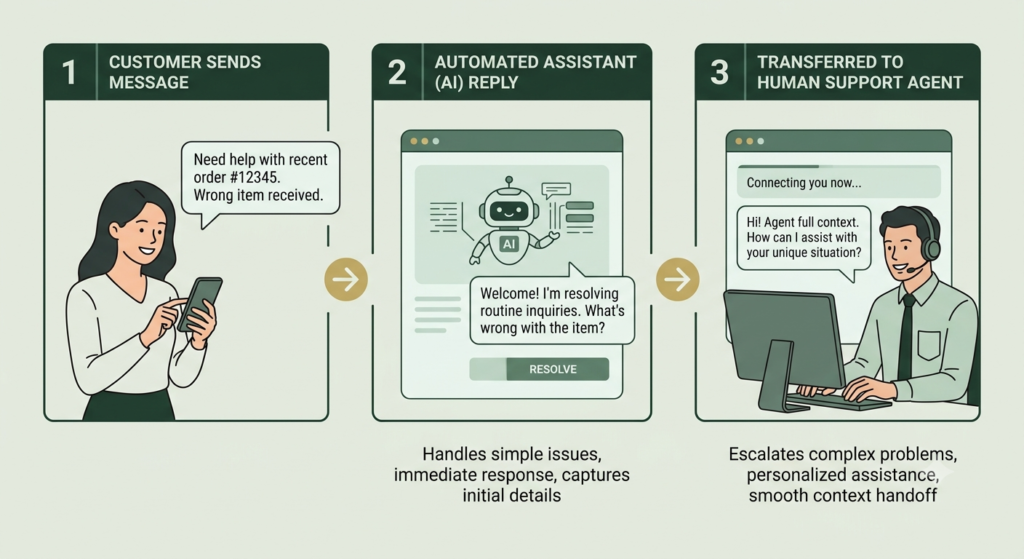
2. WhatsApp Automation for Customer Support
Customer support is one of the most practical uses of automation.
Automation can handle predictable questions while people handle complex situations.
Good automation examples
- Business hours
- Basic product information
- Order instructions
- Booking instructions
- Website links
- Frequently asked questions
- Support routing
Tasks better handled by humans
- Complaints
- Refund disputes
- Sensitive issues
- Complex technical problems
- Custom negotiations
- Situations requiring judgment
The goal is faster support, not less human support.
3. WhatsApp Business API vs WhatsApp Business App
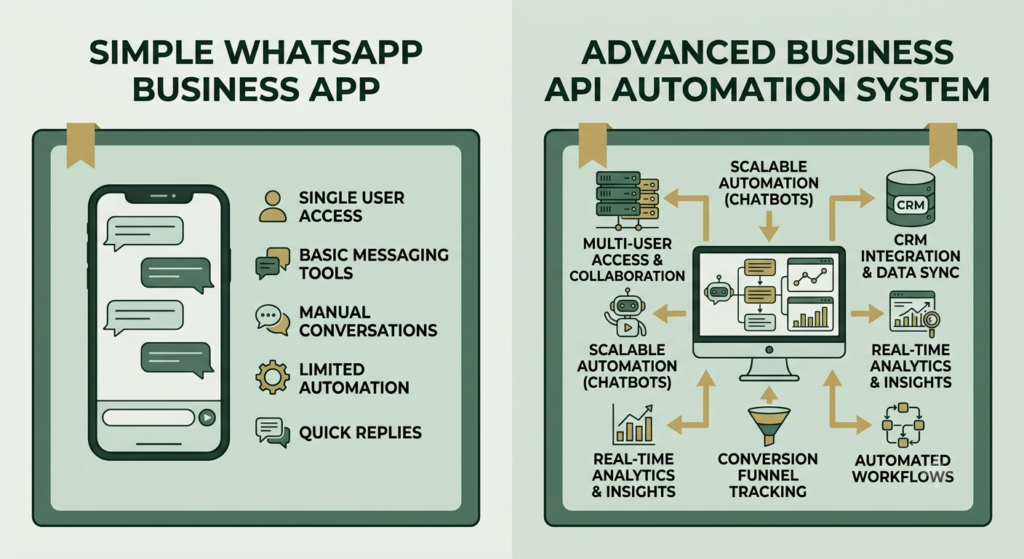
Beginners often confuse these two.
| Feature | WhatsApp Business App | WhatsApp Business Platform/API |
|---|---|---|
| Best for | Small businesses | Growing businesses |
| Setup | Simpler | More technical |
| Basic business communication | Yes | Yes |
| Quick replies | Yes | Can support structured workflows |
| Automation | Basic | Advanced |
| Integrations | Limited | Extensive |
| CRM connection | Limited/depends on tools | Designed for integrations |
| Multiple-user workflows | More limited | Better suited |
| Advanced automation | Limited | Yes |
The WhatsApp Business Platform is governed by specific messaging rules. For example, business-initiated conversations on the Platform require approved message templates, while businesses can respond without a template within the applicable 24-hour customer-service window after a user’s message.
Always check the current official documentation before implementing a production workflow because platform features, pricing and policies can change.
Official WhatsApp Business website
4. WhatsApp Business Automation and the Digital Marketing Funnel
Think of your digital marketing system as a connected funnel:
Awareness → Interest → Conversation → Qualification → Conversion → Support → Retention
Different platforms perform different jobs.
Website
Builds authority and provides detailed information.
SEO
Helps people discover your business through search.
Social media
Creates awareness and engagement.
Turns interest into direct conversation.
CRM
Organizes customer information and follow-up.
Automation
Connects repetitive steps between these systems.
This is why WhatsApp can become an important backbone or conversational layer for your digital marketing ecosystem.
It does not replace your website, SEO, social media or CRM.
Instead, it can connect them.
5. WhatsApp Automation Mistakes Beginners Should Avoid
1. Sending unsolicited messages
Do not assume that having someone’s number automatically gives you permission to send promotional messages.
WhatsApp’s policies emphasize user expectations, appropriate consent and clear opt-out processes.
2. Making every message promotional
If every automated message says “Buy Now,” customers may lose interest.
Provide useful information.
3. Creating endless chatbot menus
Customers do not want to navigate a maze.
Keep the path short.
4. Removing human support
Automation should assist people, not create a wall between the business and customer.
5. Ignoring WhatsApp policies
Do not use unofficial bulk-messaging methods simply to increase volume.
WhatsApp states that unauthorized large-scale messaging can lead to restrictions or loss of access.
6. How to Optimize WhatsApp Business Automation for Better Results
Use this simple optimization checklist:
- Complete your business profile.
- Use a recognizable logo.
- Write a clear business description.
- Create five essential quick replies.
- Write one helpful greeting message.
- Create an accurate away message.
- Organize your catalog if relevant.
- Add WhatsApp links to important marketing pages.
- Create one simple lead workflow.
- Give customers a human-support option.
- Review frequently asked questions every month.
- Remove outdated information.
- Test every link.
- Monitor customer feedback.
- Respect opt-outs.
- Review current WhatsApp policies before scaling.
Do not measure success only by the number of automated messages sent.
Track meaningful outcomes such as:
- Enquiries received
- Qualified leads
- Response time
- Conversations reaching human support
- Sales or bookings
- Customer questions resolved
- Repeat enquiries
7. A Simple WhatsApp Automation Workflow for Beginners
If you are completely new, start with this:
Step 1: Customer clicks WhatsApp from your website.
Step 2: Greeting message welcomes the customer.
Step 3: Customer chooses a topic.
Step 4: Quick reply provides the relevant information.
Step 5: Customer asks a specific question.
Step 6: Human takes over when required.
Step 7: Customer receives the next appropriate step.
That is enough to begin.
You do not need a complicated chatbot on day one.
Frequently Asked Questions About WhatsApp Business Automation
1. What is WhatsApp Business automation?
WhatsApp Business automation uses business features or the WhatsApp Business Platform to automate selected customer interactions, such as greetings, FAQs, notifications and workflow steps.
2. Is WhatsApp Business automation free?
Some basic automation features are available through the WhatsApp Business app. More advanced Platform/API solutions can involve technical setup and applicable Meta or provider charges. Check current official pricing and terms before implementing a paid workflow.
3. Can a beginner use WhatsApp Business automation?
Yes. Beginners can start with the WhatsApp Business app, a complete profile, greeting message, away message and quick replies before moving to advanced integrations.
4. What is the WhatsApp Business API?
The WhatsApp Business Platform provides APIs and infrastructure for businesses that need more advanced integrations and automated communication. Meta’s Cloud API is part of the Platform.
5. Can WhatsApp automation generate leads?
Yes. WhatsApp can be used as a conversation layer after someone clicks from a website, social media post, landing page or other marketing channel. Automation can help organize the first stage of the conversation.
6. Can WhatsApp automation replace customer service?
No. It can handle repetitive questions and routing, but complex issues often require human assistance. WhatsApp’s policy also requires appropriate escalation paths for automated responses in relevant Platform scenarios.
7. Can I send bulk promotional messages automatically?
You should not use unauthorized bulk messaging. WhatsApp’s policies require appropriate consent and impose restrictions on business-initiated messaging and approved templates on the Platform.
8. How can I avoid annoying customers with automation?
Keep messages relevant, concise and expected. Obtain appropriate consent, respect opt-outs, avoid excessive promotional messages and provide a clear route to human support.
9. What should I automate first?
Start with your most repetitive customer question. A greeting message, business-hours response, FAQ or service-information reply is usually easier to test than a complicated sales workflow.
10. What should I do after setting up WhatsApp automation?
Test the complete customer journey, check every link, review customer questions, monitor results and update your automation regularly. Automation should improve the customer experience rather than simply increase the number of messages.
Final Takeaway
WhatsApp Business automation is not about replacing people. It is about removing repetitive work so people can focus on conversations that actually need human attention.
A beginner does not need a complicated system.
Start with:
- A complete business profile
- A helpful greeting
- An accurate away message
- Five useful quick replies
- A simple customer journey
- A clear human-support option
- Regular testing and improvement
As your business grows, you can connect WhatsApp with your website, CRM, lead-generation system and other marketing tools.
The strongest automation is usually the automation that feels simple to the customer.
Start Your WhatsApp Automation Today
Choose one repetitive customer question and automate the answer first. Test it from a customer’s perspective, improve it, and then build the next workflow.