
7 Powerful Ways to Create an Instant Form and Automation for Better Campaign Results: Complete Beginner’s Guide in 2026
Introduction: Why Instant Form and Automation Matter in 2026
Imagine someone sees your campaign, becomes interested, clicks your advertisement and wants more information. What happens next?
If the person has to visit several pages, search for your contact details and wait for someone to respond, the opportunity may disappear.
An instant form reduces this friction by allowing people to submit their information through a short form. When automation is connected to that form, the next steps can happen automatically.
For example:
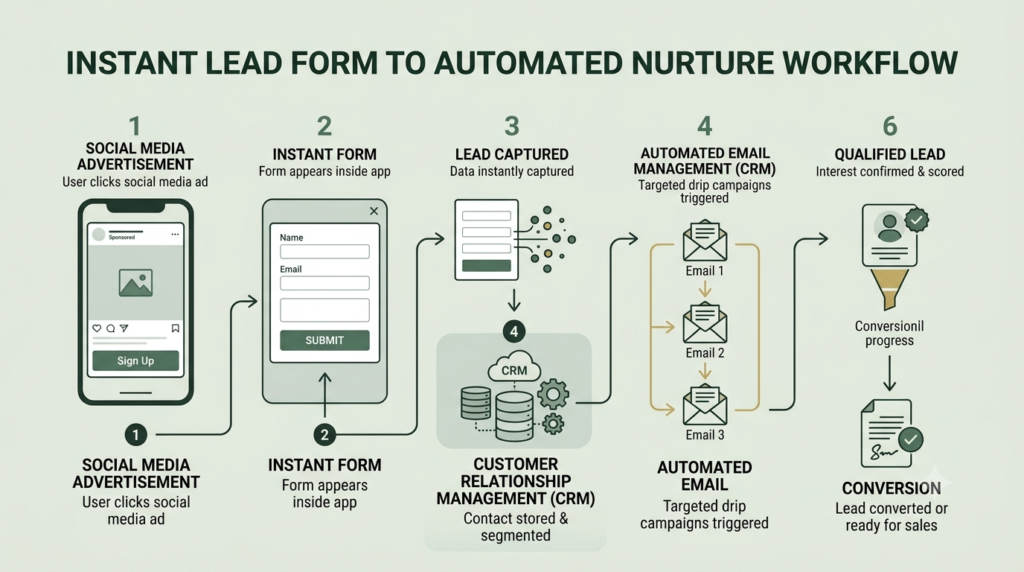
Advertisement → Instant Form → Lead captured → Confirmation → CRM → Follow-up → Lead nurturing → Conversion
This simple journey is the foundation of many modern lead generation campaign systems.
Marketing automation platforms can use form submissions as triggers for actions such as sending emails, updating customer records, creating follow-up tasks and notifying teams.
The goal is not simply to collect more names. The goal is to collect useful leads and respond to them at the right time.
What Is an Instant Form?
An instant form is a short digital form designed to collect information from a potential customer without requiring them to complete a long website journey.
Depending on the platform and campaign, you may collect information such as:
- Name
- Email address
- Phone number
- Location
- Business type
- Service interest
- Budget range
- Specific question
A good form asks only for information that is genuinely useful for the next marketing or sales step.
Simple example
Suppose a startup wants a free SEO consultation.
Instead of asking visitors to:
Ad → Website → Contact page → Form → Submit
you can create:
Ad → Instant form → Submit → Automated confirmation → Consultation booking
This removes unnecessary steps.
The 7 Essential Elements of an Instant Form
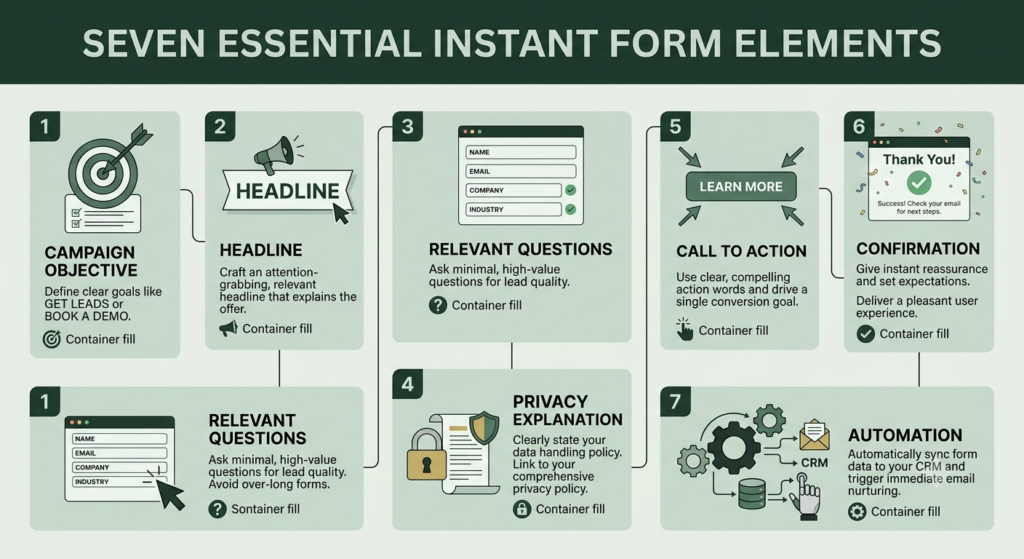
1. A Clear Campaign Objective
Before creating your form, decide what result you want.
Your objective could be:
- Generate leads
- Book consultations
- Collect enquiries
- Promote an event
- Distribute a free resource
- Request quotations
- Promote a product
- Collect registrations
Do not create a form first and decide the objective later.
Start with:
“What should this person do after submitting the form?”
That answer determines the rest of your campaign.
2. A Strong Form Headline
Your headline should tell visitors exactly what they receive.
Weak:
Submit Your Details
Better:
Get Your Free Startup SEO Checklist
Even better:
Get Your Free 2026 Startup SEO Checklist
The visitor should understand the benefit immediately.
Keep the headline connected to the advertisement. If the advertisement promises a free SEO checklist, the form should deliver that same promise.
3. Simple and Relevant Questions
A common beginner mistake is creating a form that is too long.
Start with essential information.
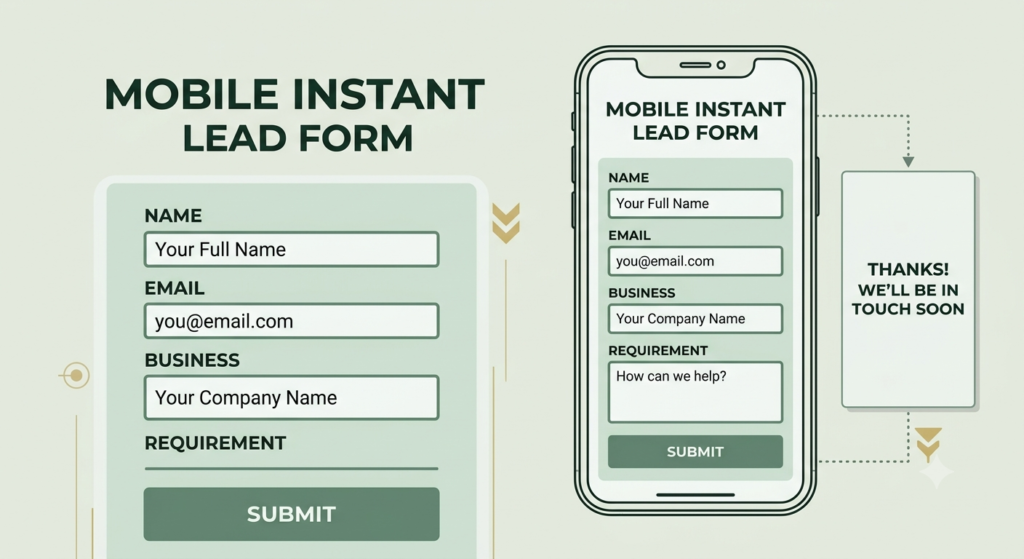
For example:
Name:
Your name
Email:
Your best email address
Business:
Website or business name
Requirement:
What marketing help do you need?
You can add qualifying questions when necessary, but every additional field should have a purpose.
A useful rule is: If you will not use the information, do not ask for it.
4. A Clear Privacy Explanation
People should understand what happens to their information.
Explain why you are collecting their details and how you intend to use them.
Where required, include appropriate privacy-policy information and consent language.
Your form should make people feel that their information is being handled responsibly—not that they are entering a mystery database.
5. A Useful Call to Action
Your CTA should describe the action.
Instead of:
Submit
consider:
- Get My Free Guide
- Request a Consultation
- Get the Checklist
- Book My Call
- Send Me the Details
- Get Started
The CTA should match the offer.
6. A Thank-You or Confirmation Step
After someone submits the form, do not leave them wondering what happens next.
Show a confirmation message such as:
“Thank you! Your request has been received. Check your email for the next step.”
You can then direct the person toward:
- A website
- A booking page
- A downloadable resource
- A product page
- Another relevant action
This is where the form begins connecting with your wider marketing automation system.
7. Automation After Submission
The real strength comes when your instant form is connected to an automated workflow.
A simple workflow can look like:
Form submitted
↓
Lead saved
↓
Confirmation sent
↓
Lead categorized
↓
Follow-up triggered
↓
Lead nurtured
↓
Conversion or sales follow-up
Workflow automation generally uses three core components: a trigger, one or more actions, and the customer or CRM record being acted upon.
How to Create an Instant Form Step by Step
The exact buttons vary by platform, but the strategy remains similar.
Step 1: Define Your Offer
Choose one specific offer.
Example:
Free 15-Minute Startup Marketing Consultation
Avoid combining five different offers in one form.
Step 2: Create Your Campaign
Choose the campaign objective that matches your intended result.
For a lead campaign, your primary goal is to make it easy for an interested person to provide their information.
Meta’s advertising ecosystem supports lead-generation campaigns and multiple ad formats and placements.
Step 3: Build the Form
Add:
- Form headline
- Short description
- Relevant questions
- Privacy information
- CTA
- Confirmation message
Preview the form on mobile before publishing.
Step 4: Connect Your Automation
Your automation should answer one question:
“What should happen immediately after this form is completed?”
For example:
Trigger: Form submitted
Action 1: Save/update lead
Action 2: Send confirmation
Action 3: Add lead to appropriate segment
Action 4: Notify salesperson or business owner
Action 5: Start nurture sequence
Action 6: Create follow-up task
This type of workflow can reduce manual data entry and help prevent leads from being forgotten.
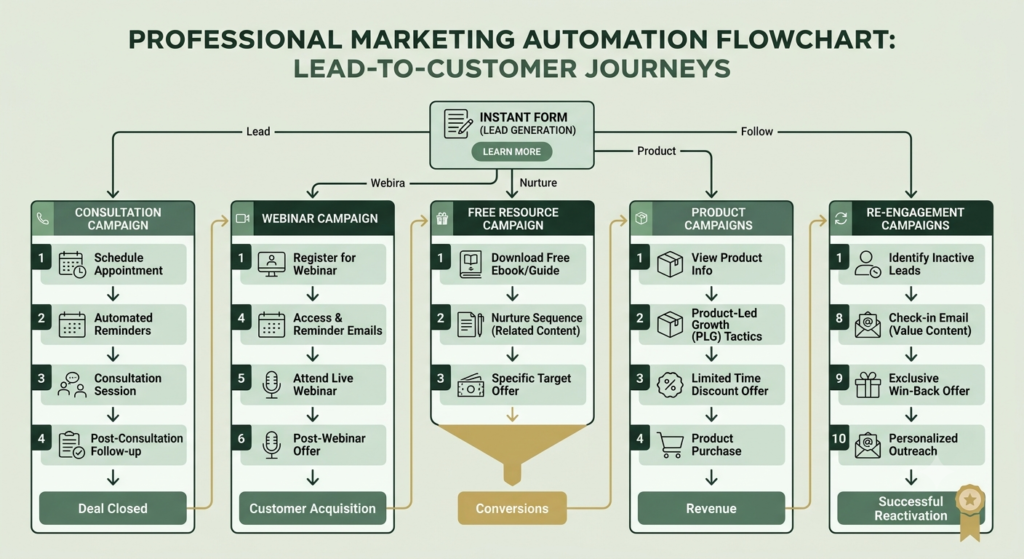
How Automation Generates Different Campaign Results
Different campaigns need different automation.
| Campaign type | Form purpose | Automation | Desired result |
|---|---|---|---|
| Lead generation | Collect enquiries | Email + follow-up | Qualified leads |
| Consultation | Collect booking requests | Confirmation + reminder | Appointments |
| Freebie | Deliver resource | Download email | Audience growth |
| Webinar | Collect registrations | Reminder sequence | Attendance |
| Product campaign | Capture interest | Offer sequence | Sales |
| Service campaign | Understand requirements | Lead qualification | Sales conversations |
| Re-engagement | Identify renewed interest | Nurture sequence | Reactivation |
The important point is that the same form structure does not need to produce the same automation.
Your automation should reflect the campaign objective.
Lead Nurturing Automation: What Happens After the Lead Arrives?
Getting a lead is only the beginning.
Some people are ready to buy immediately. Others need information first.
This is where lead nurturing automation becomes useful.
A simple five-step nurture sequence could be:
Day 0 — Welcome
“Thanks for your interest. Here is the resource you requested.”
Day 1 — Education
Explain one problem your audience commonly faces.
Day 3 — Helpful solution
Show how your product or service addresses that problem.
Day 5 — Proof or example
Share a case study, process, example or useful result where appropriate.
Day 7 — CTA
Invite the lead to take the next relevant step.
Marketing automation can use customer actions and campaign engagement to determine what communication should happen next.
The Instant Form as the Backbone of Your Campaign Entity
Think of your campaign as a connected entity rather than a single advertisement.
The instant form can become the connection point between:
Audience → Advertisement → Lead → CRM → Automation → Content → Sales → Measurement
This is why it can function as a backbone for the campaign ecosystem.
The form identifies the person and captures structured information.
The CRM stores the information.
Automation decides what happens next.
Analytics measures the result.
Your marketing team can then use those signals to improve the campaign.
For example:
Lead submits form → identifies interest in SEO → enters SEO segment → receives SEO content → clicks pricing page → becomes higher-priority follow-up
This creates a connected customer journey rather than isolated marketing activities.
How to Optimize Your Instant Form to 100%
A practical optimization checklist is:
Form optimization
☐ One clear objective
☐ Strong headline
☐ Clear benefit
☐ Short description
☐ Minimum necessary fields
☐ Relevant questions
☐ Clear privacy information
☐ Strong CTA
☐ Mobile-friendly design
☐ Useful confirmation message
Automation optimization
☐ Form submission is the correct trigger
☐ Lead is saved correctly
☐ Duplicate leads are handled
☐ Confirmation is sent
☐ Correct audience segment is applied
☐ Follow-up notification works
☐ Lead nurture sequence works
☐ Unqualified leads are separated
☐ High-intent leads receive appropriate follow-up
☐ Automation has been tested before launch
Campaign optimization
☐ Advertisement matches the form
☐ Offer matches audience intent
☐ CTA matches the offer
☐ Tracking is configured
☐ Leads are monitored
☐ Cost per lead is reviewed
☐ Lead quality is reviewed
☐ Conversion rate is reviewed
☐ Weak questions are removed
☐ Strong-performing creative is tested further
Do not try to optimize everything at once.
First make the complete journey work.
Then improve each stage.
Common Instant Form Mistakes and How to Correct Them
Mistake 1: Asking too many questions
Problem: People abandon the form.
Correction: Remove questions that are not necessary for qualification or follow-up.
Mistake 2: Unclear offer
Problem: People do not understand what they receive.
Correction: State the benefit clearly before asking for information.
Mistake 3: No automation
Problem: Leads wait for manual responses.
Correction: Create an immediate confirmation and follow-up process.
Mistake 4: Sending every lead the same message
Problem: Different prospects have different needs.
Correction: Segment leads according to information collected and behavior.
Mistake 5: Never testing the workflow
Problem: A broken automation can silently lose leads.
Correction: Submit a test lead and verify every step.
Mistake 6: Measuring only lead quantity
Problem: 100 leads do not necessarily mean 100 valuable opportunities.
Correction: Track lead quality, qualified leads, appointments and eventual conversions.
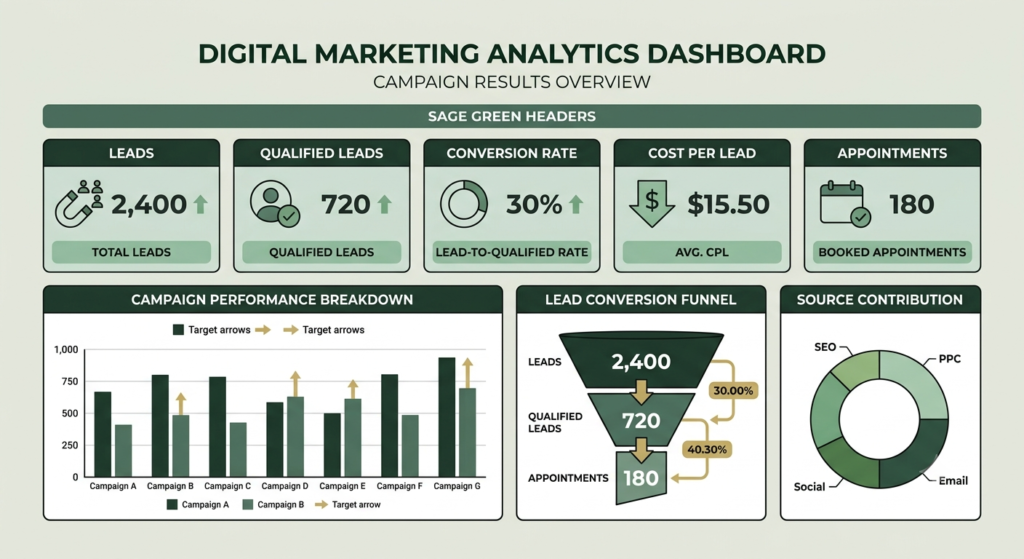
How to Measure Campaign Results
Do not stop at the number of form submissions.
Monitor:
- Impressions
- Reach
- Click-through rate
- Form opens
- Form completion rate
- Cost per lead
- Qualified leads
- Appointment rate
- Sales conversion rate
- Cost per acquisition
- Revenue generated
Your campaign may generate many inexpensive leads but few qualified opportunities.
Another campaign may generate fewer leads but stronger business outcomes.
Therefore, campaign results should be evaluated across the complete customer journey, not only at the form-submission stage.
How to Measure Campaign Results
Do not stop at the number of form submissions.
Monitor:
- Impressions
- Reach
- Click-through rate
- Form opens
- Form completion rate
- Cost per lead
- Qualified leads
- Appointment rate
- Sales conversion rate
- Cost per acquisition
- Revenue generated
Your campaign may generate many inexpensive leads but few qualified opportunities.
Another campaign may generate fewer leads but stronger business outcomes.
Therefore, campaign results should be evaluated across the complete customer journey, not only at the form-submission stage.
Frequently Asked Questions
1. What is an instant form?
An instant form is a short digital form that allows people to submit their information quickly after responding to an advertisement or campaign.
2. What is instant form and automation?
Instant form and automation means connecting a lead form with automatic actions such as confirmations, CRM updates, segmentation, notifications and follow-up.
3. Is an instant form useful for lead generation?
Yes. It can reduce the number of steps between seeing an advertisement and submitting an enquiry, making it useful for many lead generation campaigns.
4. What information should an instant form collect?
Collect only information needed to deliver the offer, qualify the lead or complete the next step. Common fields include name, email, phone number, business type and service interest.
5. What happens after someone submits an instant form?
Depending on your setup, the lead can receive a confirmation, enter a CRM, be segmented, trigger a notification or enter a lead nurturing automation sequence.
6. How can I improve campaign results?
Improve the complete customer journey rather than focusing only on form submissions. Test the offer, creative, questions, CTA, automation, follow-up and conversion process.
7. What is the difference between a form and automation?
The form collects information. Automation determines what happens after that information is collected.
8. Can beginners use marketing automation?
Yes. Beginners should start with a simple workflow such as form submission → confirmation → lead storage → follow-up and expand only after the basic process works.
9. How do I know whether my automation is working?
Submit a test form and verify every stage: data capture, confirmation, CRM entry, segmentation, notification, email delivery and follow-up.
10. Can one instant form be used for different campaigns?
It can, but separate forms are often easier to track when offers, audiences or follow-up journeys are significantly different.
Final Thoughts
Creating an instant form and automation is not simply about collecting names.
It is about creating a connected journey from attention to action.
A successful system has four foundations:
Right offer + simple form + relevant automation + continuous measurement
Start small.
Create one campaign.
Build one form.
Connect one automation.
Test the complete journey.
Then improve it using real campaign data.
When the process works reliably, you can adapt the same framework for lead generation, consultations, webinars, free resources, services, product promotions and re-engagement campaigns.
That is how a simple instant form can become an important part of a scalable marketing automation system.