
7 Proven App Promotion Campaign Strategies for Meta Ads
Introduction
An App Promotion Campaign helps businesses introduce a mobile application to people who are likely to download, open, or take valuable actions inside it. Instead of simply showing an advertisement, the campaign connects the advertisement with the app journey—from discovery to installation and, ideally, meaningful in-app activity.
For a beginner, Meta advertising can initially feel complicated because several elements work together: campaign objective, app selection, audience, creative, optimization event, budget, placements, tracking, and measurement.
The good news is that you do not need to master everything at once.
Think of an App Promotion Campaign as a bridge:
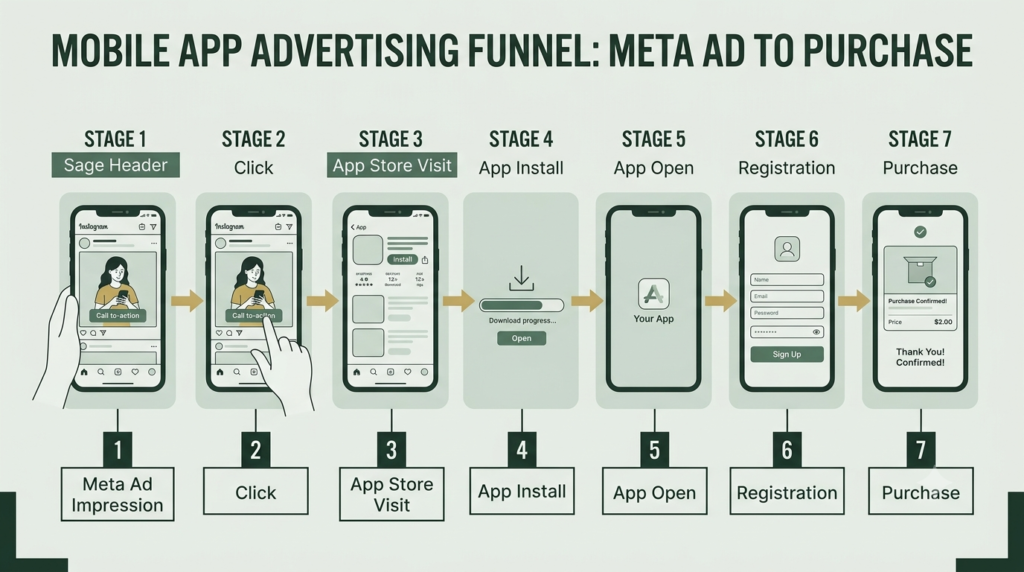
Ad → App Store/Google Play → Installation → App Open → In-App Action → Customer
The quality of every part of this journey affects the final result.
Meta’s app advertising resources describe app-install advertising as a way to send potential users directly to app stores, while app-engagement advertising can encourage existing users to return to specific areas of an app.
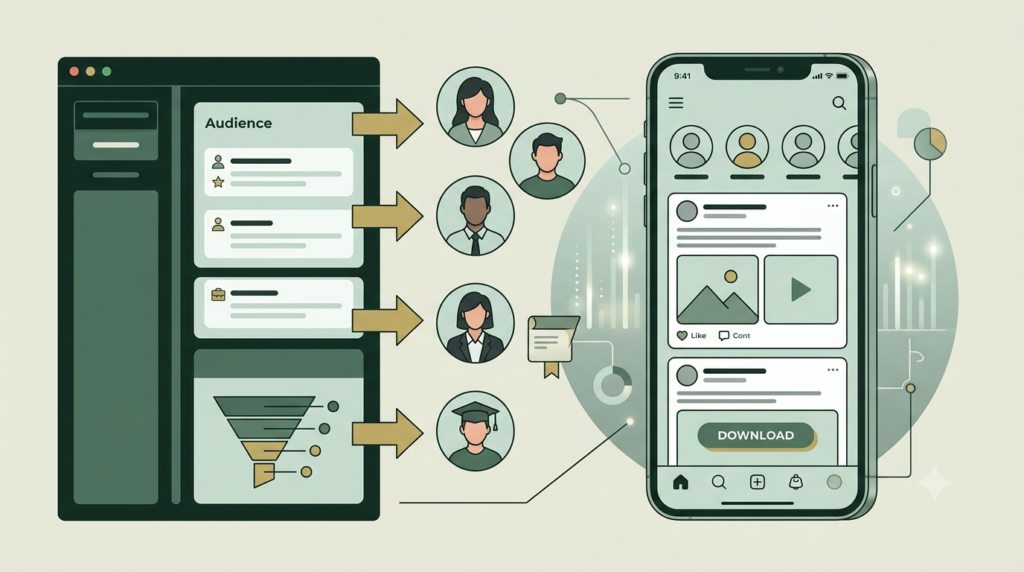
What Is an App Promotion Campaign?
An App Promotion Campaign is a Meta Ads campaign designed to promote a mobile application and encourage people to install or engage with it.
Depending on your business goal, you may want people to:
- Install your app
- Open the app
- Register
- Complete onboarding
- Make an in-app purchase
- Subscribe
- Add an item to a cart
- Complete another valuable in-app event
This makes app advertising different from simply promoting a Facebook page or website.
Why does it matter?
An app install by itself is not always the final business goal.
For example:
1,000 installs → 700 first opens → 400 registrations → 80 purchases
The important question is therefore not only:
“How many people installed my app?”
It is also:
“What did those users do after installing it?”
That distinction is essential when building a practical app promotion strategy.
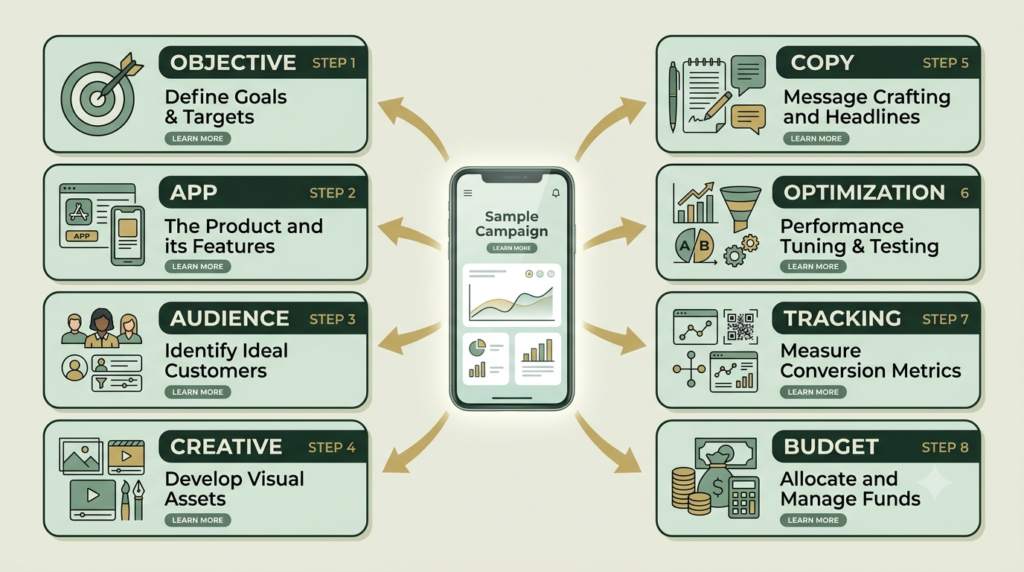
The 8 Main Elements of an App Promotion Campaign
A successful campaign is built from several connected elements.
| Element | Purpose | Beginner Question |
|---|---|---|
| Campaign objective | Defines the broad goal | What do I want users to do? |
| App | Connects advertising to the product | Which app am I promoting? |
| Audience | Identifies potential users | Who needs this app? |
| Creative | Gets attention | Why should someone stop scrolling? |
| Copy | Explains the benefit | What problem does the app solve? |
| Optimization | Guides delivery | What action matters most? |
| Tracking | Measures behaviour | What happens after the click? |
| Budget | Controls spending | How much can I test safely? |
These elements should work together rather than being treated as separate tasks.
1. Choose the Right Campaign Goal
Start with the business result you want.
For a new app, the immediate goal may be app installs.
For an established app, you may care more about registrations, purchases, subscriptions, or another valuable event.
Beginner rule
Do not choose an objective simply because it sounds impressive.
Choose the objective that matches the action you genuinely need.
For example:
New app
Ad → Store → Install
Shopping app
Ad → Store → Install → Product view → Purchase
Fitness app
Ad → Store → Install → Registration → Subscription
Your campaign should reflect the real customer journey.
2. Connect Your App Properly
Before spending money, make sure your Meta app ads and advertising infrastructure are properly connected.
Depending on your setup, this may involve:
- Apple App Store
- Google Play
- Meta business assets
- App identification
- Meta’s developer tools
- App events
- Measurement configuration
- Relevant SDK or app-event implementation
Do not skip this stage.
If tracking is incomplete, you may generate installs but struggle to understand what happens afterward.
Pre-launch checklist
Before launching:
- App is published or otherwise ready for users
- Store listing works
- Download link works
- App opens correctly
- Registration works
- Important buttons work
- Key events are measurable
- Privacy requirements are addressed
- Tracking has been tested
3. Define Your Audience
Your app promotion strategy should begin with the people who actually need the application.
Ask:
- Who has the problem my app solves?
- What age group is relevant?
- Which countries or cities matter?
- Is the app designed for consumers or businesses?
- What interests or behaviours may indicate relevance?
- Do I already have app users who can inform future targeting?
Avoid building an audience based on assumptions alone.
For a new app, start with a reasonably broad audience where appropriate and allow campaign data to reveal which users respond.
For an established app, you can also consider audiences based on previous engagement, subject to available Meta targeting and privacy controls.
4. Create Mobile-First Ad Creative
Your creative is often the first thing people notice.
A strong Meta app ad should quickly communicate:
Problem → Solution → Benefit → Action
For example: “Still forgetting your daily tasks?”
Then: “Organize everything in one simple app.”
Then: “Download today.”
Creative formats to consider
- Short vertical video
- Demonstration video
- Static image
- Carousel
- App interface demonstration
- Screen recording
- Before-and-after concept
- Problem/solution creative
For gaming applications, interactive or playable formats can also be relevant. Meta has described playable ads as an interactive format designed to let people experience part of an app before installation.
Creative principle
Do not make the advertisement look like a complicated corporate presentation.
Show the app.
Show the benefit.
Show how it solves a real problem.
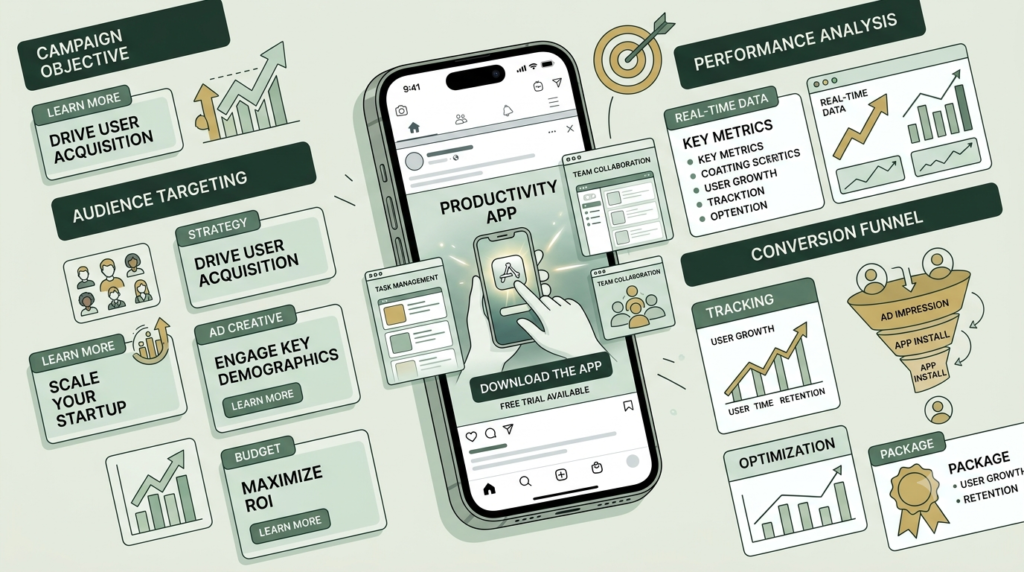
5. Write Simple Ad Copy
Your copy should answer three questions quickly:
What is it?
Explain the app.
Why should I care?
Explain the benefit.
What should I do?
Give a clear next action.
A simple structure is:
Headline:
Make [problem] easier
Primary text:
Meet [app name], a simple way to [main benefit]. Discover how it can help you [specific result].
CTA:
Download / Install / Learn More
Avoid making unrealistic promises.
6. Optimize for the Right Event
This is one of the most important parts of an app install campaign.
Suppose your business makes money from subscriptions.
You could focus only on installations, but an install does not necessarily generate revenue.
A stronger measurement framework may be:
Install → Registration → Trial → Subscription
The valuable event depends on the app’s business model.
Examples
Gaming app
Install → Tutorial completion → Level completion → Purchase
E-commerce app
Install → Registration → Product view → Add to cart → Purchase
Education app
Install → Registration → Course start → Subscription
Finance app
Install → Registration → Verification → Account action
The correct event gives you better information about whether your users are actually progressing through the funnel.
7. Set a Realistic Budget
Budget should be treated as a testing tool, especially when the campaign is new.
Instead of immediately increasing spending, establish a controlled testing period.
Track:
- Spend
- Impressions
- Reach
- Clicks
- Store visits
- Installs
- Cost per install
- Registration rate
- In-app events
- Purchase or subscription value
Simple calculation
Cost per install = Total ad spend ÷ Number of installs
Example:
₹5,000 spend ÷ 250 installs = ₹20 per install
But remember: ₹20 installs are not automatically valuable if those users never open or use the app.
That is why downstream events matter.
8. Measure and Improve
Launching an App Promotion Campaign is not the end.
It is the beginning of the learning process.
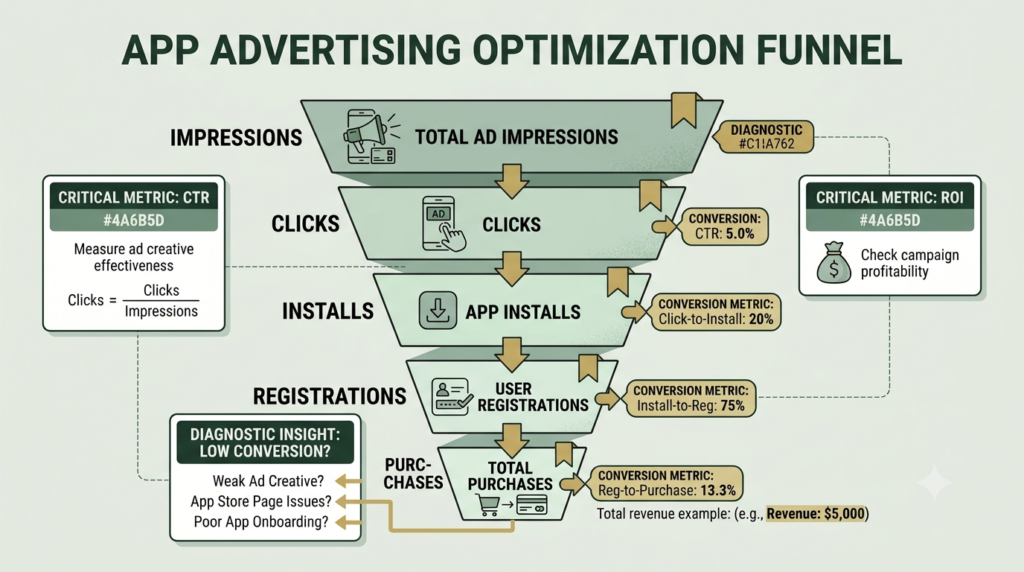
Look at the complete funnel:
Impression → Click → Store visit → Install → Open → Registration → Conversion
Then identify where users are dropping.
Example
If impressions are strong but clicks are low:
Possible issue: creative or message.
If clicks are strong but installs are low:
Possible issue: app-store page, offer, technical issue, or mismatch between ad and store listing.
If installs are strong but registrations are low:
Possible issue: onboarding experience.
If registrations are strong but purchases are low:
Possible issue: offer, pricing, product experience, or conversion journey.
This approach prevents you from blaming the advertisement for every problem.
App Promotion Campaign vs Other Meta Campaign Goals
| Campaign Approach | Main Purpose | Example |
|---|---|---|
| App promotion | Grow app users or app activity | Install an app |
| Traffic | Send people somewhere | Visit website |
| Leads | Collect prospect information | Form submission |
| Engagement | Generate interaction | Post engagement |
| Sales | Encourage purchases/conversions | Buy a product |
The correct choice depends on what happens after the user interacts with your advertisement.
How to Build an App Promotion Campaign Step by Step
Step 1: Prepare the app
Check the app, store listing, onboarding and important functions.
Step 2: Define one primary business goal
Choose the action that matters most.
Step 3: Configure measurement
Make sure important app events can be measured.
Step 4: Open Meta Ads Manager
Create a new campaign and select the appropriate app-promotion setup available in your account.
Step 5: Select the app
Connect the correct application and verify the destination.
Step 6: Define audience settings
Choose relevant geographic, demographic and other available targeting parameters.
Step 7: Set budget
Start with an amount you can comfortably use for testing.
Step 8: Build several creatives
Test different hooks, visuals and demonstrations.
Step 9: Write concise copy
Focus on the user’s problem and the app’s benefit.
Step 10: Publish and monitor
Do not make major changes every few hours.
Allow enough data to accumulate before drawing conclusions.
How to Correct an Underperforming Campaign
When performance is poor, don’t change everything simultaneously.
Use this diagnostic approach.
Problem 1: Low click-through rate
Test:
- Stronger opening hook
- Clearer benefit
- Better visual
- More obvious app demonstration
- Different headline
Problem 2: Many clicks but few installs
Check:
- App-store page
- Download experience
- Device compatibility
- Store description
- Reviews
- Screenshots
- Message consistency
Problem 3: Low-quality installs
Check whether your optimization event matches the business goal.
An inexpensive install is not necessarily a valuable customer.
Problem 4: High installs but poor retention
Investigate the product experience.
Ask:
- Does onboarding take too long?
- Is registration difficult?
- Does the app deliver the promised value?
- Are there technical problems?
- Does the advertisement create an expectation the app does not meet?
Problem 5: High costs
Test one variable at a time:
- Creative
- Audience
- Placement
- Optimization event
- Landing/store experience
- Offer
Document the change and compare results.
The App Promotion Campaign as the Backbone of the App Growth Entity
An app is not just an advertisement destination.
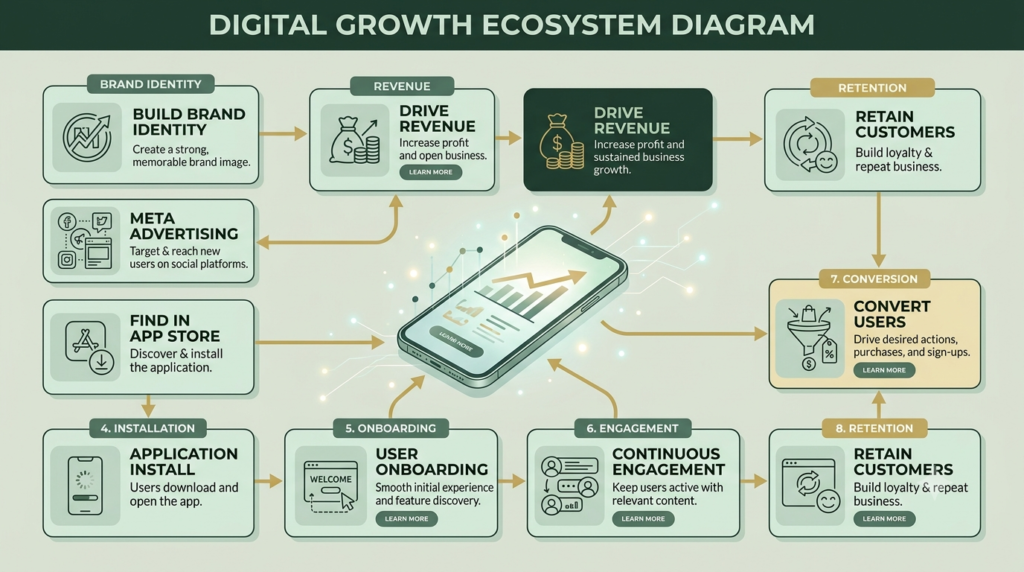
It is a complete digital entity connecting:
Brand → App → Audience → Acquisition → Engagement → Conversion → Retention → Revenue
The App Promotion Campaign sits at the acquisition layer.
That makes it an important backbone of the growth system because advertising can introduce new people to the app, while app analytics and customer behaviour can show what happens after acquisition.
Think of the complete ecosystem like this:
Brand identity
↓
Meta advertising
↓
App Store / Google Play
↓
App installation
↓
User onboarding
↓
In-app engagement
↓
Conversion
↓
Retention
↓
Revenue
A campaign should therefore never be optimized in isolation.
Frequently Asked Questions
What is an App Promotion Campaign?
An App Promotion Campaign is an advertising campaign designed to help businesses acquire or re-engage mobile app users. Depending on the campaign setup and business goal, it can focus on installations or valuable actions inside the app.
What is the main goal of an app install campaign?
The immediate goal is usually to generate app installations. However, businesses should also measure what users do after installing because installs alone do not necessarily represent business value.
How much should I spend on an App Promotion Campaign?
There is no universal budget that works for every application. Start with a controlled testing budget that you can afford and evaluate cost per install together with downstream events such as registration, purchase or subscription.
What should I track after an app install?
Track meaningful events that correspond to your business model. These might include app opens, registration, onboarding completion, product views, purchases or subscriptions.
Why are my app installs high but sales low?
Possible causes include weak onboarding, poor product-market fit, difficult checkout, pricing, technical problems or an advertisement that attracts people who are unlikely to become customers.
What type of creative works for app advertising?
Useful formats can include short videos, app demonstrations, screen recordings, static images, carousels and interactive experiences where available. Test multiple concepts rather than assuming one creative will work for every audience.
Can I promote an existing app?
Yes. App advertising can be used for both acquiring new users and encouraging existing users to return or complete actions, depending on the campaign configuration and available targeting.
How do I optimize an App Promotion Campaign?
Start by identifying the weakest stage of the funnel. Then test the relevant variable—creative, audience, store experience, optimization event or onboarding—rather than changing everything at once.
Final Takeaway
A strong App Promotion Campaign is not simply about getting the cheapest installation.
It is about building a measurable path from:
Attention → Installation → Engagement → Conversion → Retention
When the advertisement, app-store experience, app onboarding, tracking and business objective all support the same customer journey, your campaign becomes much easier to understand and improve.
Start small, measure carefully, learn from the data and improve one part of the journey at a time
Ready to Build Your App Promotion Campaign?
Start with the fundamentals: define your goal, prepare your app, connect measurement, create useful mobile-first ads and test one variable at a time.
Explore more Aahraa digital marketing guides to build a stronger Meta Ads strategy.